Single-monitor racing-line learner
If you follow an in-game guide while learning when to brake and turn, focus on repeatable steering and pedal inputs rather than assuming the wheel will change what appears on screen.


Choose a force-feedback wheel with pedals you can use consistently, a secure place to mount it and the correct version for your platform. A MOZA R3 bundle suits a desk or rig setup where you want direct drive; a Thrustmaster T248 variant offers adjustable hybrid feedback and three pedals; and Logitech’s G923, G29 and G920 offer other bundled routes, subject to platform and game compatibility. The wheel does not supply the visual racing-line guide: check that setting in your game separately.
If you follow an in-game guide while learning when to brake and turn, focus on repeatable steering and pedal inputs rather than assuming the wheel will change what appears on screen.
Your wheel must match your platform, and its mounting arrangement must fit your desk. Check the exact console variant and included mounting hardware before comparing feedback features.
If you expect to move beyond following the visual line, consider which feedback settings, pedals and mounting options will still suit the way you want to practise.
Settle platform compatibility and mounting first; then compare how each wheel-and-pedal bundle fits the braking and steering practice you want to do.
Consider it: The MOZA R3 suits a PC setup, or Xbox and PC with the Xbox bundle, if you want a direct-drive wheel that can be clamped to a suitable desk or mounted to a compatible rig.
Bear in mind: MOZA Racing specifies throttle and brake pedals in the standard SR-P Lite set; the clutch is optional.
Consider it: The Thrustmaster T248 suits players who want adjustable feedback presets and a three-pedal bundle.
Bear in mind: Its PlayStation/PC and Xbox/PC versions are different purchases; choose the one that matches your setup.
Consider it: The G923, G29 and G920 provide bundled wheel-and-pedal alternatives when you select a version for your PC or console.
Bear in mind: Logitech G says the G923’s advanced TRUEFORCE features require game integration; G29 is the PlayStation/PC alternative and G920 the Xbox/PC alternative.
| Concern | What to check | Who this matters to |
|---|---|---|
| Consistent braking and steering | Compare the feedback controls and included pedals; check whether your game supports any named advanced feedback feature. | If I am practising corner entry from an on-screen guide, I want steering and braking inputs I can repeat. Around 40% of consumers put that control need first. |
| Platform and game compatibility | Confirm the exact PlayStation, Xbox or PC variant and check your game’s wheel-support information. | A wheel that does not work with my console or main game cannot serve as my practice controller. That match comes first for around 30% of consumers. |
| Desk fit and bundle contents | Check the mounting method against your desk and confirm the pedal count and other included hardware. | My desk needs to hold the wheel securely, and I want to know whether the controls I need come in the bundle. Around 30% of consumers make setup fit their primary concern. |
A PlayStation/PC version and an Xbox/PC version can share a wheel name without supporting the same console.
Check the exact variant in your basket and confirm that your chosen game supports it before ordering.
MOZA Racing specifies two pedals in the standard R3 SR-P Lite bundle, with a clutch available separately. A clamp, stand and cockpit are also distinct pieces of hardware.
Decide whether you need a clutch for the cars you intend to drive, then check the included parts and measure your mounting space.
Adding a clutch or moving to a stand or cockpit also changes the space the setup needs.
Logitech G states that advanced TRUEFORCE features require game integration, so the wheel’s named features alone do not establish what your game will use.
Check support for both the wheel and the particular feature in the game you plan to practise with.
The R3 is a direct-drive bundle to consider if your desk or rig can accommodate it.
The T248 is relevant when adjustable hybrid feedback and a three-pedal bundle matter to your practice.
The G923, G29 and G920 offer bundled force-feedback routes with platform-specific versions.
These wheel-and-pedal choices cover Xbox/PC, PlayStation/PC and desk-oriented setups for practising steering and braking on one monitor. Check your game’s wheel support and visual racing-line setting separately.
 No image available
Consider this wheel-and-pedal set for steering and braking practice on Xbox or PC. Check support in your chosen game, the included pedal configuration and whether its mounting arrangement fits your desk.
 No image available
Consider this wheel-and-pedal system if you practise on Xbox or a Windows 10/11 PC. Check game support and make sure your intended desk or cockpit offers a sturdy, stable mounting surface.
 No image available
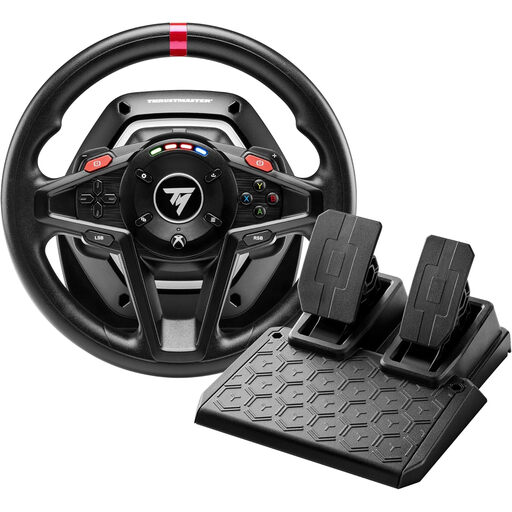
This pack is an Xbox-and-PC option for practising steering and braking at a desk. Check that its mounting arrangement fits your desk and that its pedal set has the controls you intend to use.
 No image available
This force-feedback wheel-and-pedal set is an option for practising on PS5, PS4 or PC. Check the mounting method and desk fit, along with your game’s wheel support, before choosing it.
 No image available
This force-feedback wheel-and-pedal set is an option for practising on the stated Xbox consoles or PC. Confirm your game’s wheel support and the mounting method and desk fit before ordering.
No. The wheel controls steering and provides pedal input; the visual racing-line guide depends on your game and its settings. Check the game for that option before choosing a wheel.
No. A securely mounted force-feedback wheel and pedals can give you controls for practising repeatable braking. Consider direct drive if that feedback system is a priority for you, while also checking platform fit and where the wheel will be mounted.
Do not assume so. Logitech G lists separate G923 console variants, MOZA Racing distinguishes its PC and Xbox-plus-PC R3 bundles, and Thrustmaster offers separate T248 variants. Confirm the exact model and your game’s controller support.
For an eligible UK distance order, GOV.UK says the seller must tell you about cancellation up to 14 days after delivery. Check the applicable exceptions and the seller’s instructions for notifying them; a change-of-mind cancellation is distinct from a remedy for faulty goods.