For virtual oval practice at a small desk, start with a force-feedback wheel that matches your platform and racing game, then check whether its mount and pedals fit your space. The Thrustmaster T128 offers a documented removable desk-clamp route; a MOZA R3 bundle is a direct-drive option for a suitable PC or Xbox setup, while Logitech G29 and G920 buyers must choose the version for their console.
Who this setup suits
First-time oval learner with a small desk
If the desk is used for other tasks, check how easily the wheel can be clamped and removed. Thrustmaster specifies a maximum desk thickness of 5.5 cm for the T128 clamp; MOZA specifies 50 mm for its table clamp. Both need clear space beneath the mounting edge.
PC driver practising oval racing
Check support for the exact simulator as well as the PC platform. MOZA lists iRacing among the PC titles supported by its R3 bundle; that listing does not establish support for other wheels or games.
Console player sharing a desk
The console version matters even when wheel names look similar. Logitech G identifies the G29 for PlayStation and PC and the G920 for Xbox and PC; Thrustmaster also sells separate T128 PlayStation/PC and Xbox/PC versions.
What to check before buying
Confirm your platform and game, then measure the mounting edge and plan where the pedals will sit. Steering features matter most once those basic fit checks are satisfied.
| Concern |
What to check |
Who this matters to |
| Desk fit |
Measure thickness at the mounting edge and check for drawers, rails or cable trays underneath. Thrustmaster specifies up to 5.5 cm for the T128 clamp; MOZA specifies up to 50 mm for its table clamp. |
If I need to clear the desk after practice, the clamp must attach securely without blocking what sits beneath it. Around 29% of consumers put desk fit and removable setup first. |
| Platform and game |
Match the exact wheel variant to your console or PC, then check support for your chosen simulator. MOZA lists iRacing for the R3 on PC; Logitech G distinguishes the PlayStation/PC G29 from the Xbox/PC G920. |
Playing on a particular console or simulator makes the correct version more important than a similar-looking wheel. For around 29% of consumers, compatibility is the primary concern. |
| Steering feedback |
Check for powered force feedback and set rotation and in-game calibration for the virtual car. Thrustmaster specifies a vehicle-dependent 270°–900° rotation range for the T128; game integration matters for features such as Logitech G TRUEFORCE. |
I want steering information I can use during repeated practice, without assuming one rotation setting suits every car. Steering feedback and control come first for around 24% of consumers. |
| Pedals and expansion |
Plan floor space and check the included controls before adding extras. Thrustmaster describes a two-pedal T128 set, while MOZA offers the clutch for its R3 bundle as an optional upgrade. |
When arranging the pedals under a small desk, I need usable brake and throttle positions before deciding whether a clutch matters. Around 18% of consumers make pedal placement and future controls their first priority. |
Buying pitfalls
-
Assuming similar wheel names mean the same console support
Logitech G assigns the G29 and G920 to different console families, and Thrustmaster sells separate T128 PlayStation/PC and Xbox/PC versions.
Write down your main platform and racing game, then check the exact version and game support before ordering.
-
Measuring the desktop but overlooking its underside
A clamp can be within its stated thickness limit yet still be obstructed by a drawer, cable tray or support beam.
Measure at the intended mounting edge and inspect the space below it. Compare your measurements with Thrustmaster’s 5.5 cm T128 limit or MOZA’s 50 mm table-clamp limit, as applicable.
A separate wheel stand may be needed if the desk cannot accommodate the clamp.
-
Expecting every feedback feature to behave the same in every game
Advanced feedback behaviour can depend on the game’s support or integration, not just the wheel’s hardware.
Check the exact simulator, platform and wheel combination. MOZA lists iRacing for the R3 on PC, but that does not establish compatibility for another model.
-
Leaving pedal space until after choosing the wheel
A desk-mounted wheel still needs a workable position for braking and throttle control. The standard T128 has two pedals, and the R3 bundle offers a clutch as an optional upgrade.
Decide where the pedals will rest and add other controls only if your intended cars, game controls or practice goals call for them.
Changing the pedal layout later may call for an additional stand or control.
Relevant brands to consider
Thrustmaster
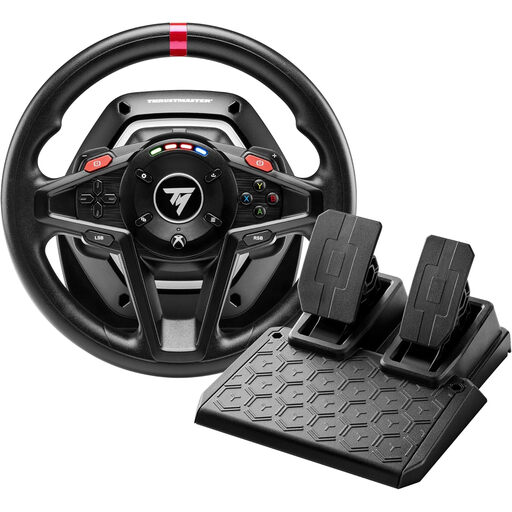
The T128 is a desk-clamp option with separate PlayStation/PC and Xbox/PC versions.
- Thrustmaster specifies force feedback, a 270°–900° vehicle-dependent rotation range and a clamp for desks up to 5.5 cm thick.
- Choose the correct platform version; the standard two-pedal set does not include a clutch.
Logitech G
The G29 and G920 offer distinct PlayStation/PC and Xbox/PC routes respectively.
- Logitech G also lists G923 variants and describes a 2.3 Nm TRUEFORCE system for that model.
- Do not treat the console variants as interchangeable or assume TRUEFORCE behaviour is available in every game.
MOZA Racing
The R3 bundle is a direct-drive route for PC, or for Xbox and PC with the corresponding bundle.
- MOZA specifies a 3.9 Nm peak direct-drive base, an included table clamp and iRacing support on PC.
- Its table clamp is specified for desktops up to 50 mm thick. Check the bundle version and pedal needs; the clutch is optional.
Joybuy wheels for desk setups
These wheel-and-pedal choices cover Xbox/PC and PlayStation/PC practice. Before choosing one for a small desk, match its platform to your simulator and check the mounting space for that particular package.
 No image available
Thrustmaster T128 SimTask Pack (Xbox and PC)
Consider this pack for Xbox or PC practice if its mounting arrangement suits your desk. Check the mounting edge and underside clearance, as well as support for your chosen oval simulator.
View on Joybuy
 No image available
Thrustmaster T128 wheel and pedal set (PS5, PS4, PC)
This PlayStation/PC T128 is worth considering when a removable, force-feedback desk setup meets your needs. Thrustmaster specifies a two-pedal set, a 270°–900° vehicle-dependent rotation range and a T128 clamp limit of 5.5 cm; also check underside clearance and support for your simulator.
View on Joybuy
 No image available
Thrustmaster T248 wheel and magnetic pedal set (PS5, PS4, PC)
For PlayStation or PC practice, this T248 package combines a force-feedback wheel with a magnetic pedal set. Confirm how it mounts to your desk and whether the exact wheel works with your chosen simulator.
View on Joybuy
 No image available
Turtle Beach VelocityOne Race (Xbox, Windows 10/11)
For an Xbox or Windows 10/11 setup, consider this wheel-and-pedal system only after checking that the desk can support its mounting arrangement. Confirm clamp fit, desk stability and support for your simulator.
View on Joybuy
 No image available
Thrustmaster T128 wheel and pedal set (Xbox Series X/S, Xbox One, PC)
This Xbox/PC T128 version is a force-feedback choice for practice with the included pedal set. Check how this package attaches to your desk, whether there is clearance underneath and whether your simulator supports the wheel.
View on Joybuy
Frequently asked questions
Do I need to set the wheel to 900° for oval practice?
No: set rotation and in-game calibration for the virtual car and simulator rather than assuming 900° is correct. Thrustmaster says the T128 adjusts within a 270°–900° range according to the vehicle used in-game.
Can one racing wheel work on both PlayStation and Xbox?
Do not assume that it can. Logitech G specifies the G29 for PlayStation and PC and the G920 for Xbox and PC; Thrustmaster likewise sells separate T128 PlayStation/PC and Xbox/PC versions.
How can I tell whether a wheel clamp fits my desk?
Measure the mounting-edge thickness and inspect the space underneath for obstructions. Thrustmaster specifies up to 5.5 cm for the T128 clamp, while MOZA specifies up to 50 mm for its table clamp; either clamp also needs room to tighten beneath the desk.
Do I need a clutch pedal or shifter to start?
Not necessarily: begin by checking the controls required by the cars and simulator you intend to use. The standard Thrustmaster T128 has a two-pedal set, and MOZA offers a clutch for the R3 bundle as an optional upgrade.


