Desk-based PC time-trial racers
You want to practise steering and braking at a computer desk, then clear the space when the session ends. Check the mount and pedal position alongside the wheel’s PC compatibility.


Choose a racing wheel for desk-based time trials by checking the exact platform and game support first, then whether its mount fits your desk. Compare feedback and braking controls only after those basics are settled; neither drive type nor a torque figure establishes how much sound or vibration a wheel will create in a shared bedroom.
You want to practise steering and braking at a computer desk, then clear the space when the session ends. Check the mount and pedal position alongside the wheel’s PC compatibility.
Your PlayStation or Xbox determines which wheel variant to consider. Thrustmaster, for example, lists separate T128 PlayStation/PC and Xbox/PC versions.
You need a secure setup that can be put away and whose sound and desk vibration are acceptable to the other person in the room. Assess those effects for the particular wheel and desk rather than assuming a drive type will be quiet.
Settle platform and game compatibility, then desk fit; feedback features matter only if you can use and mount the wheel in your room.
| Concern | What to check | Who this matters to |
|---|---|---|
| Platform and game support | Match the exact variant to your PC or console, then check the intended game’s controller and feature support. | If my wheel cannot work with the console and time-trial game I use, its other features will not help me practise. Around 30% of consumers put platform and game support first. |
| Desk mounting and removal | Measure desk thickness and usable edge clearance; check the specified clamp and where the pedals will sit. | I need to secure the wheel for a session without making the shared desk a permanent racing setup. For around 29% of consumers, removable mounting is the primary concern. |
| Feedback and braking controls | Compare the stated feedback adjustments and pedal controls for the exact bundle; check whether game integration is required. | When practising repeated braking and cornering, I want controls I can adjust and use consistently. Around 24% of consumers prioritise feedback and braking features. |
| Sound and desk vibration | Look for model-specific sound and vibration evidence, and consider how the wheel will behave on your intended desk. | If someone else is in the bedroom, I need to judge whether a session will disturb them, particularly through the desk. Low disturbance comes first for around 17% of consumers. |
Thrustmaster lists separate T128 PlayStation/PC and Xbox/PC variants. Fanatec says Xbox compatibility depends on the wheel, while PlayStation compatibility depends on the base.
Check the exact variant and your game’s supported-controller information before ordering, rather than relying on the product-family name.
Clamp limits differ. MOZA specifies its table clamp for desktops up to 50 mm thick; that limit should not be applied to other clamps.
Measure the desk edge, including any underside obstruction, and check whether the clamp comes with the precise bundle.
If the clamp cannot fit, using the wheel at that desk may require a separate mount or stand.
Drive type and torque describe aspects of wheel feedback, not the sound a particular wheel makes or the vibration a particular desk transmits.
Seek model-specific sound and vibration information if disturbance is decisive, and check the retailer’s change-of-mind terms before trying a setup at home.
Logitech G says TRUEFORCE and the G923’s advanced features require game integration.
Check support for your intended time-trial title separately from basic platform compatibility.
The G923 is a wheel-and-pedal option for buyers considering a packaged setup.
The T128 and T248 ranges offer packaged wheel-and-pedal choices with distinct console variants.
The R3 provides a direct-drive bundle route for PC, with a distinct Xbox-and-PC version.
The CSL DD Ready2Race range is a PC direct-drive bundle route for buyers interested in adding components later.
These Xbox-and-PC wheel choices suit different approaches to time-trial practice: a wheel-and-pedal system for a securely mounted setup, or a wireless wheel with integrated racing controls when a separate pedal set is not part of your plan. Check your game, desk and shared-room needs for either choice.
 No image available
Consider this wheel-and-pedal system if you want separate braking controls for Xbox or Windows time-trial practice. Confirm support for your game and that its mounting hardware fits a sturdy desk; assess sound and desk vibration before relying on it in a shared bedroom.
 No image available
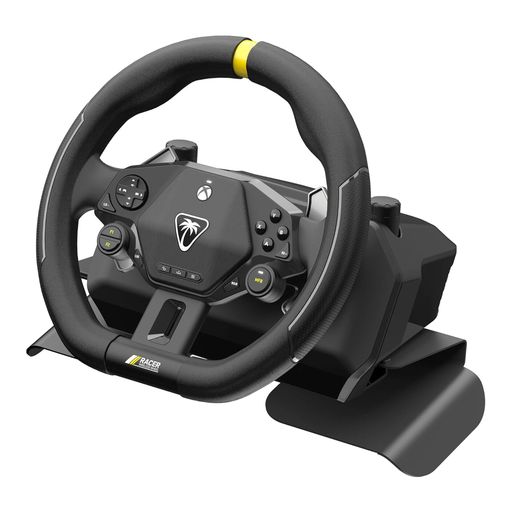
Consider this wireless wheel if integrated throttle and brake controls suit your practice better than a separate pedal set. Check support for your game, whether its desk or lap-rest arrangement fits your space, and its feedback features if those matter to you; do not assume how quietly it will operate in your room.
Check the platform label for the exact variant, then check support for your game. Thrustmaster lists separate T128 PlayStation/PC and Xbox/PC versions; Fanatec says Xbox compatibility depends on the wheel and PlayStation compatibility on the base.
No: direct drive alone does not tell you how much sound or desk vibration a setup will produce. If disturbance matters, seek information about the specific model and consider how securely it can be mounted on your desk.
Measure desktop thickness, usable front-edge clearance and the space available for your chair and any pedals. MOZA Racing Support specifies its table clamp for desktops up to 50 mm thick; check the limits for the clamp supplied with the wheel you intend to buy.
Check the retailer’s change-of-mind return terms before ordering, particularly any conditions concerning assembly or use. Keep a desk-fit concern separate from a wheel that is faulty or misdescribed, and ask the retailer about the applicable remedy if there is a product fault.