Precision-focused PC time-trial drivers
You want steering feedback you can adjust between practice runs and have a suitably rigid place to mount a direct-drive base. Check that the wheel and your racing game support the settings you intend to use.


For repeated time-trial practice, choose a racing wheel that works with your platform and game, then make sure you can mount it securely and use its feedback comfortably throughout a session. A direct-drive system may suit a rigid, adjustable setup, while an integrated wheel-and-pedal system involves fewer separate components; headline torque alone does not settle the choice.
You want steering feedback you can adjust between practice runs and have a suitably rigid place to mount a direct-drive base. Check that the wheel and your racing game support the settings you intend to use.
You practise on PlayStation or Xbox and need the exact wheel, base and connected rim to work with your console. Platform compatibility comes before comparing feedback specifications.
You need a mount that fits your desk and a driving position you can maintain without the wheel shifting or your shoulders and back sitting awkwardly. A higher-force base also places greater demands on the mounting setup.
Check platform and game compatibility first, then whether the wheel can be mounted securely. After that, compare the feedback controls and the components supplied with each system.
| Concern | What to check | Who this matters to |
|---|---|---|
| Repeatable feedback | Check the drive type, available feedback adjustments and support in your racing game. Manufacturer torque figures alone do not show how a wheel will feel in your setup. | I want to recognise braking and steering cues across successive laps without setting the force beyond what I can control consistently. Around 29% of consumers put feedback detail first. |
| Mounting and comfort | Measure the desk and check the specified clamp or stand fit; allow room to position the seat, screen and pedals. | If the wheel moves or my driving position feels awkward, a long practice run becomes harder to sustain. Around 29% of consumers chiefly prioritise stable mounting and comfort. |
| Platform compatibility | Confirm the exact PC or console variant, supported game and, for modular systems, the base-and-rim combination. | I need to know the system works with my console and chosen game before considering upgrades. Around 24% of consumers make compatibility their primary concern. |
| System completeness | Identify whether the product is a wheel base, a wheel-and-pedal system or a bundle, and check which rim, pedals and mount you need. | I would rather choose every required component deliberately than discover that a base cannot yet be used as a complete setup. Around 18% of consumers put completeness first. |
MOZA Racing describes the R12 V2 as a wheel base, whereas Logitech G describes the G923 as a wheel-and-pedal racing system. Those products do not supply the same starting set of components.
List the wheel rim, pedals and mounting equipment needed for the exact product before deciding whether it suits your setup.
A base-only setup may also require a compatible rim, pedals and clamp or stand.
Fanatec states that its CSL DD is not PlayStation-compatible, while its Gran Turismo DD Pro supports PlayStation and PC. Logitech G also offers separate platform variants of its PRO Racing Wheel.
Check the exact base, bundle and connected rim against your intended platform and game.
A clamp has limits of its own: MOZA Racing specifies desktops up to 50 mm thick for its desk clamp. That limit does not establish a fit for every base or desk.
Measure your desk, assess its rigidity and confirm the mounting method specified for the exact wheel base.
If the desk cannot support the planned mount, using a suitable wheel stand or cockpit changes the space the setup needs.
Force strength does not correct an awkward screen, seat or wheel position. The Health and Safety Executive's display-screen guidance discusses screen position and lower-back support, although it is not racing-wheel-specific advice.
Arrange the screen, seat, pedals and wheel so you can drive without twisting or shrugging your shoulders, then choose feedback settings you can control throughout the session.
Offers integrated G-series systems and higher-force PRO direct-drive variants; the exact platform version matters.
Offers modular, PC-oriented direct-drive equipment, including the R12 V2 wheel base.
Offers modular systems with different platform support across its wheel bases and bundles.
Offers wheel systems for specified console families and PC, including a PlayStation/PC T598 package.
These wheel choices cover different Xbox/PC and PlayStation/PC setups. Compare their stated platform and supplied controls before checking game support, mounting fit and the feedback behaviour you need for repeated laps.
 No image available
Consider this wheel-and-pedal set if you practise on Xbox or PC and want those components together. Confirm support for your racing game and check that its mounting arrangement fits your desk or stand; the stated platforms do not include PlayStation.
 No image available
This wheel-and-pedal set suits a PlayStation or PC setup where force feedback is a selection priority. Confirm that your racing game supports the wheel and that the mounting arrangement works with your driving position.
 No image available
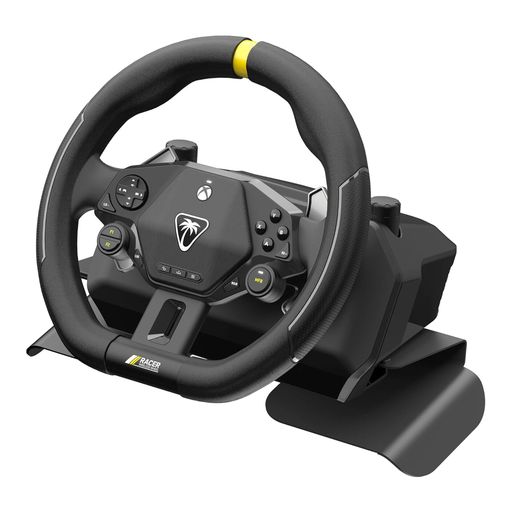
This wireless wheel is an option for Xbox or PC practice when you prefer controls on the wheel rather than a separate pedal set. If force cues are important to your lap practice, check its force-feedback capability and support in your specific game before choosing it.
 No image available
Consider this wheel-and-pedal set for a PS5, PS4 or PC setup if those supplied components match your plans. Check game support, force-feedback capability and mounting fit before relying on it for repeated feedback-led practice.
No: start with a wheel that works with your platform and game, stays firmly mounted and offers feedback you can control consistently. Logitech G and MOZA Racing specify different torque figures for their products, but those manufacturer figures alone do not establish which setup will suit your desk or driving preferences.
Yes, if the exact base has a compatible mount and the desk can support a stable installation. MOZA Racing states that its desk clamp supports desktops up to 50 mm thick; check the clamp's base compatibility and your desk's dimensions rather than assuming any clamp will fit.
Position the screen, seat, pedals and wheel so you can drive without twisting your back or shrugging your shoulders. The Health and Safety Executive's display-screen guidance recommends lower-back support and a screen roughly an arm's length away with its top around eye level; adapt that workplace guidance to the space your wheel setup occupies.
No: Fanatec lists the CSL DD as not PlayStation-compatible. Fanatec lists the Gran Turismo DD Pro for PC and PlayStation instead; confirm the exact base, connected rim and game requirements for the setup you intend to use.