Desk-based truck-sim starters
If you are moving from a keyboard or gamepad to a wheel and pedals without building a rig, focus on the exact platform version and how the wheel mounts to your desk.


For virtual truck driving at a single-monitor desk, start with a wheel that matches your gaming platform and can be mounted securely; a wheel-and-pedal bundle keeps the initial setup simpler. Consider a separate shifter, a larger truck-style rim or a direct-drive base when those controls matter to you, but check accessory compatibility and the space and stability each setup needs.
If you are moving from a keyboard or gamepad to a wheel and pedals without building a rig, focus on the exact platform version and how the wheel mounts to your desk.
If selecting gears by hand is a priority, check that your chosen shifter works with the wheel family and that you have a stable place to mount it separately.
If adjustable steering feedback or a truck-sized rim matters more than a minimal setup, check game support, desk rigidity and the accessories required for the exact configuration.
Choose the platform version first, then check what fits on your desk. Add specialised truck controls only if you want to use them in your intended game.
| Concern | What to check | Who this matters to |
|---|---|---|
| Desk setup | Check the mounting arrangement and whether the wheel, pedals and your other controls fit your space. | I want to start driving with a wheel and pedals without rebuilding my desk; around 29% of consumers put a secure, straightforward setup first. |
| Platform and game fit | Confirm the exact PC, PlayStation or Xbox variant and check support for your truck-simulator title. | A familiar wheel name is little use to me if I choose the wrong version for my platform; roughly 29% of consumers make exact compatibility their primary concern. |
| Truck-style controls | Check shifter compatibility and mounting space, or whether a larger rim suits your available space. | I would rather have physical gear selection or more truck-like controls than keep the smallest setup; around 24% of consumers prioritise those controls. |
| Steering feedback | Check game support, the base’s mounting requirements and the adjustments offered by the exact configuration. | On PC, I care most about adjusting how the steering responds, even if the setup needs a sturdier mount; about 18% of consumers put feedback first. |
Logitech G identifies the G29 as the PlayStation/PC version and the G920 as the Xbox/PC version. Similarly named wheels need not support the same platforms.
Decide which platform you will use, then check the precise variant before ordering.
Logitech G specifies its Driving Force Shifter for the G923, G29 and G920 families; that does not establish compatibility with another wheel base.
Check both wheel-family and platform support, and leave a separate stable mounting position for the shifter.
MOZA Racing presents its R5 Pro Truck Bundle through an EU-store listing. The listed hardware is useful for comparing control layouts, but a listing for another region does not settle your local ordering and support arrangements.
Before choosing a truck-specific bundle, check the seller, product version, supplied power equipment and warranty arrangements for the offer you intend to use.
MOZA Racing lists a table clamp with its R5 bundle, but a clamp alone cannot establish whether your particular desk has enough usable edge space or rigidity.
Measure the mounting area and check clearance for your keyboard, mouse and pedals before settling on a base.
If your desk flexes or cannot accommodate the mount, a suitable stand or rig may be needed.
A wheel-and-pedal route with distinct PlayStation/PC and Xbox/PC versions and an optional shifter for specified wheel families.
A route for buyers comparing platform-specific wheels with additional controls and truck-oriented accessories.
A PC-focused direct-drive route, including an R5 desk-clamp bundle and a separate truck-oriented configuration.
These choices focus on wheel controls for a desk-based truck-sim setup: a Windows truck-control system and an Xbox/PC wheel-and-pedal set. Check your game and mounting space before choosing between them.
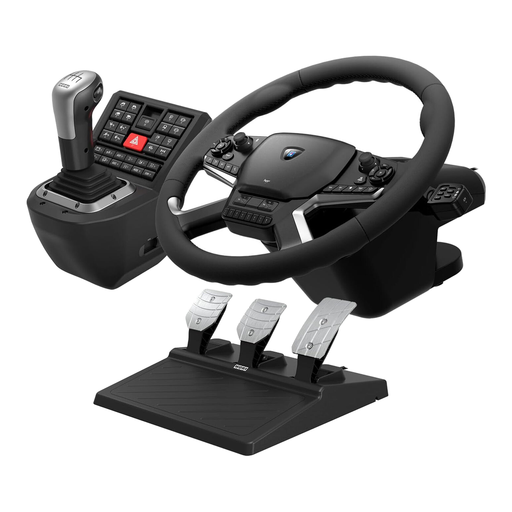 No image available
Consider this truck-oriented control system for a Windows 11/10 PC setup. Check the space needed for the controls, pedals and mounting points at your desk.
 No image available
This wheel-and-pedal set is an option for an Xbox or PC desk setup. Confirm support for your exact truck game and check that its mount fits your desk.
Choose the wheel for your platform, desk and preferred controls rather than treating monitor count as a wheel specification. SCS Software describes adjustable seat position, head position and view angle in its truck simulators, so you can also adjust the in-game driving view.
Check the exact model variant against the platform you use, not just the wheel-family name. Logitech G lists the G29 for PlayStation/PC and the G920 for Xbox/PC; Thrustmaster likewise has distinct T248 platform versions.
No; add one if physical gear selection is important to you. For Logitech G’s Driving Force Shifter, check that you have a compatible G923, G29 or G920 wheel and somewhere stable to mount the shifter.