Choose a wheel that works with your particular bus game and playing platform before deciding which steering features you want. In a shared bedroom, a secure desk mount, manageable pedals and a setup you can put away matter more than buying the strongest feedback system. A flatter mount and spinner knob may suit your preferred bus controls, but neither they nor direct drive are prerequisites for playing.
Who this setup suits
Bedroom desk players
If you need to remove the wheel after a session, check how it attaches to your desk and where the pedals will go. Thrustmaster describes a quick desk attachment for the PlayStation-and-PC T128, while the MOZA R3 Xbox-and-PC bundle includes a table clamp.
Bus-control enthusiasts
If you prefer a flatter steering position or want one hand free for other controls, Thrustmaster describes those options for its PlayStation-and-PC T128 SimTask Pack. Check the controls supplied with the particular variant you intend to buy.
Players tied to one platform
Your PC or console narrows the choice before steering features come into play. Logitech G distinguishes its PlayStation-and-PC G29 from the Xbox-and-PC G920; the researched MOZA R3 bundle is for Xbox and PC.
What matters when choosing
Start with game and platform support, then decide whether desk convenience, bus-style controls or steering feedback is your main priority.
| Concern |
What to check |
Who this matters to |
| Desk fit and disturbance |
Measure desk thickness and underside clearance; plan a stable place for the pedals. Thrustmaster states a 15–50 mm desk-thickness range for its PlayStation-and-PC T128 SimTask Pack. |
If I share a bedroom, I need a wheel I can secure and remove without leaving the desk occupied. Around 36% of consumers put that mounting and storage need first. |
| Game support and bus controls |
Check the exact game, edition and platform for wheel support or manual mapping. Decide whether a flatter mount or spinner knob suits how you steer. |
I want the wheel to work in my bus game, with controls that suit the way I drive rather than features I will not use. That is the primary need for around 46% of consumers. |
| Steering feedback |
Compare the complete bundle and its mounting demands, not torque alone. Logitech G specifies dual-motor force feedback for the G29/G920; MOZA lists a 3.9 Nm peak-torque direct-drive base for its R3 Xbox-and-PC bundle. |
If steering feel is my reason to upgrade, I still need a desk that can hold the wheel securely. Around 18% of consumers prioritise feedback and upgrade potential. |
Common buying mistakes
-
Picking the wrong console version
Logitech G specifies the G29 for PlayStation and PC, but the G920 for Xbox and PC. Similar-looking wheels in one family need not work with the same console.
Match the exact variant to the platform you use before comparing its other features.
-
Assuming support because the wheel works in another game
Wheel support depends on the game and platform. Bus Simulator says some wheels not directly supported by Bus Simulator 21 can be configured manually, without promising every function.
Check your game’s current wheel list and input-mapping options for the particular model you want.
-
Buying a shifter solely for Bus Simulator 21
According to the Bus Simulator 21 developer response, its buses have automatic gearboxes and do not support manual shifting. A separate shifter would not change that.
Consider a shifter only if another game you play supports it and it works with your wheel.
-
Overlooking the desk and the person sharing the room
A wheel that fits your platform can still be awkward if its clamp does not fit the desk or the pedals move during use. Feedback and pedal movement also matter when someone else shares the bedroom.
Measure the desk, secure the wheel and pedals, and agree on practical playing times before settling on a setup.
Relevant brands and product lines
Thrustmaster
Its PlayStation-and-PC T128 SimTask Pack is relevant if you want a desk-mounted, heavy-vehicle-style steering position.
- Thrustmaster describes a flat-position mount with adjustable height and tilt, plus a spinner knob for one-handed steering.
- The stated 15–50 mm desk range belongs to that researched pack. Check the specifications of other platform variants separately, along with support for your bus game.
Logitech G
The G29 and G920 are wheel-and-pedal options for different platform combinations rather than interchangeable console versions.
- Logitech G specifies dual-motor force feedback and pedals; Bus Simulator lists G29 support for the PS4 version of Bus Simulator 21.
- Choose the correct G29 or G920 platform variant. A compatible optional shifter is not needed for Bus Simulator 21’s automatic buses.
MOZA Racing
The R3 Xbox-and-PC bundle is an option to examine if direct-drive steering feedback is a priority.
- MOZA Racing lists a 3.9 Nm peak-torque direct-drive base, two pedals and an included table clamp for this bundle.
- Confirm support in your particular bus game and make sure the desk can hold the setup securely; direct drive is not required for bus simulation.
Joybuy wheels for this setup
These Xbox-and-PC wheel-and-pedal choices are relevant if you want a desk-based setup for simulated bus driving. Check support in your particular game and the fit of your desk before choosing between them.
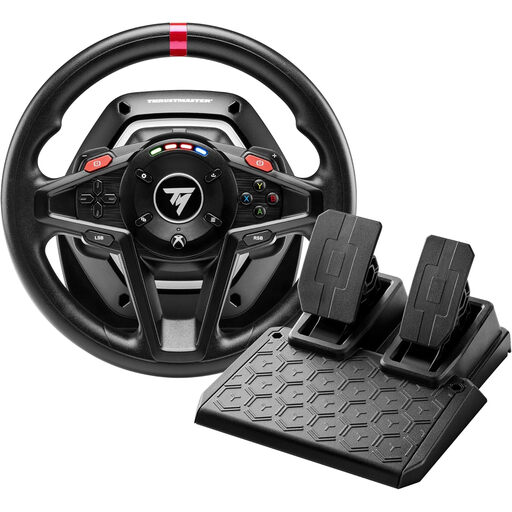 Image unavailable
Thrustmaster T128 SimTask Pack (Xbox and PC)
Consider this pack if a bus-style steering position appeals to you. Confirm the included mount and the Xbox-and-PC variant before buying; specifications for the PlayStation-and-PC pack should not be assumed to apply to it.
Check support in your exact bus game and make sure the clamp fits a stable desk.
View on Joybuy
 Image unavailable
Thrustmaster T-248X Wheel and Pedals (Xbox and PC)
Consider this Xbox-and-PC wheel-and-pedals set if you want a racing-wheel setup for bus driving. Check that your exact game accepts the wheel and that its clamp fits your desk before buying.
View on Joybuy
Questions about bus simulator wheels
Will any racing wheel work with my bus simulator?
No: compatibility depends on the particular game, edition, platform and wheel. Bus Simulator lists directly supported models for Bus Simulator 21 and says some other recognised wheels can be configured manually, without guaranteeing every function.
Do I need a gear shifter for Bus Simulator 21?
No, not for its buses: according to the Bus Simulator 21 developer response, they use automatic gearboxes and manual shifting is unsupported. A shifter may still be useful in another compatible driving game.
Can I use a wheel on a bedroom desk instead of a cockpit?
Yes, if its mount fits a stable desk and you can secure the pedals. Thrustmaster specifies a 15–50 mm desk-thickness range for the PlayStation-and-PC T128 SimTask Pack, while the MOZA R3 Xbox-and-PC bundle includes a table clamp; check the fit of the exact version you choose.
What if steering or pedals do not respond on PC?
Check the game’s wheel-input settings and the manufacturer’s setup instructions for your exact model. Thrustmaster provides T128 driver and firmware resources for Windows 10 and 11; Bus Simulator 21 developer guidance also advises checking whether Steam Input is overriding wheel input on PC.


