Small-room oval-racing learners
You need to mount a wheel and pedals for a session, then put them away rather than leave a cockpit on the floor. Thrustmaster describes the T128 clamp as suitable for quick setup and storage.


Choose a removable desk-clamped wheel and pedals if you need to put the setup away after each virtual oval practice session; Thrustmaster describes the T128 clamp as tool-free. If the desk or chair moves during use, consider whether you have room to store a foldable stand instead. Check the exact platform edition, desk fit and simulator calibration before choosing a feedback system.
You need to mount a wheel and pedals for a session, then put them away rather than leave a cockpit on the floor. Thrustmaster describes the T128 clamp as suitable for quick setup and storage.
You want repeatable steering and pedal inputs for virtual oval practice and are willing to calibrate the controls. iRacing instructs users to calibrate controllers when they are first connected or moved to another USB port.
You need to identify the correct PC, PlayStation or Xbox wheel edition before comparing feedback or mounting options. Thrustmaster lists separate platform compatibility for its wheel models.
Choose it when: You can use a suitable desk during practice and need to remove the wheel afterwards; Thrustmaster describes the T128 clamp as tool-free.
Trade-off: A removable wheel still depends on a stable desk, chair and pedal position.
Choose it when: You want to consider a direct-drive wheel without planning a permanent cockpit; MOZA describes its 3.9 Nm R3 PC bundle as suitable for a desk or entry-level cockpit.
Trade-off: Check the mounting arrangement separately. MOZA specifies desktops up to 50 mm thick for its optional table clamp.
Choose it when: Desk mounting is impractical but you can store a folded stand; Next Level Racing describes its Wheel Stand 2.0 as foldable for limited storage space.
Trade-off: A stand needs its own storage spot, and its wheel and pedal mounts must fit your chosen equipment.
| Concern | What to check | Who this matters to |
|---|---|---|
| Temporary mounting and storage | Check clamp fit at the desk edge and where the wheel, pedals and cables will go after use. | If I must clear the room after practice, the whole setup needs a workable place to go. Around 46% of consumers put temporary mounting and storage first. |
| Steering and pedal control | Check simulator recognition, then calibrate the controls; iRacing calls for calibration on first connection or after a USB-port change. | I want steering and braking inputs I can repeat while learning the oval, rather than judging a wheel by its feedback feature alone. For around 36% of consumers, control and feedback are the primary concern. |
| Platform and equipment fit | Verify the exact wheel edition, included pedals and any clamp or stand needed for your simulator and hardware. | If I switch between devices or use a console, the wrong wheel edition could rule out my intended setup. Platform and equipment fit come first for around 18% of consumers. |
The Thrustmaster T128 has separate PlayStation/PC and Xbox/PC versions, while MOZA distinguishes PC and Xbox-and-PC R3 bundles. Similar-looking wheels need not have the same platform compatibility.
Identify your simulator and hardware platform, then check the exact model edition and included equipment before ordering.
A wheel mount does not keep a desk from moving or a chair from rolling under pedal pressure. MOZA specifies a maximum desktop thickness of 50 mm for its optional table clamp.
Measure the desk where the clamp would attach and assess the chair and pedal position. If desk mounting is unsuitable, check whether a compatible foldable stand will fit both the equipment and your storage space.
A separate compatible clamp or stand may be needed for the mounting arrangement you choose.
iRacing instructs users to calibrate controllers when they are first connected or moved to another USB port; an old configuration may not reflect the current connection.
Use consistent USB ports where possible and follow the simulator’s calibration prompts after installation or a port change.
Logitech’s TRUEFORCE effects depend on game integration. A feedback feature does not establish that a particular wheel fits your platform, desk or simulator configuration.
Confirm compatibility and secure mounting, calibrate the controls, then adjust feedback to a level you can control during practice.
The T128 is relevant if you want a removable desk setup; it comes in separate PlayStation/PC and Xbox/PC versions.
The G923 is relevant if you are comparing wheel-and-pedal setups with Logitech’s TRUEFORCE force-feedback feature.
The R3 PC bundle is a compact direct-drive option that MOZA describes for desk setups and entry-level cockpits; an Xbox-and-PC version also exists.
These wheel-and-pedal choices cover desk-oriented racing setups and PC or console editions. For virtual oval practice in a small room, match the platform first, then check each wheel’s mounting and storage needs; the truck-focused system particularly calls for a simulator-control check.
 No image available
Consider this clamp-mounted wheel-and-pedal set if you want to practise at a desk rather than leave a cockpit assembled; check the clamp against your desk edge and plan a stable pedal position.
The product description lists Xbox and PC compatibility, force feedback, up to 900° rotation, three feedback modes and a three-pedal set with a load-cell brake.
 No image available
This edition suits a removable desk setup if its clamp fits your desk; Thrustmaster describes the T128 attachment as tool-free for quick setup and storage.
The product description lists force feedback and magnetic pedals. Check that your simulator recognises the wheel and calibrate its controls after connection.
 No image available
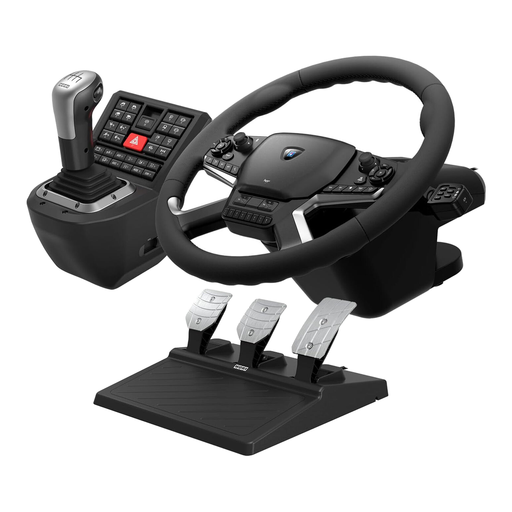
Consider this PC system only after checking that your oval simulator recognises its controls and that its mounting arrangement fits your desk and storage space; the product description focuses on truck simulation.
The description lists a USB wheel-and-pedal system, mounting clamps, a detachable shifter and dual-motor force feedback. Confirm the simulator’s control mapping before relying on it for oval practice.
 No image available
This is the Xbox-and-PC T128 edition for steering and pedal practice. If you need to put the equipment away, check how this particular set mounts to your desk and where you will store it.
The product description lists adjustable force feedback and an adjustable magnetic pedal base. Calibrate the controls in your intended simulator after connecting them.
 No image available
This PlayStation-and-PC set is an option for steering and pedal practice if its mounting and storage arrangement suits your room. Check those details and whether it meets your feedback needs before choosing it.
The product description lists Bungee Cord recentering, three driving profiles, 240° rotation and magnetic pedals; recentering should not be mistaken for a stated force-feedback feature.
A USB wheel and pedals may work, but check the exact model and complete the simulator’s control setup. iRacing says virtually any USB controller can work and instructs users to calibrate controllers when first connected.
No: a suitable desk and removable clamp can avoid a permanent cockpit. Thrustmaster describes the T128 clamp as tool-free; if your desk or chair moves during use, consider a compatible foldable stand and check where it will be stored.
Calibrate it on first connection and after moving a controller to a different USB port, as iRacing instructs. Follow the simulator’s on-screen control prompts rather than assuming an earlier configuration still applies.
Stop using the wheel. The Thrustmaster T128 manual instructs users to unplug it and disconnect the other cables if it produces abnormal heat, sounds or odours; it says repairs should be carried out by the manufacturer, an authorised representative or a qualified technician.
Check an applicable electrical-waste collection route rather than putting powered equipment in ordinary household waste. GOV.UK identifies the Waste Electrical and Electronic Equipment Regulations 2013, as amended, as the underpinning UK legislation; ask your retailer or local authority which collection route accepts your equipment.