For a kart simulator in a small room, start with a wheel that fits your platform and can be mounted on your desk, then work out where its pedals will go between sessions. Check support for your exact game before choosing between feedback systems: MOZA lists KartKraft for the R3 on PC, while Thrustmaster maintains a separate game-compatibility list for the T128. A desk clamp saves the space taken by a permanent cockpit, but it does not secure the pedals.
Who is this setup for?
Pack-away desk racers
You play at a desk or table rather than leaving a cockpit in place. Thrustmaster describes the T128 as quick to attach and store; MOZA specifies tool-free installation for its table clamp. In either case, allow room for the pedals while playing and somewhere to put them afterwards.
PC kart-sim players
Your choice depends on the kart game as well as the computer. MOZA lists KartKraft among the R3’s supported PC games; check the current support information for the exact wheel and game you intend to use.
Console-first players with limited space
You need both a workable desk setup and the right console version. Thrustmaster offers separate T128 PlayStation/PC and Xbox/PC versions, while MOZA distinguishes its PC and Xbox R3 bundles.
What matters when choosing?
Check platform and game support before comparing feedback features, then measure the desk and plan a stable position for the pedals. A compact wheelbase alone does not settle how much floor space the full setup needs.
| Concern | What to check | Who this matters to |
|---|
| Mounting and pedals |
Measure desk thickness and clamp clearance; decide how to keep the pedals from moving. MOZA specifies desktops up to 50 mm thick for its table clamp. |
If I need to clear the desk after driving, the wheel must come off easily and the pedals need a place to go. Roughly 42% of consumers would put this space-and-storage need first. |
| Platform and game support |
Match the exact wheel version to your PC or console, then check current support for your kart game and its platform. |
I do not want a similar-looking console variant that will not work with my system, or to assume my kart game accepts the wheel. For roughly 33% of consumers, compatibility would be the primary concern. |
| Steering feedback |
Compare the stated feedback system and check whether the desk is stable enough for the intended setup. Confirm game integration before relying on enhanced features such as Logitech TRUEFORCE. |
If steering feel drives my choice, I need to weigh the feedback system against what my desk can hold and what my game implements. Around 25% of consumers would prioritise that trade-off. |
Mistakes to avoid
-
Assuming similarly named wheels work with both consoles
Thrustmaster’s T128 and Logitech’s G923 are offered in distinct platform versions. A PlayStation/PC version does not establish Xbox support, or vice versa.
Match the full variant name and the manufacturer’s platform information to the device you will use.
-
Planning for the wheel clamp but not the pedals
A clamp holds the wheelbase to the desk, not the separate pedal set. Pedals still take up footwell space and may move under braking.
Measure the desk and footwell, then choose where the pedals can be braced before ordering.
If the pedals cannot stay put, you may also need a non-slip mat or another way to brace them.
-
Equating a feedback feature with game support
Logitech says TRUEFORCE detail depends on game integration, while Thrustmaster maintains a separately updated compatibility list for the T128. A feature name does not establish support for your kart title.
Check the current information for the exact wheel, game and platform before purchase.
Relevant brands to consider
Thrustmaster
The T128 is relevant if you want a force-feedback wheel and pedals that can be attached to a desk and stored after a session.
- Thrustmaster specifies Hybrid Drive force feedback, two pedals and a tool-free desk or table attachment system for the T128.
- Choose the PlayStation/PC or Xbox/PC version for your platform, and check Thrustmaster’s current list for your kart game.
MOZA Racing
The R3 is a compact direct-drive route for a desk-based setup, including PC players considering KartKraft; MOZA also offers an Xbox-specific bundle.
- MOZA describes the R3 bundle as having a 3.9 N·m direct-drive base and a table clamp, and lists KartKraft among supported PC games.
- MOZA specifies a maximum desktop thickness of 50 mm for its table clamp. Check desk stability, pedal placement and the exact PC or Xbox bundle.
Logitech G
The G923 is a wheel-and-pedals option where its particular PC, PlayStation or Xbox version matches your system.
- Logitech lists G923 variants for PC, PlayStation/PC and Xbox/PC, with TRUEFORCE hardware.
- Logitech says enhanced TRUEFORCE detail requires game integration; check the intended kart title rather than assuming the feature applies.
Joybuy product choices
These choices cover desk-based wheel-and-pedal sets for different platforms, plus a wireless wheel with integrated driving controls for consumers considering a setup without separate pedals. Match the exact game and mounting arrangement to your space before choosing.
 No image available
Thrustmaster T128 wheel and pedal set for PS5, PS4 and PC
Consider this version for desk-based PlayStation or PC sessions when you want to remove the wheel between uses. Thrustmaster describes the T128’s desk attachment as tool-free.
The product title specifies force feedback and a pedal set. Check your exact kart game’s support and plan how to keep the separate pedals steady.
Joybuy
 No image available
Thrustmaster T-248X wheel and pedals for Xbox and PC
Consider this Xbox and PC set if its desk-mounting arrangement fits your table and you have room to position the pedals.
Check support for your exact kart game and how you will prevent the pedals from shifting.
Joybuy
 No image available
Turtle Beach VelocityOne Race wheel and pedals for Xbox and Windows 10/11
Consider this system only if your desk offers a firm mounting surface and your footwell can accommodate stable pedal placement.
The title identifies Xbox and Windows 10/11 versions. Check the intended kart game and your desk arrangement before choosing it for a compact space.
Joybuy
 No image available
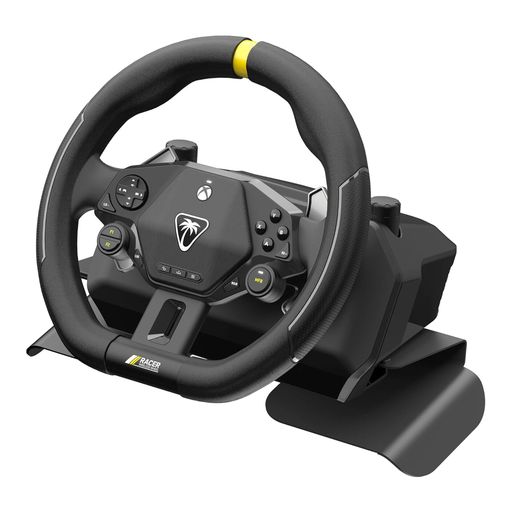
Turtle Beach Racer wireless wheel for Xbox and PC
Consider this wheel if avoiding a separate pedal set matters more to your space plan than choosing a conventional wheel-and-pedals package. Check whether its integrated driving controls suit how you want to play.
Confirm that your kart game accepts its control mode, and check whether force feedback is a feature you require.
Joybuy
Frequently asked questions
Can I use a kart-sim racing wheel without a cockpit?
Yes, if its clamp fits a sufficiently stable desk or table and you can position the pedals securely. Thrustmaster specifies a desk attachment for the T128, while MOZA specifies a table clamp for compatible bases; neither wheel clamp holds a separate pedal set in place.
Does the MOZA R3 support KartKraft?
MOZA lists KartKraft among the R3’s supported PC games. Check current compatibility for the exact R3 bundle and game edition before ordering; the PC listing does not establish support for another wheel or a console edition.
Will one Thrustmaster T128 work on both PlayStation and Xbox?
No: Thrustmaster offers separate PlayStation/PC and Xbox/PC T128 versions. Choose the variant that names the console you use rather than relying on the shared T128 model name.
How thick can a desk be for the MOZA table clamp?
MOZA specifies desktops up to 50 mm thick for its table clamp. Also check that the clamp has access beneath the desk, that the surface is stable and that the clamp fits your chosen base.


