Choose a wheel made for your PC or console, then check whether your exact bus simulator recognises it before comparing force feedback, rotation or accessories. Bus Simulator 21 lists particular wheels as preconfigured, but its PC, PS4 and Xbox One support differs; a flatter heavy-vehicle-style setup is worth considering only if the wheel also works with your game and fits your desk.
Who is this for?
Bus Simulator 21 players choosing for a specific platform
If you play on PC, PS4 or Xbox One, the publisher’s platform-specific wheel list is more useful than a wheel’s hardware specifications alone. Check the entry for your version of the game before choosing a model.
Players building a heavy-vehicle-style desk setup
If a flatter steering position or spinner knob appeals to you, check that the mount fits both your wheel and your desk. Consider where a shifter or other controls would sit within reach.
PC or Xbox players considering direct drive
If you are comparing a direct-drive wheel with a conventional setup, make game recognition, control mapping and desk mounting part of the decision. Drive type alone does not establish support for your bus simulator.
What matters when choosing?
Start with the game and platform you own. Bus Simulator’s support information for Bus Simulator 21 identifies preconfigured models, while other wheels may call for manual configuration; once you have a workable match, decide whether desk position, steering feel or additional controls matter most to you.
Bus Simulator 21 on PC
Consider: The publisher lists Logitech G29, G920 and G923, along with selected Thrustmaster models including TMX, T150, T300/T300RS and TX, as preconfigured PC wheels.
Bear in mind: A wheel recognised by Windows but absent from that list may need controls configured in the game.
Bus Simulator 21 on PS4
Consider: The Logitech G29 is listed for the PS4 game and is Logitech G’s PlayStation/PC version of this wheel pair.
Bear in mind: The similar-looking G920 is Logitech G’s Xbox/PC version; check support afresh for another game or console edition.
Bus Simulator 21 on Xbox One
Consider: The publisher lists the Logitech G920 and Thrustmaster TMX for the Xbox One game.
Bear in mind: Recognition of an unlisted console wheel may still require manual configuration without full functionality.
| Concern |
What to check |
Who this matters to |
| Game and platform compatibility |
Match the exact wheel variant to your PC or console, then check the game’s model-specific support and mapping requirements. |
If I mainly play one bus simulator, I want its controls to work on my platform before I think about wheel feel. Around 31% of consumers put that compatibility match first. |
| Heavy-vehicle driving position |
Check wheel-and-mount compatibility and desk fit; Thrustmaster specifies a 15 mm to 50 mm desk clamp range for its SimTask Steering Kit. |
At a desk, I may prefer a flatter wheel and a spinner knob to a racing-style position. For around 31% of consumers, that driving layout is the primary concern. |
| Steering range and feedback |
Compare stated rotation and drive type, then check whether your game provides useful feedback and accepts the controls. |
Once the game recognises my wheel, I care most about how steering and feedback behave. This is the first priority for around 23% of consumers. |
| Accessories and expansion |
Check that each shifter, mount or other control fits the wheel family and is usable in your game. |
If I plan to add controls later, I want to know which accessories will work together before settling on a wheel. Around 15% of consumers make expansion their main concern. |
Buying pitfalls
-
Confusing the G29 with the G920
Logitech G assigns them different consoles: G29 is the PlayStation/PC version, while G920 is the Xbox/PC version. Similar names do not make them interchangeable for a console setup.
Match the wheel variant to your console and the game’s support list before comparing its other features.
-
Assuming PC recognition means complete game support
Bus Simulator says other Windows-compatible wheels may work with Bus Simulator 21 but need manual configuration. Being recognised by a computer does not settle how the game will map every control.
Look up your exact game, platform and wheel model; if the model is unlisted, decide whether you are willing to configure and test it.
-
Choosing from torque or rotation alone
Thrustmaster states a 270° to 900° rotation range for the TMX, while MOZA Racing states 3.9 Nm peak torque for the direct-drive R3. Neither specification, by itself, tells you whether your bus game supports that wheel.
Establish game and platform compatibility before using hardware specifications to narrow your choice.
-
Planning accessories after choosing the wheel
A shifter or heavy-vehicle mount may suit your intended layout but must fit the wheel and work with your desk and game. Logitech G specifies its Driving Force Shifter for G923, G29 and G920 wheels.
List the controls and mounting parts you want, then check each component against the wheel family and your available desk space.
Relevant brands to consider
Logitech G
The G29 and G920 offer distinct PlayStation/PC and Xbox/PC routes. Both appear in Bus Simulator 21 support information for applicable platforms.
- Logitech G states that the G29 and G920 include dual-motor force feedback and adjustable floor pedals.
- The console versions are not interchangeable. Its optional Driving Force Shifter fits G923, G29 and G920 wheels, but support in your chosen game still needs checking.
Thrustmaster
Thrustmaster offers the TMX Xbox/PC wheel and a separate heavy-vehicle-style mounting route through its SimTask products.
- Thrustmaster specifies 270° to 900° rotation for the TMX. Its SimTask Steering Kit provides a flatter mounting position and spinner knob for compatible T128 and T248 wheels.
- A platform-compatible wheel or mount is not automatically preconfigured in a bus game. Confirm the exact model’s game support and the mount’s desk fit.
MOZA Racing
The Xbox/PC R3 bundle is a direct-drive option for consumers who want to investigate that type of feedback.
- MOZA Racing specifies a 3.9 Nm peak-torque direct-drive wheelbase, pedals and an included table clamp for the R3 bundle.
- Xbox licensing and the wheel’s hardware do not establish recognition or control mapping in a particular bus simulator; confirm both before choosing it for that purpose.
Joybuy products for a desk setup
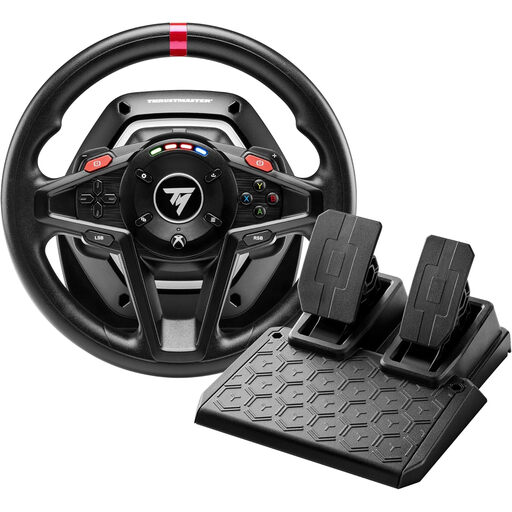
This wheel-and-pedal choice is aimed at a flatter, heavy-vehicle-style desk setup. Check recognition and control mapping in your exact bus simulator before buying it for that game.
 No image available
Thrustmaster T128 SimTask Pack (Xbox and PC)
Consider this pack if you want a wheel-and-pedal setup with a flatter desk-mounted position for simulated heavy-vehicle driving.
The listing specifies a T128 wheel, T2PM pedals, force feedback, up to 900° rotation and an adjustable flat-position mount for desks 1.5–5 cm thick.
Confirm that your desk fits the clamp and that your exact bus simulator recognises the wheel and its controls.
View on Joybuy
Questions about bus-simulator wheels
Should I choose a G29 or G920 for simulated bus driving?
Choose by platform: Logitech G specifies the G29 for PlayStation and PC, and the G920 for Xbox and PC. For Bus Simulator 21, the publisher lists G29 for PS4, G920 for Xbox One and both as preconfigured on PC; check separately if you play another game or edition.
Will any Windows-compatible racing wheel work with Bus Simulator 21?
Not necessarily with the same setup effort or functionality. Bus Simulator says other Windows-compatible wheels may work but require manual configuration; check the support information for your exact wheel and game platform before relying on its controls.
How can I position a desk-mounted wheel more like a heavy-vehicle wheel?
A compatible adjustable mount can give you a flatter steering position. Thrustmaster specifies its SimTask Steering Kit for T128 and T248 wheels, with a spinner knob and a clamp for desks 15 mm to 50 mm thick; measure your desk and check your wheel model before ordering.
What should I check when setting up a wheel on PC?
Follow the manufacturer’s driver, firmware and connection instructions, then bind and test controls inside your game. Thrustmaster’s T128 instructions say not to connect that wheel to a PC until prompted during installation; Bus Simulator 21 also provides a steering-wheel diagnostics tool in its input settings.


