Platform-first circuit learners
If your virtual circuit runs on a particular PC or console, confirm that the exact wheel version and game work together before comparing feedback or accessories.


Start with a racing wheel version supported by your PC or console and the game you use for mountain-circuit practice, then weigh steering feedback against pedal control and mounting needs. Choose a bundle you can secure to your setup, and check how your headphones and voice chat connect to that PC or console rather than assuming the wheel provides an audio connection.
If your virtual circuit runs on a particular PC or console, confirm that the exact wheel version and game work together before comparing feedback or accessories.
If you plan to repeat tight bends and changing-grip sections, steering feedback, braking control and a firmly mounted wheel all deserve attention.
If the wheel will live on a desk, check its mounting requirements alongside the way your headphones and microphone connect to your PC or console.
Confirm platform and game support first. Then compare feedback, pedals and the physical setup you will use for practice.
| Concern | What to check | Who this matters to |
|---|---|---|
| Platform and game fit | Match the exact wheel variant to your PC or console, then check support for your game. | If my circuit runs on one platform, I need a wheel that works with that platform and game before its other features matter. Roughly 33% of consumers would put compatibility first. |
| Steering feedback | Compare drive mechanisms and confirm that your game supports the wheel’s force-feedback features. | When I repeat tight corners and changing-grip sections, I want steering feedback I can use to practise my corrections. Around 27% of consumers would make feedback their primary concern. |
| Pedals and manual controls | Check the supplied pedals and whether the clutch, shifter or handbrake you want is included or compatible. | If I practise braking points or drive manual cars, I need to know which controls the bundle gives me from the start. About 20% of consumers would prioritise pedals and expansion. |
| Desk and headphone setup | Check mount fit and desk stability; confirm the headset and voice-chat connection for your PC or console. | At a desk, I need the wheel to stay secure while my headphones work with the rest of my setup. Approximately 20% of consumers would put those practical needs first. |
Versions within a product family can serve different platforms. For example, Thrustmaster’s PlayStation/PC T248 is not the Xbox/PC T248 X listed below.
Check the exact variant against your PC or console and the game you intend to use before comparing its controls.
A wheel that moves during steering can make repeated corner practice difficult. Thrustmaster’s T300 manual calls for its base to be secured.
Measure your desk, check its stability and confirm the chosen bundle’s clamp or other mounting requirements.
A separate stand or rig may be needed if your desk cannot accommodate the mount securely.
The MOZA R3 Xbox/PC bundle has two pedals and offers a clutch as an add-on. The controls supplied with a starter bundle may therefore differ from those you want for manual-car practice.
Check the included pedal set and decide whether you need a clutch, shifter or handbrake before choosing a bundle.
Wheel compatibility does not establish where a wired or wireless headset connects, or how voice chat works on your platform.
Check the headset, PC or console, game and voice-chat requirements together rather than choosing a wheel on an assumed audio feature.
These product lines illustrate different platform, bundle and mounting choices; check the exact version rather than treating a brand name as a compatibility guarantee.
The R3 offers an entry-level direct-drive bundle route for PC users and, in its Xbox/PC version, Xbox users.
The PlayStation/PC T248 and T300RS GT provide distinct hybrid-drive and belt-drive bundle routes.
The G PRO Racing Wheel is a direct-drive option for buyers considering a higher-force setup.
The PC-focused CSL DD Ready2Race bundle is a modular direct-drive route.
These wheel-and-pedal choices cover Xbox/PC and PlayStation/PC practice setups. Use the platform named on each product, then check your game, mounting space and headset connection before choosing.
 No image available
Consider this wheel-and-pedal system for repeated practice on a supported Xbox or Windows 10/11 PC game.
Secure the wheel to a sturdy, stable surface, and confirm your game and headset connection before buying.
 No image available
This Xbox/PC wheel-and-pedal set is a route for practising steering and braking in a supported game.
Check desk mounting and headset routing for your setup. Do not assume it has the platform compatibility of the PlayStation/PC T248.
 No image available
For PS5, PS4 or PC practice, this T248 pairs a force-feedback wheel with a magnetic pedal set; Thrustmaster lists three feedback presets for this PlayStation/PC model.
Confirm support for your game, how the wheel mounts and how your headset connects.
 No image available
Consider this Xbox/PC pack if you practise at a desk and want to check mount fit before ordering.
Its stated mount range is for desks 1.5–5 cm thick; check desk stability as well. The supplied accelerator and brake pedals do not provide a clutch, and headset routing depends on your setup.
 No image available
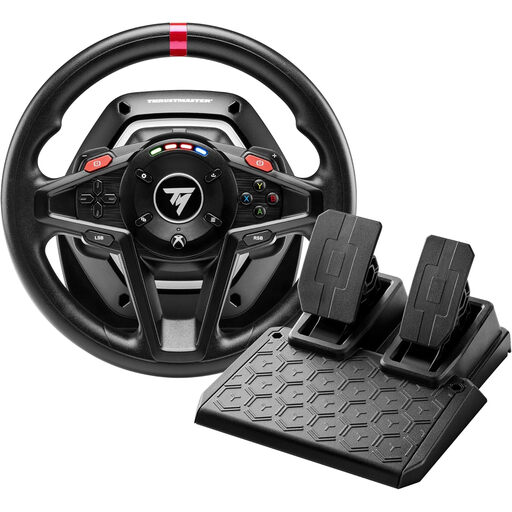
This PlayStation/PC wheel-and-pedal set suits practice in a game that supports the T128 on your chosen platform.
The set has two pedals, so check your plans for clutch use. Confirm mounting fit and headphone routing for your own setup.
No. A compatible force-feedback wheel with pedals can serve repeated corner and braking practice without being direct drive. SCAN’s racing-simulation buying guide describes different steering feel across gear, belt and direct-drive mechanisms; weigh that distinction against your mounting setup and the controls included in the bundle.
No. Check the exact wheel variant and your game’s support for it. Thrustmaster’s cited T248 and T300RS GT versions are for PlayStation and PC, while MOZA Racing’s UK R3 Xbox/PC bundle serves Xbox and PC; Logitech G also offers distinct G PRO platform configurations.
Plan the headphone connection through your particular PC or console unless the documentation for your exact setup specifies another route. Check your headset’s connection method, microphone needs and the game’s controller support before ordering the wheel.
Yes, when the product instructions call for secure mounting. Thrustmaster’s T300 manual instructs users to secure its wheel base; for any wheel you choose, check the mount against your desk and follow that model’s fitting and power-supply instructions.