Desk-based virtual truck drivers
If you play at an ordinary desk, a removable wheel mount lets you reclaim the desktop after a session. You still need a place for the pedals while driving and somewhere to store them afterwards.


Choose a wheel that fits your desk and playing platform, then work out where its pedals will go during play and afterwards. A standard clamp-on bundle suits a setup you put away between sessions; a compatible SimTask mount adds a flatter, truck-style steering position but takes more desk space. A compact direct-drive bundle is another route for PC players who want that type of feedback and can accommodate its pedals.
If you play at an ordinary desk, a removable wheel mount lets you reclaim the desktop after a session. You still need a place for the pedals while driving and somewhere to store them afterwards.
A flatter steering position and a spinner knob may matter more to you than keeping the desk setup as small as possible. Check the mount and desk together, not just the wheel.
If you mainly play on PC and can make room for pedals near the desk, a desk-clamped direct-drive bundle is an option. Its controls and platform version still need to suit your truck games.
Start with the space you can use during a session, not just the space the wheel occupies in storage. Desk fit, pedal placement and platform compatibility can rule out a setup before feedback features become relevant.
Choose it when: You want to attach a wheel for a session and put it away afterwards.
Allow for: The pedals still need floor space, and a standard wheel position is less truck-specific than a flat-mounted SimTask setup.
Choose it when: You want a flatter position and spinner knob with a compatible Thrustmaster wheel.
Allow for: The mount adds desk hardware, and its 15–50 mm desk-thickness range must fit your clamping edge, according to Thrustmaster.
Choose it when: Direct-drive feedback is a priority and a PC bundle suits your games.
Allow for: MOZA Racing's PC R3 bundle has a GT-style rim and pedals rather than dedicated truck controls; its Xbox-capable bundle is a separate variant.
| Concern | What to check | Who this matters to |
|---|---|---|
| Desk fit and storage | Measure the clamping edge and plan where the pedals will sit and be stored. Thrustmaster specifies a maximum desk thickness of 5.5 cm for the standard T128 clamp. | I need to clear the desk after driving without leaving a cockpit in the room. Around 42% of consumers would put temporary setup and storage first. |
| Truck-style steering | Check wheel and mount compatibility and whether you want a flatter angle and spinner knob. Thrustmaster specifies a 15–50 mm desk range for its SimTask Steering Kit. | If one-handed turns and a heavy-vehicle-style wheel position are central to how I play, I can give the mount more desk room. Roughly 33% of consumers would make truck-style controls their primary concern. |
| Feedback and controls | Compare the drive type, exact platform variant and included controls. MOZA Racing lists the PC R3 bundle as direct drive with 3.9 N·m peak torque and a two-pedal set. | I mainly play on PC and want to prioritise feedback hardware while retaining a desk setup. For about 25% of consumers, that would be the leading need. |
A desk clamp avoids a permanent cockpit, but bundled pedals still occupy floor space during play.
Measure the clear area between chair and desk, decide where the pedals can stay stable and choose a storage spot for them.
Thrustmaster offers distinct PC/Xbox and PC/PlayStation T128 versions. MOZA Racing also distinguishes its PC R3 bundle from the Xbox-capable ESX version.
Match the exact wheel or bundle variant to your main device and intended game before weighing its other features.
Choosing the wrong console variant could mean replacing the wheel.
Thrustmaster specifies 15–50 mm for the SimTask Steering Kit, while the standard T128 clamp has a stated maximum of 5.5 cm. Those are different fit checks.
Measure the solid desk edge, including anything beneath it that obstructs the clamp, against the mount you intend to use.
A direct-drive wheelbase does not remove the need for a secure desk mount, a steady chair and pedals that stay in position.
Check those contact points before choosing a feedback upgrade for a temporary desk setup.
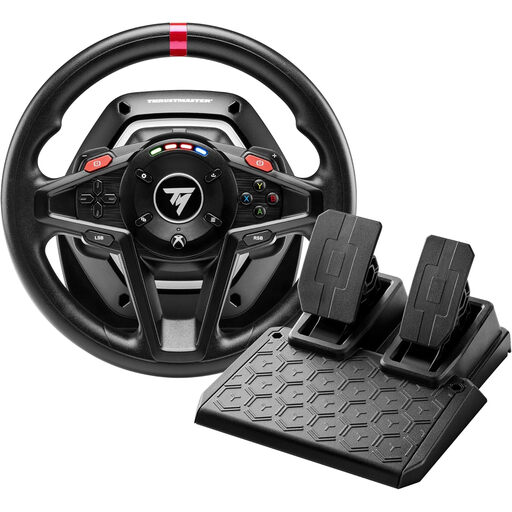
The T128 offers a standard desk-clamped starting point, while the separate SimTask Steering Kit provides a truck-oriented mounting option for compatible T128 and T248 wheels.
The R3 is a desk-clamped direct-drive route for players considering a PC setup rather than a dedicated truck-control layout.
The G923 is a wheel-and-pedal option for buyers who may also want an optional H-pattern shifter.
These choices cover a truck-style T128 setup, a Windows truck-control system and an Xbox/PC wheel-and-pedal bundle for desk-based play. Check each one against your desk, pedal space and games rather than treating desk mounting as a guarantee of fit.
 No image available
Consider this pack if a flatter, truck-style steering position is your priority. Thrustmaster specifies a 15–50 mm desk-thickness range for the SimTask mount; check your clamping edge, pedal space and game compatibility before choosing the Xbox/PC variant.
 No image available
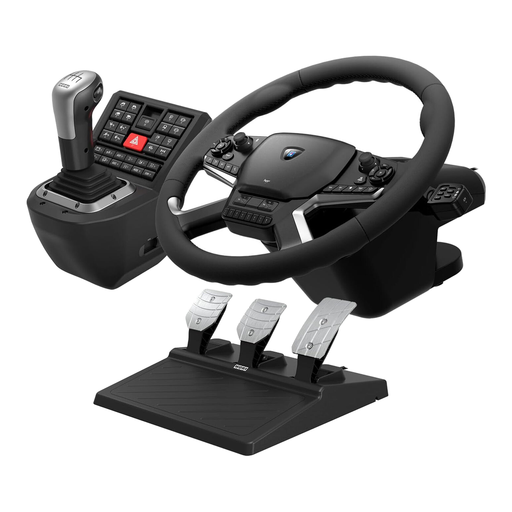
Consider this Windows truck-control system if you want a setup centred on virtual trucking. Before buying, check how its controls will fit your desk and where you can place and store the pedals.
 No image available
This Xbox/PC wheel-and-pedal bundle suits someone considering a standard desk-mounted arrangement. Check clamp fit and pedal space; if you want to add a truck-style mount, confirm compatibility with this exact variant and whether the mount is included.
No: a wheel can clamp to the desk instead of using a permanent cockpit, but its pedals still need a stable floor position during play. Measure pedal space and plan where the set will go afterwards.
Measure the solid edge where you will clamp it and check the mount you intend to use. Thrustmaster specifies a maximum desk or table thickness of 5.5 cm for the standard T128 clamp, but a 15–50 mm range for the SimTask Steering Kit.
Choose the exact variant that matches your device, then check the game you intend to play. Thrustmaster offers separate PC/Xbox and PC/PlayStation T128 versions; MOZA Racing's PC R3 and Xbox-capable ESX bundles are also distinct.
A separate shifter is an optional choice if you want manual gear selection and have room to mount it. Logitech G's Driving Force Shifter has built-in clamps; check compatibility with your exact wheel before adding it.