For radio-play dialogue in a room with audible background noise, start by considering a cardioid dynamic microphone used close to each actor. A cardioid condenser is worth considering for detailed voices and effects when the room is quiet and controlled, but it can make unwanted room sound more noticeable. Choose USB for direct computer recording, XLR for an interface or mixer, or a dual USB/XLR model if you need both connection options; check the power and equipment requirements of the particular microphone.
Who is recording?
Home-recording dialogue makers
If fans, traffic or reflections are audible in your recording room, plan for close microphone placement, a stable stand and control of plosive sounds. RØDE’s guidance notes that sensitive microphones can pick up more background noise; a cardioid dynamic is a route to consider before pursuing extra detail.
Quiet-room drama and effects creators
For whispered lines or deliberately recorded sound effects in a controlled space, a cardioid condenser may suit the detail you want. Check its stated self-noise and, for an XLR model, whether your interface or mixer supplies the required phantom power.
Computer-first solo producers
If you want to record directly to a computer now but may use an interface or mixer later, consider a microphone with both USB and XLR connections. Check its monitoring options as well as the cables and other equipment your intended setup needs.
What matters when choosing?
Decide how much room sound you can control before choosing a dynamic or condenser microphone; then choose the connection that fits how you will record. USB and XLR describe connections, not alternatives to those microphone types.
| Concern |
What to check |
Who this matters to |
| Clear dialogue in a noisy room |
Consider a cardioid dynamic for close speech. Check placement and whether a pop filter or shock isolation suits your setup. |
If fans or room reflections compete with an actor’s voice, I need dialogue that stays clear without capturing more of the room than necessary. Around 36% of consumers put room control first. |
| Detail in voices and effects |
For a controlled room, compare cardioid condensers and their stated self-noise; check the power required by an XLR model. |
For quiet lines and deliberate sound effects, I want to preserve detail without making room noise part of the performance. Around 36% of consumers prioritise detailed capture. |
| Recording and monitoring setup |
Choose USB, XLR or both for your equipment; check monitoring and whether you have enough inputs for simultaneous actors. |
When starting with one narrator at a computer, I need a workable connection now and may want separate equipment later. Around 28% of consumers place the recording workflow first. |
Mistakes to avoid
-
Buying a sensitive condenser to fix an untreated room
A condenser can capture the detail you want alongside fan noise and reflections you do not. RØDE’s guidance notes that condenser microphones tend to pick up more background noise.
Make a short recording in the intended room. If unwanted sound is obvious, consider closer cardioid dynamic placement and improvements to the room before choosing a condenser for its detail.
Controlling the room may also take time or require a quieter recording location.
-
Assuming an XLR microphone plugs straight into a laptop
An XLR-only microphone needs a suitable interface or mixer. Audio-Technica specifies 48 V phantom power for the AT2020, while Shure specifies +48 V for the SM7dB only when its built-in preamp is active.
Check the microphone connection, interface inputs, power requirements, cable, stand and monitoring arrangement as one recording chain.
For the AT2020, Audio-Technica states that the XLR cable is sold separately; an XLR setup may also require an interface or mixer.
-
Sharing one microphone without planning actor positions
Sharing a microphone gives you less independent control over each actor’s level when editing. Shure’s placement guidance recommends one microphone for a single sound source where practical.
If separate microphones and inputs are available, assign one to each actor and rehearse placement. If actors must share, rehearse their positions and speaking distances before recording.
-
Expecting USB to solve placement problems
A USB connection simplifies the route into a computer, but it does not prevent plosives, handling noise or room reflections.
Check whether you can monitor the performance, position the microphone on a stable stand and make a test recording before the session.
Relevant brands to consider
Shure
Shure’s SM7dB and SM58 illustrate different close-spoken dynamic microphone setups.
- According to Shure’s specifications, the cardioid SM7dB has an internal pop filter, shock isolation, hum shielding and selectable +18 dB or +28 dB built-in preamp gain.
- The SM7dB remains an XLR microphone rather than a direct USB option. Its preamp requires +48 V phantom power when active.
- Shure specifies a cardioid pattern and built-in pop filter for the SM58, a simpler dynamic vocal option.
- The SM58’s published response is voiced for vocals; do not assume it will sound like a neutral studio condenser.
RØDE
RØDE has dynamic speech models and cardioid condensers relevant to different radio-play rooms and connections.
- RØDE lists the PodMic as an XLR dynamic microphone with internal pop filtering and shock mounting. The PodMic USB adds USB-C, XLR and headphone monitoring.
- RØDE states 4 dBA self-noise for the XLR NT1 Signature Series and lists a shock mount, pop filter and XLR cable. Its NT1 5th Generation offers USB and XLR connections.
- RØDE’s guidance notes that condensers can pick up more background noise. A quiet microphone specification cannot compensate for a noisy or reflective room.
Audio-Technica
Audio-Technica’s AT2020 is an XLR cardioid condenser to consider for dialogue when the recording space is controlled.
- Audio-Technica describes the AT2020 as a side-address cardioid condenser intended for uses including voiceovers.
- The AT2020 requires 48 V phantom power through its XLR connection, and Audio-Technica states that the XLR cable is sold separately.
Joybuy microphones for dialogue recording
These dual USB/XLR dynamic microphones are options for close-spoken dialogue, particularly if you want to begin at a computer and retain an XLR connection for another setup. Test microphone position and room sound before relying on either for a full cast recording.
 No image available
FIFINE K688CTW White dynamic USB/XLR microphone kit with boom arm
Consider this kit for close-spoken dialogue if you want a boom arm for positioning and the choice of USB or XLR connection. Its product title also identifies a headphone jack; check that your planned monitoring and XLR equipment fit the way you intend to record.
Before setting up the boom arm, confirm that its clamp fits your desk. Make a test recording in the intended room rather than assuming a dynamic microphone will remove background noise.
View on Joybuy
 No image available
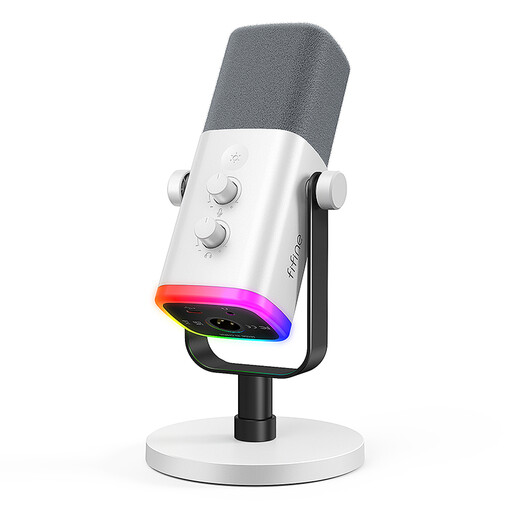
FIFINE AM8W White RGB dynamic USB/XLR microphone
For solo dialogue recorded at a computer, this model offers USB and XLR connection choices. Its product title identifies a gain knob, mute button and monitoring jack; check how the controls and monitoring work with the connection you plan to use.
Plan how you will position the microphone for consistent speech distance, and check the cable and audio equipment needed if you intend to use XLR. Test the sound in your recording room before a session.
View on Joybuy
Frequently asked questions
Does each radio-play actor need a separate microphone?
Use a separate microphone for each actor when you need independent levels and editing control and have enough inputs to record them. Shure recommends one microphone per sound source where practical; if actors share, rehearse their positions and accept that their voices will be harder to adjust separately.
Should I choose a condenser for dialogue recorded at home?
Choose a condenser when your room is quiet and controlled enough for the detail you want to capture. RØDE’s guidance notes that condensers tend to pick up more background noise, so a close-used cardioid dynamic is another route if fans or reflections remain audible.
What equipment does an XLR microphone need?
An XLR-only microphone needs a compatible audio interface or mixer and a suitable cable. Check power by model: Audio-Technica specifies 48 V phantom power for the AT2020 condenser, while Shure specifies +48 V for the SM7dB only when its built-in preamp is switched on.
Can I record a radio play directly into a computer?
Yes, if your microphone has a compatible USB connection. RØDE lists both USB and XLR connections for the PodMic USB and NT1 5th Generation; if you instead choose an XLR-only microphone, plan for suitable audio hardware, particularly when recording several actors at once.


