Who each layout suits

Small-desk management players

If mouse space is tight but you want direct access to movement controls, consider a 65% board with dedicated arrows. HyperX says its Alloy Origins 65 also retains Page Up, Page Down, Home and Delete; check the keys on any other model individually.

Shortcut-heavy rail planners

If you regularly use function keys and navigation shortcuts, a tenkeyless (TKL) board keeps those key groups while leaving out the numpad. Check your game’s bindings before giving up keys you use directly.

Shared-space players

If typing noise could disturb someone nearby, consider switch type alongside keyboard size. HyperX describes the keys on its full-size Alloy Core RGB as quiet, while SteelSeries describes sound-dampening features on its Apex Pro TKL Gen 3; neither description tells you how a selected variant will sound at your desk.

What matters when choosing

60%

Choose when: Freeing desk space matters more to you than having dedicated navigation keys.

Trade-off: You will rely more on secondary-function layers for omitted controls.

65%

Choose when: You want a compact board with dedicated arrows, as offered by the HyperX Alloy Origins 65.

Trade-off: Check how you will access function keys and any navigation keys your particular model omits.

TKL

Choose when: Direct access to a function row and navigation cluster matters more than minimising keyboard width.

Trade-off: TKL omits the numpad and uses more desk space than a smaller compact layout.

Full-size

Choose when: Your game bindings or other computer tasks make a physical numpad useful.

Trade-off: Allow more desk width than you would for a compact board.

Concern What to check Who this matters to
Desk space and direct controls Measure the available width and check for dedicated arrows and the navigation keys you use. If I have little room beside the mouse, I want a smaller board without moving routine controls onto an Fn layer. Around 45% of consumers put that combination first.
Typing noise Check the selected switch type and any stated sound-dampening features; do not assume a compact board is quiet. Playing in a shared room, I would put less disturbance ahead of having the smallest keyboard. Roughly 33% of consumers make lower noise their primary concern.
Shortcut and numpad access Compare your game and desktop commands with the available function keys, navigation keys and numpad. If I use many commands or enter numbers outside the game, I would keep the physical keys I reach for most. About 22% of consumers prioritise that direct access.

Buying pitfalls

  • Treating all compact layouts as interchangeable

    A 60% board, a 65% board and a TKL board give up different dedicated keys. HyperX says its Alloy Origins 65 retains arrows and several navigation keys, while its TKL guidance describes a function row and navigation cluster.

    List the controls you use most in your railway game. Check whether each candidate provides those keys directly or requires an Fn combination.

  • Assuming a UK storefront means a UK key layout

    Physical UK/ISO and US/ANSI layouts differ. The Joybuy listing for the HyperX Alloy Origins 65 identifies the HX Red variant as US Layout.

    Check the selected variant’s layout label and key images if Enter shape, left Shift shape or printed symbols matter to you.

  • Prioritising adjustable switches over usable keys

    SteelSeries and Logitech G describe adjustable-actuation features on particular TKL models, but those features do not establish that they are needed for railway management games.

    Decide on the keys, desk fit and acceptable noise first. Consider switch adjustment if you specifically want to customise key feel.

  • Overlooking fault support when ordering online

    Keyboard feel can be difficult to judge from a listing. GOV.UK states that consumer rights protect purchases made remotely as well as in person; a retailer’s returns process does not replace those rights.

    Keep your order record, read the retailer’s returns information and consult the relevant UK consumer-rights guidance if the keyboard arrives faulty.

Brands to consider

HyperX

Its cited range provides examples of 60%, 65%, TKL and full-size layouts.

  • HyperX specifies dedicated arrows and several navigation keys on the Alloy Origins 65, and describes quiet keys on the full-size Alloy Core RGB.
  • Those features belong to different models; check the selected model and layout variant rather than applying them to the whole range.

Logitech G

Its cited TKL models focus on slim construction or adjustable key response.

  • Logitech G describes the G515 RAPID as 22 mm high and offers actuation adjustment on the cited RAPID models.
  • If you do not need response customisation, check the retained keys and physical layout before giving that feature priority.

SteelSeries

The cited Apex Pro TKL Gen 3 is a TKL option with configurable magnetic switches.

  • SteelSeries states that actuation can be set from 0.1 to 4.0 mm and describes onboard configuration storage.
  • Its described sound-dampening features do not establish how quiet it is relative to another keyboard.

Joybuy keyboards for this setup

These 65%, 75% and 96% keyboards offer different balances of desk space and physical keys. A 75% layout is another option if you want a function row on a compact board; compare each model’s selected layout and actual dimensions with your desk and shortcuts.

AULA F75 75% gaming keyboard, US layout

AULA F75 75% Wireless Keyboard, QWERTY US Layout

Consider this 75% model if you want a compact keyboard and are comfortable with a US key layout. Its title specifies wired, Bluetooth and 2.4G connection options and PBT keycaps; check its dimensions against your desk.

View on Joybuy

HyperX Alloy Rise 75 Wireless Keyboard UK

HyperX Alloy Rise 75 Wireless Keyboard UK

This 75% wireless model is worth comparing if you want a smaller keyboard without moving straight to 65%. Confirm its physical key layout and dimensions: “UK” in the title alone does not establish the key shape of the selected variant.

View on Joybuy

ASUS ROG Falchion Ace HFX 65 gaming keyboard, UK layout

ASUS ROG Falchion Ace HFX 65, UK Layout

Consider this 65% analog gaming keyboard if compactness and a stated UK layout matter to you. Check how its selected variant handles any function-key shortcuts you use regularly.

View on Joybuy
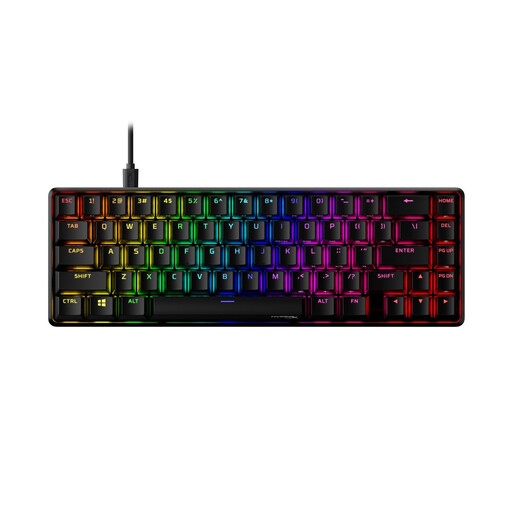
HyperX Alloy Origins 65 with HX Red switches, US layout

HyperX Alloy Origins 65, HX Red, US Layout

Consider this mechanical 65% board if you want the arrow and navigation keys HyperX specifies for the Alloy Origins 65. This listed HX Red variant is US Layout; check that its key positions, dimensions and access to your function-key shortcuts suit you.

View on Joybuy

Black ASUS ROG Strix Scope II 96 wireless keyboard, UK layout

ASUS ROG Strix Scope II 96 Wireless, Black, UK Layout

Consider this 96% wireless model if you want a physical numpad as well as a stated UK layout. A 96% keyboard is a different desk-space commitment from a 65% board, so compare its dimensions with the room available; confirm the selected switch variant too.

View on Joybuy

Common questions

Is a 60% keyboard practical for railway management games?

A 60% keyboard can work if saving desk space matters most and you are comfortable using secondary-function layers. If you want dedicated arrows and common navigation keys, compare a 65% model such as the HyperX Alloy Origins 65 and check your game’s bindings.

When should I choose TKL instead of full-size?

Choose TKL when you want a dedicated function row and navigation cluster but can do without a physical numpad. A full-size board is worth the extra desk space if you use that numpad for game commands or other numeric entry.

Does a UK listing guarantee a UK keyboard layout?

No: check the selected variant’s physical layout rather than relying on the storefront location. The Joybuy title for the HyperX Alloy Origins 65 HX Red specifies US Layout, so buyers who need UK key positions should check the label and images carefully.

Do railway management games require adjustable magnetic switches?

Choose adjustable switches if you specifically want to customise key response, not as a substitute for checking the controls you need. Start with desk fit, dedicated keys, the physical layout and an acceptable typing sound.

What if a keyboard bought online arrives faulty in the UK?

A faulty online purchase is covered by UK consumer protections, which are distinct from a retailer’s change-of-mind returns policy. Keep your order details, contact the seller about the fault and consult GOV.UK’s consumer-rights guidance for the advice service relevant to where you live.