
24/7 Customer Support

Free returns

Same-day & Next-day Delivery

Quality Guaranteed

Unlock Your Welcome Offers: FREE Delivery | Up to 80% OFF | Free 30-day JoyPlus trial
Download the APP
In the world of competitive PC gaming, particularly in fast-paced FPS titles like Valorant and CS2, every millisecond counts. The rise of the rapid trigger keyboard has shifted the landscape, offering a tangible advantage in movement and responsiveness. However, with this new technology comes a wave of marketing claims and technical jargon that can be difficult to navigate. As a shopper, it's easy to fall into common traps that lead to a disappointing purchase.
My role as a Joybuy Product Recommendation Officer is to help you sidestep these issues. We'll break down what truly matters in a modern FPS gaming keyboard and highlight the key features to look for, ensuring your investment enhances your gameplay rather than hindering it.
Before diving into specifications, let's address the frequent mistakes buyers make:
To make an informed choice, focus on these non-negotiable features. They are the true differentiators that separate a gimmick from a genuine performance tool.
This is the defining feature of a modern Valorant keyboard. Unlike traditional mechanical switches that have a fixed actuation point (the depth at which a keypress is registered), magnetic switches allow you to customise this.
The polling rate, measured in Hertz (Hz), is how many times per second the keyboard reports its status to your computer. The standard for gaming keyboards has long been 1000Hz (1ms response time). Newer models boast an 8000Hz keyboard polling rate, reporting every 0.125ms. While technically faster, the perceptible difference is minimal for most players. What's more important is a stable connection and efficient processing that ensures your inputs are registered without delay or error. A wired Type-C connection is generally the most reliable for competitive play.
Your keyboard's physical footprint and construction are just as important as its internal technology.
Based on these practical criteria, here are a few keyboards matched to different gamer profiles.

Why This Fits Their Persona: This user is focused on gaining a competitive edge in games like Valorant and CS2 without overspending. They need the core performance features—Rapid Trigger and a high polling rate—in a reliable, compact package that maximises desk space for mouse movement.
It balances a high 8000Hz polling rate with a solid metal top plate, avoiding the pitfall of focusing on one spec while ignoring build quality. The software provides direct control over actuation and RT.
Features fully adjustable actuation (0.2mm-4.0mm) and Rapid Trigger. The 65% (68-key) compact layout is ideal for FPS gaming setups.
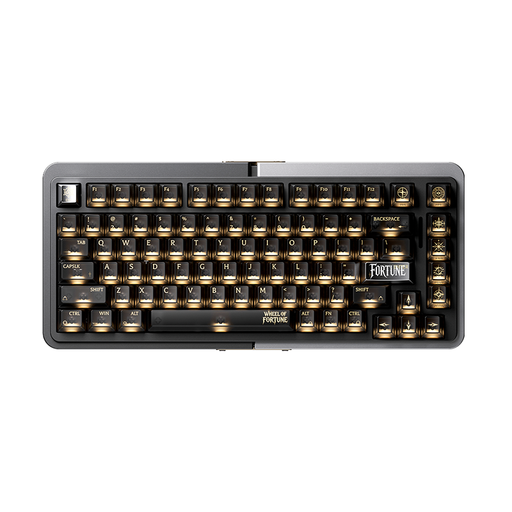
Why This Fits Their Persona: This user values aesthetics and a substantial feel as much as performance. They want a keyboard that feels solid, looks clean on their desk and delivers top-tier magnetic switch technology without compromise. The 75% layout offers a great balance of function and form.
It sidesteps the "flimsy build" pitfall with a full aluminium alloy frame, providing a hefty and rigid base that eliminates flex and enhances the typing experience. It focuses on core performance over inflated specs.
Excellent build quality with a premium feel. The 75% layout retains dedicated arrow and function keys while remaining compact, making it versatile for both gaming and productivity.
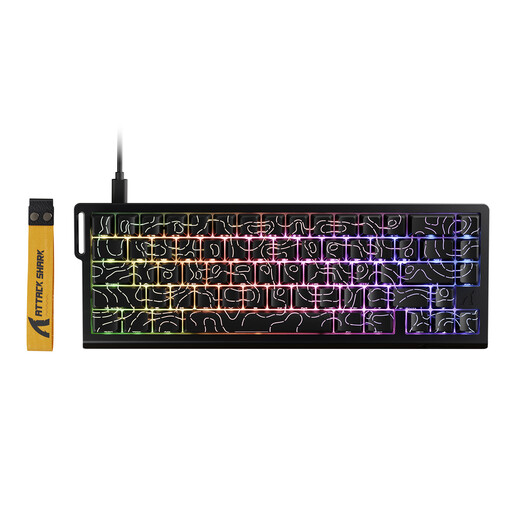
Why This Fits Their Persona: This gamer needs the smallest possible keyboard to maximise mouse space or for easy transport to LAN events. They require a full suite of performance features, including web-based driver support for easy customisation on any PC without installing local software.
It avoids the "software nightmare" by offering both a web driver and onboard memory. This means you can configure your settings once and have them work on any machine, which is perfect for tournament play.
Extremely compact 66-key layout. Features hot-swappable magnetic switches, allowing for future customisation or repairs without soldering. Includes a full feature set with 8000Hz polling and 0.01mm RT accuracy.
We have compiled a complete, real-time list of products that fully satisfy these strict selection criteria and UK safety regulations.
The core difference lies in how a keypress is detected. Standard mechanical keyboards use a physical contact mechanism, where two metal leaves touch to complete a circuit. A magnetic switch keyboard, or hall effect keyboard, uses a magnet and a sensor. The sensor detects the changing magnetic field as you press the key, allowing for an analogue input. This is what enables features like adjustable actuation and rapid trigger, as the keyboard knows the exact position of the key at all times, not just whether it's "on" or "off".
For the vast majority of players, including many professionals, a stable 1000Hz polling rate is perfectly sufficient. An 8000Hz keyboard reduces theoretical latency from 1ms to 0.125ms. While this is an eightfold improvement on paper, the practical, in-game difference is often imperceptible and can be negated by other factors like monitor refresh rate, internet ping and even your own reaction time. It's a "nice-to-have" feature for those seeking every possible advantage, but a well-built 1000Hz keyboard with rapid trigger will serve you better than a poorly made 8000Hz one.
Generally, it is straightforward. Most rapid trigger keyboards come with dedicated software (or a web-based driver) where you can access the settings. This interface usually provides a simple slider or input box to set the actuation distance for your keys (how far you press to activate) and the rapid trigger sensitivity (how far the key has to travel up to reset). You can often set a universal profile or customise it on a per-key basis. It may take some experimentation to find the settings that feel right for your playstyle, but the process itself is not technically difficult.