
24/7 Customer Support

Free returns

Same-day & Next-day Delivery

Quality Guaranteed

Unlock Your Welcome Offers: FREE Delivery | Up to 80% OFF | Free 30-day JoyPlus trial
Download the APP
A Rapoo wireless gaming mouse can offer fast tracking, programmable controls and a cleaner desktop, but headline specifications do not always tell the complete buying story. UK shoppers comparing an 8K wireless gaming mouse, lightweight design or very high DPI should check how those features work in everyday use.
The main traps are easy to overlook:
Polling rate is measured in hertz. A 1,000Hz mouse reports its position up to 1,000 times per second, while an 8K wireless gaming mouse can report up to 8,000 times per second. At 8K, the theoretical reporting interval is shorter, which may appeal to FPS players using high-refresh-rate monitors.
However, 8K is not automatically necessary for every setup. Check that your PC has sufficient processing capacity and that the receiver can be positioned close to the mouse. Large metal objects and other 2.4GHz devices may contribute to interference. A low-latency wireless mouse should also offer a wired mode for setup, charging or troubleshooting.
A 53g gaming mouse is designed for players who use broad, rapid movements, particularly in FPS games. Lower weight can make repositioning easier, but shape remains just as important. Consider:
An ergonomic wireless mouse should support your preferred grip without forcing your wrist into an awkward angle. More buttons are not automatically useful if they are difficult to reach or easily pressed by accident.
Some Rapoo models provide independent X/Y DPI adjustment, allowing horizontal and vertical sensitivity to be set separately. This can be useful with widescreen displays or specific in-game control preferences. A 30K DPI gaming mouse offers a wide adjustment range, while a 26K model may already provide ample control for most users.
Switch durability is normally expressed as a click rating. The stated 100-million mechanical switch or 120-million optical switch lifespan is a manufacturer specification, not a guarantee of identical performance in every environment. Optical switches may appeal to shoppers who want infrared click registration, while mechanical versions retain a traditional click feel and sound.

Why This Fits Their Persona: A practical entry point for PC or Mac users who want a lightweight wireless gaming mouse with advanced specifications without moving directly to an optical-switch model.
Its 8K wireless specification is paired with a stated 750-hour battery figure at 1,000Hz, making the operating conditions clearer than an unqualified battery claim.
53g weight, 26K independent X/Y DPI, 10 programmable buttons, onboard memory and a 100-million mechanical switch.
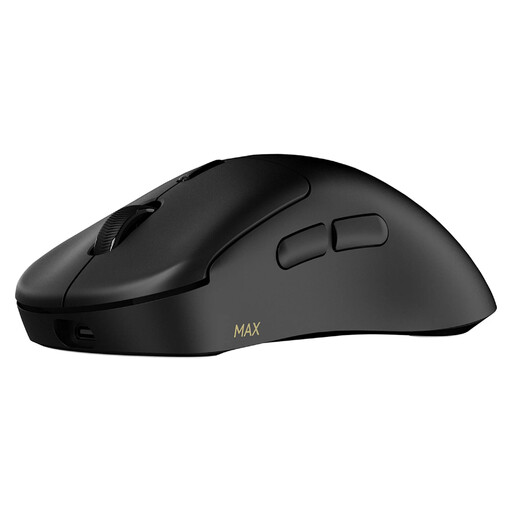
Why This Fits Their Persona: Suits competitive PC and Mac players who want optical switching, extensive sensitivity adjustment and wireless 8K support in a 53g shell.
The product specification separates its 30K DPI, native 8K wireless polling and 750-hour figure at 1,000Hz, so each claim has a defined context.
120-million optical switch, 99.9% stated resolution accuracy, 10 programmable buttons, macros and A HUB software for Windows and Mac OS.
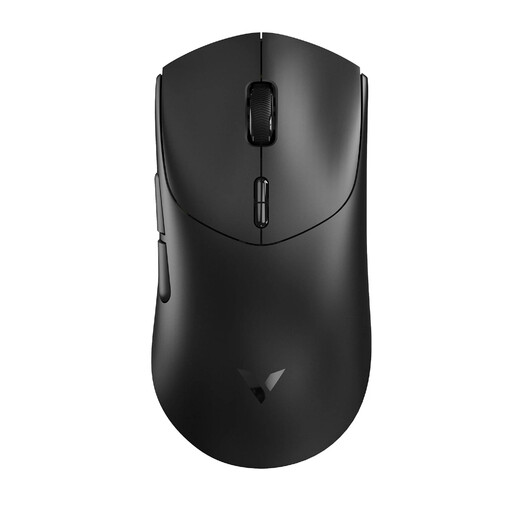
Why This Fits Their Persona: A suitable match for long gaming sessions, macro-heavy MOBA play and users who prefer familiar mechanical click feedback.
It does not present the mechanical switch as an optical alternative; shoppers can choose it specifically for click feel and compare it with the VT7 MAX if optical switching is preferred.
53g construction, 26K independent X/Y DPI, native 8K wireless polling, 100-million mechanical switch and up to 750 hours at 1,000Hz.
After delivery, charge the mouse using the supplied or a suitable certified USB-C cable. Install the manufacturer’s A HUB software where required, then update the driver before enabling low-power mode or customising macros.
For 8K use, place the receiver close to the mouse and away from large metal objects. Test 1,000Hz, 4KHz and 8K settings to see how your computer responds. Save a profile to onboard memory if you move between a home PC, work laptop or Mac.
Keep the mouse dry, do not disassemble the integrated lithium battery and stop using it if it becomes unusually hot, swells or shows visible damage. Dispose of the device through an appropriate electrical-waste route rather than household rubbish.
It can be useful for competitive players with high-refresh-rate monitors and a computer capable of handling the additional updates. For office work, casual games or older PCs, 1,000Hz may provide a simpler balance between responsiveness and system load.
Selected VT2, VT3 MAX and VT7 models state up to 750 hours at 1,000Hz, with low-power mode enabled after a driver update. Actual battery life varies with polling rate, usage, charging condition and software settings.
The listed models specify different click ratings: up to 120 million clicks for certain optical-switch versions and up to 100 million clicks for mechanical versions. These are manufacturer specifications. Choose optical switching for infrared click registration, or mechanical switching if traditional tactile and audible feedback is more important.