Who each option suits

Window-side manual recipe coster

If you add up ingredient or portion costs away from a computer, a standalone calculator gives you a dedicated display. An adjustable screen lets you change its angle, though you should still check for reflections at your usual worktop position.

Margin and error-checking user

If you enter many ingredients or revisit pricing calculations, look at the exact model’s answer-check, grand-total or cost/sell/margin functions. Check how those functions work before making them part of your costing method.

Spreadsheet-based recipe coster

If your figures belong in a spreadsheet or business application, an external numeric keypad can provide a separate set of number keys. You will still need a compatible computer, application and readable monitor.

What matters when choosing

Standalone desktop calculator

Choose it when: You calculate ingredient totals or prices without opening a computer application.

Trade-off: Extra review or margin functions may come with a larger desk unit; an adjustable display still needs checking for reflections.

USB numeric keypad

Choose it when: Your recipe-cost figures are entered into a spreadsheet or other computer application.

Trade-off: It needs a compatible computer and does not make the connected monitor easier to see beside the window.

Concern What to check Who this matters to
Viewing a manual calculation Check the calculator’s display angle and digits, then look for reflections from your normal working position. If steadiness matters, check how it sits on the worktop. When I total ingredients at the worktop, I want to reposition the display rather than struggle to read it in window light; around 46% of consumers put this display-first, standalone need first.
Reviewing costs and margins Compare answer-check or grand-total functions with the cost/sell/margin functions you would actually use. Confirm each model’s operating steps and settings. For repeated recipes, I need to revisit a result or apply my chosen margin method without losing track of entries; around 36% of consumers prioritise calculation review and business functions.
Entering figures into software Confirm computer compatibility, the connection and available USB ports; consider key size and whether your existing keyboard already has a number pad. If my costing file is in a spreadsheet, I need to enter figures there rather than calculate them on a separate device; roughly 18% of consumers put computer-based number entry first.

Mistakes to avoid

  • Buying a keypad when you need an independent calculator

    A USB numeric keypad enters numbers into software; it does not provide the standalone screen and workflow needed for calculations away from a computer.

    Decide where your recipe-cost calculation will take place before choosing a device. For software-based work, confirm compatibility and an available connection.

  • Taking solar power as a sign of sunlight readability

    Power source and screen visibility are different questions. Sharp specifies dual solar/battery power for the EL-337C, but that does not establish how its display will look in direct window light.

    Check the display from your usual working angle and choose a position away from direct reflections where possible.

  • Trusting a tax or margin result without checking the inputs

    Calculation keys work with the rates and figures you enter; they cannot establish that your ingredient costs, recipe yield or pricing method are correct.

    Confirm the device’s settings and your calculation method, then cross-check an early recipe calculation before using its result for pricing.

Brands to consider

Sharp

Sharp’s desktop range includes models for simple totals and models with more detailed business-calculation functions.

  • Sharp Calculators specifies a tilt-adjustable 12-digit display and answer check for the EL-337C; the EL-1501 has cost/sell/margin calculation and an item counter.
  • Check the particular model rather than assuming every Sharp calculator has the same functions. A larger business-oriented unit also needs more desk space.

Aurora

The DT401 is a desktop-calculator option for frequent manual entry at a worktop.

  • Aurora Europe describes an adjustable 12-digit display with extra-large digits, large keys and rubber feet on the DT401.
  • An adjustable screen does not establish how clearly it will appear at your particular window-side position.

Targus

The Targus numeric keypad serves computer-based recipe costing rather than independent desktop calculation.

  • The keypad is described as a way to enter numbers into spreadsheets and other applications.
  • It depends on a compatible computer and application; check the connection and your existing keyboard before buying.

BakkerElkhuizen

The S-board 840 is another external-keypad option for entering figures at a computer.

  • Anti-reflective white keys with dark lettering and a concave key shape are described for the S-board 840.
  • Key visibility does not establish that the connected monitor will be readable beside a bright window; confirm computer compatibility separately.

Joybuy products for manual costing

This desktop-calculator option is for adding up recipe costs without a computer. Check its display at the intended window-side position, and keep it out of direct sunlight.
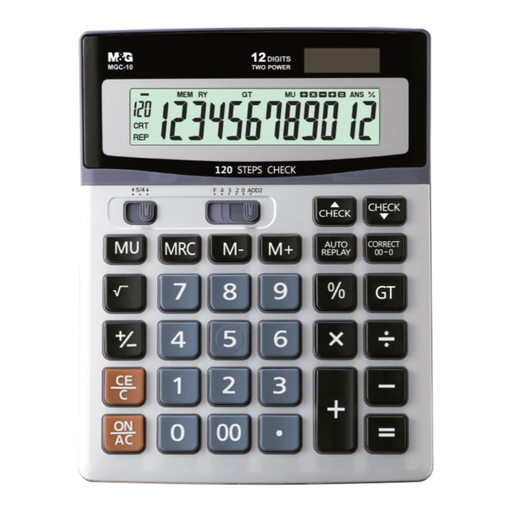
M&G 12-Digit Check & Correct Calculator, 120 Steps

M&G 12-Digit Check & Correct Calculator, 120 Steps

A standalone option for manual recipe-cost calculations away from a computer. The named variant has a 12-digit display and 120-step Check & Correct designation.

Check whether the display angle works at your chosen worktop position. Keep the calculator away from direct sunlight rather than placing it where the sun falls on the unit.

Joybuy

Common questions

Should I buy a calculator or a numeric keypad for recipe costs?

Choose a standalone calculator if you need to calculate without a computer; choose a USB numeric keypad if you enter costs into a compatible computer application. A keypad is an input device, not a substitute for an independent calculator display.

What should I check on a calculator beside a bright window?

Start with an adjustable display, then check it for reflections at the actual worktop. Aurora Europe specifies an adjustable display for the DT401, and Sharp Calculators specifies a tilt-adjustable display for the EL-337C; those features do not guarantee readability in direct sunlight.

Will tax or margin keys work out the right recipe selling price?

No: those keys perform calculations using the figures and settings you supply. Check ingredient costs, yield assumptions, the relevant rates and your pricing method before relying on the result; Sharp lists business-calculation functions on specific models, not as a check on your inputs.

How can I check repeated ingredient-cost entries?

Look for an answer-check or correction function and confirm its exact steps in the model’s manual. Sharp Calculators lists answer check for the EL-337C, but you should still cross-check the quantities and ingredient costs you entered.