Students with limited desk space
If books, a keyboard and recipe notes must share the desk, you need to check the monitor’s footprint as well as its screen size and available connections.


Measure the usable desk space and check your computer’s video outputs before choosing a monitor. A compact Full HD screen suits straightforward recipe entry; a similarly sized QHD or 16:10 screen gives you a different workspace for detailed records, while a 27-inch QHD screen needs more room. For longer sessions, consider how you can position the screen, and check USB-C video and charging compatibility rather than assuming one cable will do both jobs.
If books, a keyboard and recipe notes must share the desk, you need to check the monitor’s footprint as well as its screen size and available connections.
If you regularly compare recipes with ingredient records, source notes and a spreadsheet, resolution or extra vertical workspace may matter more than a larger diagonal alone.
If you want a simpler cable setup, distinguish a USB-C display connection from laptop charging, and check whether the required cable comes with the monitor.
For recipe indexing, choose the workspace that fits both your desk and the way you handle source material: a compact Full HD view, a denser or taller compact view, or a larger QHD view.
Choose it when: You mainly work in one recipe, browser or spreadsheet view at a time and need to preserve desk space.
Trade-off: A 1920 × 1080 screen has less workspace for simultaneous panes than a similarly sized QHD option.
Choose it when: Recipe sources, notes and index fields compete for space on a roughly 24-inch screen.
Trade-off: QHD adds pixels across the screen; 1920 × 1200 adds vertical pixels compared with Full HD. Check which dimension helps your work.
Choose it when: Your measured desk has room for a 27-inch screen beside your study materials.
Trade-off: A larger screen takes more physical space; USB-C connection and charging capabilities still vary by model.
| Concern | What to check | Who this matters to |
|---|---|---|
| Text and document space | Compare resolution and aspect ratio: Dell UK lists the P2425D at 2560 × 1440 and the P2425 at 1920 × 1200. | If I keep recipe sources beside ingredient fields and notes, I want enough room to read and enter details without constantly switching views. Around 36% of consumers put this workspace need first. |
| Desk footprint | Measure available width and stand depth, then check that the inputs match your computer. | With books and a keyboard already on my desk, I need a screen that leaves space to work; around 29% of consumers prioritise a manageable everyday setup. |
| Screen positioning | Check height and tilt adjustment against your desk and chair; check mounting compatibility if you plan to use an arm. | During long reading and entry sessions, I need to position the screen comfortably rather than rely on a display mode alone. For around 21% of consumers, positioning is the primary concern. |
| Laptop connection | Check USB-C video support, stated power delivery and cable inclusion, or use a suitable HDMI or DisplayPort connection. | I want fewer cables around my laptop, but the screen must still connect as intended; around 14% of consumers put laptop integration first. |
LG UK lists USB-C display connectivity and up to 15 W power delivery for the 27U631A-B, but says its USB-C cable is sold separately. That charging limit may not meet your laptop’s needs.
Check your laptop’s USB-C video support and charging requirements, the monitor’s power-delivery rating and which cable you will need.
You may need a separate USB-C cable and may still need to use the laptop’s charger.
Roughly 24-inch monitors can offer Full HD, QHD or a taller 16:10 workspace, while their stands may occupy different amounts of desk space.
Compare the exact resolution, aspect ratio, width, stand depth and adjustment options before deciding what fits.
The Health and Safety Executive notes that poorly designed display-screen workstations and environments can contribute to discomfort, fatigue and eye strain for workers. A monitor feature does not arrange your chair, lighting or screen position.
Consider the whole workstation, including screen placement, lighting and changes of activity during long sessions.
GOV.UK describes retailer take-back duties for waste electrical equipment of the same type as a new purchase. How you hand over an old monitor depends on the retailer’s arrangements.
Ask the seller about its same-type take-back route before ordering a replacement.
Dell UK lists compact monitors with distinct Full HD, QHD and 16:10 configurations relevant to document-based work.
LG UK’s 27U631A-B is a larger QHD option for a desk that can accommodate a 27-inch display.
BenQ’s GW2490 is a compact Full HD option for straightforward browsing and recipe entry.
These monitors offer compact QHD, WUXGA and Full HD choices for a student-room recipe-indexing desk. Check each model’s physical fit and connections against your own setup.
 No image available
Consider this QHD model if recipe records and source material compete for screen space. Check its dimensions against your desk and confirm that its connections suit your computer.
 No image available
Consider this WUXGA model if vertical space for long recipe entries is a priority. Confirm the video connection and supplied cable you need before ordering.
 No image available
For recipe notes and spreadsheet rows, Dell UK lists the P2425 with a 24.07-inch 1920 × 1200, 16:10 display and height, tilt, swivel and pivot adjustment. Confirm the exact SKU’s refresh rate and required inputs before ordering; do not assume it provides USB-C charging.
 No image available
Consider this USB-C model if connecting a laptop is central to your recipe-indexing setup. Check USB-C video and charging compatibility, the included mounting accessories and the weight before planning where to place it.
 No image available
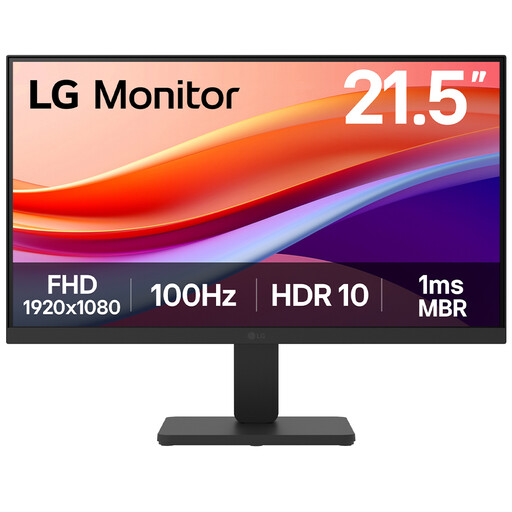
If desk width is tight and you mainly need a straightforward recipe-entry view, consider this 22-inch Full HD model. Its name specifies a VA display, 100 Hz refresh rate and HDMI; check the stand dimensions and positioning options against your desk.
Only if the monitor’s stated power delivery meets your laptop’s charging needs. LG UK lists up to 15 W for the 27U631A-B and says its USB-C cable is sold separately, so check both charging requirements and cable inclusion.
For a qualifying UK distance purchase, the usual cancellation deadline is 14 days after you or a nominated person other than the carrier receives the goods, under regulation 30 of the Consumer Contracts Regulations 2013. Check whether your order qualifies and follow the seller’s return process; remedies for faulty or misdescribed goods are separate from a change-of-mind cancellation.
Ask the seller about same-type electrical-equipment take-back before placing your order. GOV.UK describes retailer duties to offer take-back of waste equipment of the same type as an item sold; confirm the practical handover arrangements with the retailer.
Using a monitor to build a recipe index does not, by itself, involve the viewing activities identified by TV Licensing. TV Licensing says you need to be covered if you watch or record live TV on any channel or streaming service, or download or watch BBC iPlayer, on any device.