For a straightforward connection to powered speakers or compatible wireless audio equipment, consider an automatic turntable with the appropriate line output or Bluetooth connection. A manual deck suits a more configurable hi-fi system if you are prepared to check its phono-stage requirements. Before choosing either route, check your records’ speeds and find a stable, level position away from the speakers.
Who each setup suits
Listeners using powered or wireless speakers
If your loft already has powered speakers or Bluetooth audio equipment, start with the connection between those devices and the turntable. A suitable line output or Bluetooth connection can keep the setup simple; automatic operation also reduces how often you handle the tonearm.
Collectors checking older record formats
Inspect your soundtrack records before choosing a speed setting. A collection of 33⅓ RPM LPs and 45 RPM singles calls for a different choice from one that also contains 78 RPM discs; the latter may require a suitable cartridge and stylus arrangement as well as the correct turntable speed.
Listeners building a hi-fi system
A manual deck is worth considering if you are comfortable matching it to amplification and attending to setup. In a converted loft, give the deck rigid, level support and consider where the speakers will stand. Platter and damping features do not, by themselves, establish how a turntable will behave on your floor or furniture.
What matters when choosing
Automatic, easy-to-connect playback
Choose it when: You want to play records through compatible powered or wireless audio equipment with less tonearm handling. Sony specifies Bluetooth, a built-in phono pre-amplifier and automatic start and return for the PS-LX310BT.
Trade-off: Sony specifies 33⅓ and 45 RPM for the PS-LX310BT, but not 78 RPM or USB output; check those needs before choosing it.
Three-speed playback and USB
Choose it when: Your collection includes 78 RPM records or you want a computer connection for recording. Audio-Technica specifies 33⅓, 45 and 78 RPM speeds and USB output for the AT-LP120XUSB.
Trade-off: The AT-LP120XUSB is fully manual. For unfamiliar older discs, confirm the appropriate cartridge and stylus guidance before playback.
Manual hi-fi setup
Choose it when: You want to assemble a system around a manual turntable and can give it stable support. Rega’s Planar 1 and Pro-Ject’s Debut Carbon EVO illustrate different approaches to this route.
Trade-off: Confirm the phono-stage connection for the exact model. Rega specifies an integrated MM phono stage for the Planar 1 Plus, rather than treating it as a feature of every Planar 1 variant.
| Concern |
What to check |
Who this matters to |
| Connection and ease of use |
Identify your speakers’ or amplifier’s input, then check whether the turntable supplies a matching phono or line-level connection, or compatible Bluetooth output. |
If I already use powered or wireless speakers, I want a connection I can make without assembling a larger hi-fi system. Around 29% of consumers put straightforward connection and operation first. |
| Record speeds and recording |
Read your record labels for 33⅓, 45 or 78 RPM; check the exact model for USB output if you want to make digital recordings. |
Older discs in my collection make the required playback speed my starting point, and I may want to record them to a computer. For around 21% of consumers, format flexibility is the primary need. |
| Manual system setup |
Check the fitted cartridge, available adjustments and whether your amplifier provides a suitable phono input. |
I am willing to cue a manual deck and match separate components to build the system I want. That system-focused choice comes first for around 29% of consumers. |
| Loft placement and stability |
Measure the surface, allowing room for the lid and cables; plan for rigid, level support and separation from speakers. |
My available furniture and speaker positions may make finding a steady place for the deck the hardest part of the purchase. Around 21% of consumers prioritise physical fit and placement. |
Mistakes to avoid
-
Assuming every turntable connects to any speaker
A phono-level output and a normal AUX or line input are not interchangeable without appropriate phono pre-amplification. A switchable built-in pre-amplifier helps only when its selected output mode matches the equipment you are connecting.
Check the actual inputs on your speakers or amplifier, then confirm the outputs and phono pre-amplifier settings of the exact turntable model.
-
Choosing 78 RPM playback without checking your records
Vintage artwork or an old soundtrack does not establish a record’s speed. Even a turntable with a 78 RPM setting needs an appropriate playback arrangement for the particular disc.
Read the record labels first. If you have 78 RPM discs, check the turntable maker’s cartridge and stylus guidance before playing unfamiliar records.
-
Expecting the deck alone to solve loft vibration
A dust cover, heavier platter or damping feature cannot account for every combination of floor movement, furniture and nearby speakers.
Measure the intended position, use a rigid and level support, and separate the speakers from the turntable where the room allows.
-
Overlooking stylus maintenance
The stylus contacts the record groove, and replacement arrangements differ between cartridge designs and models.
Confirm the fitted cartridge, the availability of a suitable replacement stylus and how it is changed before choosing a deck.
Turntable brands to consider
Audio-Technica
Its specified models illustrate both a simpler automatic route and a more adjustable, three-speed manual route.
- Audio-Technica specifies automatic 33⅓/45 RPM operation, a switchable phono pre-amplifier and a replaceable stylus for the AT-LP60X.
- The AT-LP120XUSB adds 78 RPM playback and USB output, but is fully manual. Do not assume those features apply to the AT-LP60X.
Sony
The PS-LX310BT is an automatic option for listeners connecting to compatible wired or Bluetooth audio equipment.
- Sony specifies Bluetooth, a built-in phono pre-amplifier, line output and automatic start and return for the PS-LX310BT.
- Sony’s UK specification lists 33⅓ and 45 RPM speeds, with no USB connector, exchangeable headshell or 78 RPM setting for that model.
Rega
The manual Planar 1 models suit a system in which the turntable’s connection to the amplifier is considered in advance.
- Rega specifies preset bias and a factory-fitted Carbon moving-magnet cartridge for the Planar 1.
- Rega specifies an integrated MM phono stage for the Planar 1 Plus. If you are considering the standard Planar 1, confirm how it will connect to your system.
Pro-Ject
The manual Debut Carbon EVO offers physical setup and speed-control features to consider for a dedicated turntable position.
- Pro-Ject specifies motor suspension, height-adjustable feet, a damped 1.7 kg steel platter, electronic speed selection and a supplied 78 RPM belt.
- Confirm a suitable phono-stage connection and the setup needed for the records you intend to play; a supplied phono cable does not itself establish built-in pre-amplification.
Joybuy turntables for automatic playback
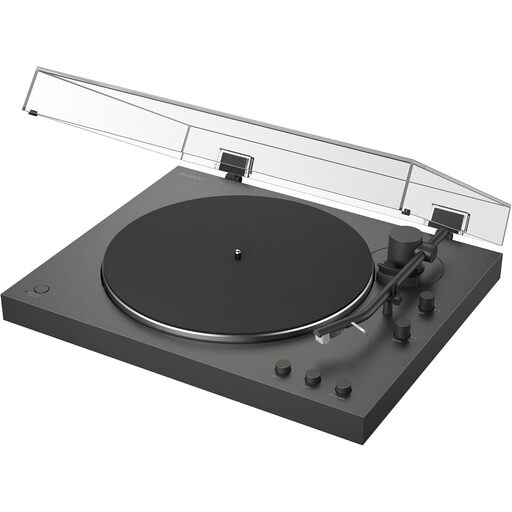
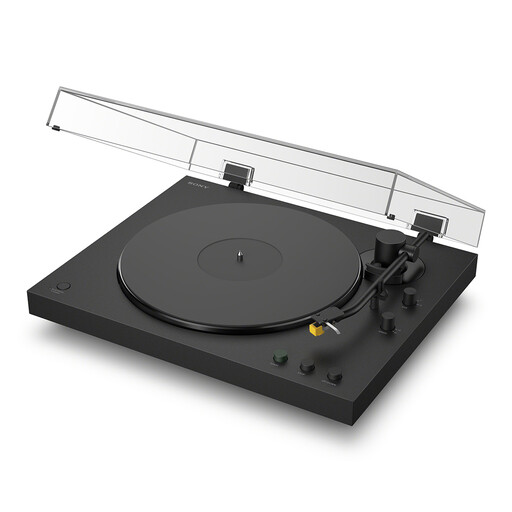
These Sony models are choices to consider if automatic playback and Bluetooth connection suit your loft setup. Check the exact model’s outputs, supported record speeds and dimensions against your equipment, collection and intended surface.
 No image available
Sony PS-LX3BT Bluetooth automatic turntable
Consider this model if Bluetooth connection and automatic playback match how you want to listen. Check its outputs against your speakers or amplifier, and confirm its supported speeds if your collection includes 78 RPM records.
View on Joybuy
 No image available
Sony PS-LX5BT Bluetooth automatic turntable
Consider this model if you want automatic playback with a Bluetooth connection. Before placing it in the loft, check the dimensions and connection options for your intended surface and audio equipment; confirm the supported speed if you own 78 RPM records.
View on Joybuy
Common questions
Can I connect a record player directly to powered speakers?
Yes, if the turntable provides a suitable line-level output and the powered speakers have a compatible input. Check whether the exact turntable has built-in phono pre-amplification; otherwise, a compatible separate phono pre-amplifier may be needed.
Do vintage soundtrack records require a 78 RPM turntable?
Only records that actually require 78 RPM call for that speed setting. Check the labels in your collection: Sony specifies 33⅓ and 45 RPM for the PS-LX310BT, while Audio-Technica specifies 33⅓, 45 and 78 RPM for the AT-LP120XUSB. Check cartridge and stylus suitability before playing unfamiliar older discs.
Does a Bluetooth turntable include speakers?
No; a Bluetooth connection does not mean speakers are built into the turntable. Sony describes the PS-LX310BT as connecting to compatible wireless speakers or headphones, so plan for the audio equipment you intend to use.


