What matters when choosing?
For a spoken meditation in a noisy flat, settle the microphone-placement question before choosing between a computer-based workflow and a standalone recorder.
USB dynamic microphone
Choose it when: You mainly record one close-spoken voice and have a compatible computer or mobile device.
Allow for: A stable microphone position and a host device; directional pickup will not remove every interruption or noise source.
Handheld recorder with built-in microphones
Choose it when: Direct-to-card portability matters most, or you deliberately want room ambience in the recording.
Allow for: Built-in stereo microphones capturing more of the surroundings along with your voice.
XLR recorder and external dynamic microphone
Choose it when: You need standalone recording but want to position a separate microphone close to your mouth.
Allow for: A compatible microphone, cable and stable mount, with more setup than a single handheld device.
| Concern |
What to check |
Who this matters to |
| Voice against flat noise |
Check for directional pickup and a way to hold the microphone close to your mouth. RØDE suggests approximately 5–10 cm; test for plosives and excessive bass. |
When traffic or appliances are audible, I want my spoken guidance to remain prominent without capturing as much room sound. Around 42% of consumers put voice-to-noise balance first. |
| Simple recording workflow |
Check whether recording goes to a compatible computer or phone by USB, or directly to a card; confirm the connections and accessories you need. |
I want to start a meditation take without assembling a complicated recording setup. A straightforward workflow is the primary need for around 25% of consumers. |
| Standalone capture |
Check card-recording support, power arrangements and the external input you would need for a later microphone. Do not treat 32-bit float as room-noise control. |
If I move between rooms or record away from my computer, I need a device that works on its own. Around 17% of consumers put standalone recording first. |
| Monitoring and expansion |
Check the headphone output and whether USB, XLR inputs or both USB and XLR outputs fit your intended setup. |
I want to hear interruptions during a test take and leave room to change my microphone setup later. For around 16% of consumers, monitoring and expansion come first. |
Joybuy microphones for close voice recording
These USB/XLR dynamic microphones suit the close-spoken, device-connected route for a guided meditation. Check positioning and your recording device before choosing; neither microphone is a standalone recorder.
 No image available
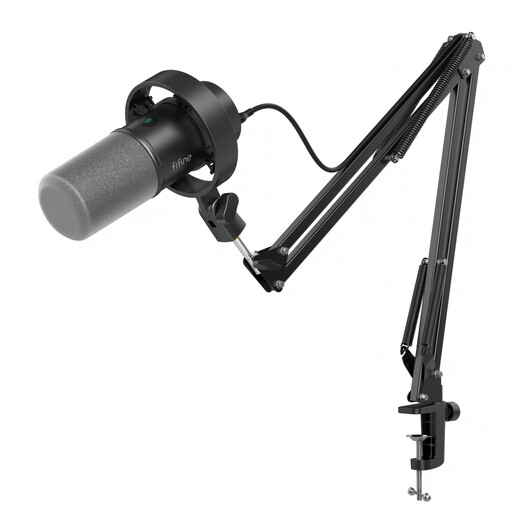
FIFINE K688CT USB/XLR Dynamic Microphone Kit with Boom Arm
Consider this kit if you record spoken guidance through a compatible USB device and need an arm to position the microphone close to your mouth.
The product name specifies a dynamic microphone, boom arm, mute button, headphone jack and gain knob. Check that the arm clamp fits your desk and what cable and input your intended XLR setup requires.
View on Joybuy
 No image available
FIFINE AM8 USB/XLR Dynamic Microphone with Desktop Stand
Consider this microphone if a desktop stand lets you place it close enough for spoken guidance in your recording space.
The product name specifies a dynamic microphone, mute button, headphone jack and desktop stand. Check the stand’s position before recording and confirm what your intended XLR connection requires.
View on Joybuy
Common questions
Will a 32-bit-float recorder remove noise from neighbours or traffic?
No. Zoom and Tascam describe 32-bit float in terms of recording-level management, not acoustic isolation. For spoken meditation in a noisy flat, test a close-positioned directional microphone and reduce controllable noise sources; a low-cut filter may help with some low-frequency noise but will not remove every background sound.
How close should the microphone be to my mouth?
RØDE advises approximately 5–10 cm for close voice recording. Use a stable position and make a test take; if plosives become distracting, try angling the microphone slightly away from the direct breath path or using a pop filter.
Can I use a handheld recorder and an external dynamic microphone together?
Yes, if the recorder’s input and the microphone’s connection and power requirements are compatible. Zoom specifies two XLR/TRS inputs on the H4essential; a handheld model with a 3.5 mm input calls for a separate compatibility check rather than assuming any XLR microphone will plug straight in.
Can I put commercial music under a meditation uploaded in the UK?
Do not assume that buying the music permits its use in an uploaded recording. GOV.UK says online use of copyright music may require licences; check that the rights or permissions cover the particular music and how you intend to publish it.
What if the recording captures someone else’s identifiable voice?
If an organisation or business processes identifiable voices, the Information Commissioner’s Office advises identifying and documenting a lawful basis before processing personal information and providing privacy information about the purpose and basis. Whether particular household activity falls within an exemption requires its own assessment; avoid recording other people’s voices where practicable.


