Fixed-desk value buyer
You want to replace an old home desktop without paying for capabilities your photo storage and light editing do not need. Compare the complete setup, not just the computer itself.


A refurbished desktop can suit a fixed desk if its exact hardware meets Microsoft’s Windows 11 requirements, the seller provides credible refurbishment and storage checks, and the complete setup fits your photo library. A new desktop may suit you better if you would rather avoid uncertainty about prior use; consider a laptop only if portability matters. Before moving or deleting photos, make and check a separate backup: the UK National Cyber Security Centre advises keeping recoverable copies of irreplaceable photos.
You want to replace an old home desktop without paying for capabilities your photo storage and light editing do not need. Compare the complete setup, not just the computer itself.
Your priority is keeping family pictures recoverable during a computer change and afterwards. The UK National Cyber Security Centre recommends considering separate copies of irreplaceable photos.
You value clear operating-system eligibility and understandable seller terms more than the lowest initial outlay, and want to compare a specific refurbished configuration with a specified new PC.
For a household replacing an old photo PC, compare the complete setup alongside operating-system support, storage condition and a separate backup plan.
| Concern | What to check when buying | Who this matters to |
|---|---|---|
| Total replacement value | Compare the computer, included accessories, monitor connections, usable storage and separate backup arrangements. | If I am replacing an old PC, I want the whole setup to fit my budget and photo library, not just the tower. Around 24% of consumers put total replacement value first. |
| Supported Windows | Check the exact processor and whole-device eligibility, including TPM 2.0 and UEFI/Secure Boot capability, against Microsoft’s Windows 11 requirements. | I want to know that the exact computer meets Windows 11 hardware requirements, rather than rely on an installed operating-system label. Around 24% of consumers put supported Windows first. |
| Photo storage and backup | Measure the library, request drive-specific diagnostic information for a used drive, and plan a separate copy before migration. | I need enough space for my pictures and a separate copy I can recover if something goes wrong. Around 19% of consumers put photo preservation first. |
| Seller and refurbishment assurance | Check the actual seller’s written warranty, return procedure, component testing and data-sanitisation information. | I want clear answers about who refurbished the PC and who handles a fault, rather than relying on a condition grade alone. Around 19% of consumers put seller assurance first. |
| Fit with your desk | Match display outputs to your monitor and check bundle contents, USB connections, placement and planned storage expansion. | I want the new computer to work with the screen and peripherals I already have. Around 14% of consumers put existing-setup fit first. |
Microsoft says devices that do not meet Windows 11’s minimum requirements are not guaranteed updates. An installed copy does not establish that the computer’s hardware is eligible.
Ask for the exact configuration and check device-specific eligibility against Microsoft’s requirements, rather than relying on an operating-system screenshot.
A successful transfer does not protect pictures from later drive failure or accidental loss. A backup left connected can also be exposed to malware.
Make a separate copy before migration, check that files open, and keep another recoverable copy separately. The UK National Cyber Security Centre advises considering both online and removable-media backups for irreplaceable photos.
A condition grade and a drive diagnostic describe different things. Crucial notes that SMART data can provide an early warning of drive problems, but a cosmetic description is not a substitute for drive-specific information.
Ask for the drive identity and relevant diagnostic details, then read the actual seller’s warranty and return terms.
A drive replacement or a return can add time and handling after purchase.
Compact PCs can differ in what is included. Lenovo says the ThinkCentre M70q Gen 5 is sold without a monitor, wireless keyboard or mouse.
Check the exact configuration’s included equipment and compare it with the monitor, cables and input devices you already own.
Consider Dell desktop configurations for a fixed desk, while keeping Dell’s refurbished programme distinct from third-party refurbishment.
Compare a particular refurbished ProDesk with a separately specified new HP desktop configuration.
Consider a compact ThinkCentre if a small fixed-desk computer suits your space, and check whether the particular device is part of Lenovo’s certified programme.
These desktop and all-in-one options list internal SSD storage for a fixed-desk setup. Compare the stated capacity with your photo library, check the exact operating system and included accessories, and arrange a separate backup.
 No image available
The listed 2TB NVMe SSD gives you a stated capacity to compare with your photo library; the listing says the monitor and peripherals are not included.
Specifications named in the listing: AMD Ryzen 7 9800X3D, NVIDIA GeForce RTX 5080 16GB, 32GB DDR5, 2TB NVMe SSD and Windows 11 Home.
Check the whole device against Microsoft’s Windows 11 requirements; an operating-system label alone does not establish hardware eligibility.
 No image available
The listed 1TB NVMe SSD gives you a stated capacity to compare with your photo library; the listing says the monitor and peripherals are not included.
Specifications named in the listing: Intel Core Ultra 7 265KF, NVIDIA GeForce RTX 5070 12GB, 32GB DDR5, 1TB NVMe SSD and Windows 11 Home.
Check the whole device against Microsoft’s Windows 11 requirements; an operating-system label alone does not establish hardware eligibility.
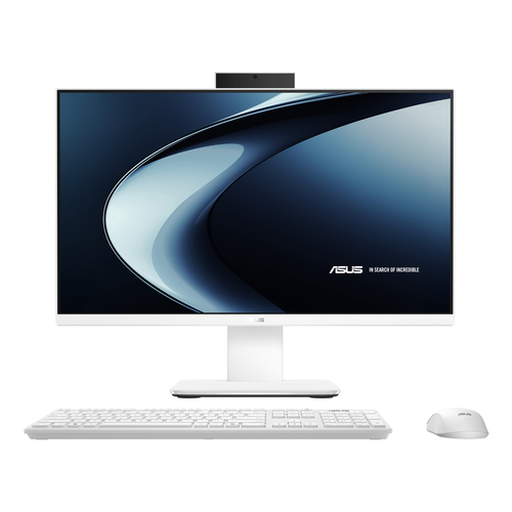 No image available
This all-in-one listing specifies a 23.8-inch Full HD display and wireless keyboard and mouse, so compare its included setup with the equipment you already have.
Specifications listed: Core 5 210H, 16GB DDR5 memory and 512GB SSD. Windows 11 Home is specified in the product description.
Check the exact device against Microsoft’s Windows 11 requirements and compare the stated storage capacity with your photo library.
 No image available
The compact mini-desktop format may suit a fixed desk where space matters; compare its listed 512GB SSD capacity with your photo library.
Specifications in the product name: AMD Ryzen 5 7430U, 6-core/12-thread, 16GB LPDDR4 RAM and 512GB SSD. The name also lists support for 4K triple-screen display, Wi-Fi 6 and Bluetooth 5.2.
Check the operating system and its eligibility for your intended use, along with the connections and accessories needed for your existing setup.
No. Check the exact device against Microsoft’s requirements, including its compatible processor, TPM 2.0 and UEFI/Secure Boot capability. Microsoft says Windows 11 on ineligible hardware is unsupported and is not guaranteed updates.
Standard Windows 10 support ended on 14 October 2025, according to Microsoft. Eligible, enrolled consumer devices can receive specified security updates through 12 October 2027 under the UK consumer Extended Security Updates programme; check the edition and enrolment requirements. The programme does not provide general fixes, new features or technical support.
Make a separate copy of the photo folders before migration, check that it contains the expected files and open some pictures, then transfer them to the replacement. Keep another independent copy afterwards; the UK National Cyber Security Centre advises considering online and removable-media backups for irreplaceable photos.
Confirm your pictures are recoverable before deleting anything. The UK Information Commissioner’s Office advises properly deleting personal information before selling or disposing of a computer and warns that a computer that will not turn on may still hold accessible data. Choose an appropriate secure-deletion or disposal method for its storage media.
For a purchase from a business, GOV.UK says faulty or misdescribed goods may require a remedy, and a seller’s warranty does not remove statutory rights. For applicable online distance sales, customers ordinarily have 14 days after delivery to notify the seller that they wish to cancel, then another 14 days to return the goods. Check the seller’s identity, return procedure and any applicable exceptions.
Yes. The UK Office for Product Safety and Standards says commercially sold used products must be safe and notes that wear or modifications can create less obvious risks. Check the seller, supplied equipment and instructions; this guidance does not certify a particular computer.