For one seated speaker in a rehearsal room, start with a directional microphone placed close to the voice. A USB/XLR dynamic model offers a direct-to-computer option; an XLR cardioid condenser suits a more controlled, stand-based setup with compatible recording hardware. Choose wireless when movement or camera placement calls for it, and test the recording before the introduction: directionality cannot remove every sound in the room.
Who is recording?
One speaker in an active room
If music, conversation or ventilation may continue nearby, a close-positioned directional microphone lets you prioritise the speaker. Shure’s directionality guidance explains that a unidirectional microphone is less sensitive to sound arriving off-axis; placement still matters.
A speaker at a fixed recording position
If you can set up a stand and record in a reasonably controlled part of the room, an XLR cardioid condenser is another route. Check that your recorder or interface and the accessories needed for the particular microphone are ready before the session.
A presenter who needs to move
If the presenter must walk, address a camera away from a stand or pass a handheld microphone between speakers, wireless recording may fit the shot. It also brings charging, connection and microphone-placement checks.
What matters when choosing?
Choose the recording approach around the speaker’s position: a fixed microphone keeps placement predictable, while wireless earns its place when the speaker needs freedom to move.
Dynamic USB/XLR microphone
Choose it when: One presenter can speak close to a fixed microphone and a direct computer connection would simplify the setup.
Allow for: Consistent speaking position and a check of any software requirements for controls you intend to use.
Cardioid XLR condenser
Choose it when: You can use a stand in a relatively controlled room and already have, or plan to use, suitable XLR recording hardware.
Allow for: The required connection and power arrangements; a cardioid pattern will not eliminate reflections or sound arriving from the front.
Wireless microphone
Choose it when: The presenter needs to move or a stand and cable would interfere with the recording setup.
Allow for: Charging, receiver compatibility and a test of both the wireless connection and any onboard recording.
| Concern |
What to check |
Who this matters to |
| Room sound |
Check the pickup pattern and which side faces the speaker; monitor a short take with the microphone close to the voice. |
If nearby rehearsals or room reflections compete with my introduction, I need the microphone to prioritise my voice. Around 42% of consumers put room-noise control first. |
| Recording connection |
Match USB or XLR to your recording device; for an XLR condenser, check its power requirement and the accessories you need. |
I want to arrive with a working fixed-position setup rather than discover that a connection or power source is missing. For around 33% of consumers, a straightforward recording chain is the primary concern. |
| Movement and backup |
Check device and receiver compatibility, charging and whether any onboard recording is enabled. |
If the presenter must move or a cable would interfere with the shot, I need a setup that accommodates that movement and protects the take. Mobility or backup is the main priority for around 25% of consumers. |
Mistakes to avoid
-
Expecting cardioid pickup to soundproof the room
A directional pattern reduces pickup from some angles, but reflections and sounds arriving from the speaker’s direction can still reach the microphone.
Bring the microphone close, face its intended pickup side towards the speaker and, where practical, put the main unwanted sound behind it. Reduce activity during the take and listen to a test recording.
-
Buying an XLR condenser without planning the recording chain
An XLR microphone needs a suitable input device; the Audio-Technica AT2020 specifically requires 48 V phantom power, and its XLR cable is sold separately.
Check your recorder or interface, cable, power capability, stand and headphones before choosing the microphone. For a simpler direct-computer connection, consider whether a USB/XLR model meets your needs.
-
Choosing wireless for a speaker who will stay still
Wireless operation adds charging and connection checks that may not help a seated presenter. The RØDE Interview PRO also requires a compatible RØDE Series IV receiver for wireless use.
Use wireless when movement or camera placement makes it useful. Otherwise, test a close-positioned fixed microphone before taking on the extra setup.
Brands to consider for these setups
Shure
The MV7+ offers USB-C and XLR connections and a headphone output, making it relevant to a fixed, single-speaker setup with a choice of recording paths.
- Shure describes voice-isolation, denoising and automatic level features for the MV7+.
- Those features do not replace close placement or a test take; check software compatibility if you need app-controlled functions.
RØDE
RØDE has distinct options for a fixed XLR setup and for mobile recording, rather than one interchangeable route.
- RØDE lists a shock mount, pop filter and XLR cable with the NT1 Signature Series; Wireless PRO offers dual-channel wireless operation and onboard recording.
- The NT1 Signature Series still needs suitable XLR recording hardware. Interview PRO has omnidirectional pickup and needs a compatible receiver when used wirelessly.
Audio-Technica
The AT2020 is a cardioid XLR condenser to consider for a stand-based recording position.
- Its cardioid pattern provides a directional option when one speaker can remain in front of the microphone.
- Audio-Technica specifies a full 48 V phantom-power requirement for the AT2020 and sells its XLR cable separately.
Joybuy microphone choices
These choices cover fixed USB/XLR microphones for a close-positioned presenter and a wireless kit for a presenter who needs to move. Check how each will connect to your recording device before choosing.
 No image available
FIFINE K688CTW White Dynamic Microphone Kit with Boom Arm
Consider this kit when one speaker can stay close to a boom-mounted microphone for the introduction.
The named kit has USB and XLR connections and a headphone jack. For XLR use, plan for a separate cable and a compatible input device; listen to a test take before recording.
View on Joybuy
 No image available
FIFINE AM8 USB/XLR Dynamic Microphone with Desktop Stand
Consider the desktop-stand setup if the presenter can keep a consistent position close to the microphone.
The named variant has USB/XLR connections and a headphone jack. If you intend to use XLR or particular microphone controls, check the cable, input device and connection-mode requirements first.
View on Joybuy
 No image available
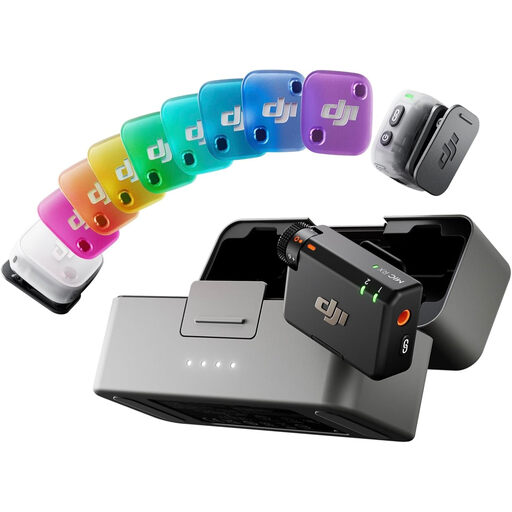
DJI Mic Mini 2 (2 TX + 1 RX + Charging Case)
Consider this wireless kit if the presenter needs to move or a fixed microphone would interfere with the shot.
The named bundle contains two transmitters, one receiver and a charging case. Before purchase, confirm compatibility with your recording device and app, and test how the microphone captures speech and room sound in your intended position.
View on Joybuy
Questions about the setup
Cardioid or omnidirectional: which suits one speaker in a rehearsal room?
Start with cardioid or another unidirectional pickup if the aim is to prioritise one speaker over off-axis room sound. Shure’s directionality guidance distinguishes this from omnidirectional pickup, which responds to sound from all angles. Directionality will not remove reflections or noise arriving from the front, so make a close-positioned test recording.
Does an XLR condenser need an audio interface?
An XLR condenser needs a suitable XLR input on a recorder, mixer or audio interface, rather than a direct computer connection on its own. For the AT2020, Audio-Technica specifies a full 48 V phantom-power supply through a balanced XLR cable; check the equipment you have before buying.
Where should I place a cardioid microphone for the introduction?
Place its intended front towards the speaker and, where practical, its rear towards the main unwanted sound. RØDE identifies the gold dot as the front of the NT1 Signature Series and describes rejection behind that model. Keep the speaker’s position consistent and listen to a monitored test take before the interview begins.


