Start with the console or PC you use, then check whether the controller can move your awkward in-game actions to inputs you can reach comfortably. Xbox Elite Wireless Controller Series 2 offers paddles and saved profiles for Xbox and Windows, while DualSense Edge offers mappable back buttons for PS5; the exact 8BitDo Ultimate 2 variant matters because platform support differs. If you need a substantially different physical layout rather than extra rear controls, consider the PS5 Access controller or Xbox Adaptive Controller and check the external devices and setup your arrangement requires.
Who needs a different control layout?
Xbox and Windows players who want rear controls
If a face-button combination or stick click interrupts your preferred grip, paddles offer another place for supported button assignments. Xbox lists removable paddles and saved profiles for the Elite Wireless Controller Series 2; configure it using a supported Xbox or Windows connection.
PS5 players who change layouts between games
DualSense Edge provides mappable back buttons and profiles for different layouts on PS5, according to PlayStation. It can also connect to supported other devices, but controller features vary by device, connection and game.
Players who need an alternative physical arrangement
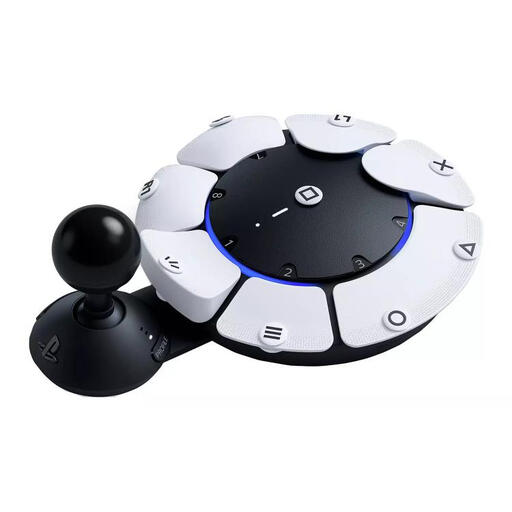
When rear buttons alone do not provide the layout you need, consider configurable external inputs. PlayStation lists expansion ports for compatible devices on the PS5 Access controller; Xbox describes the Adaptive Controller as a hub for separately sold external controls.
What should you check before choosing?
Identify the actions you want to move, then match the exact controller variant to your platform and the connection needed to configure it.
| Priority | What to check | Your needs |
|---|
| Input layout |
Check which commands can be remapped, where added controls sit and whether you need compatible external inputs. PlayStation specifies 3.5 mm expansion ports for the PS5 Access controller; Xbox specifies 3.5 mm and USB inputs for the Adaptive Controller. |
I want to move particular actions away from an awkward combination—or arrange controls differently from a conventional gamepad. |
| Platform fit |
Match the exact model to each console or operating system. 8BitDo lists Ultimate 2 Wireless for Windows, Android, SteamOS and Apple platforms, but Ultimate 2 Bluetooth for Switch 1/2 and Windows. |
A controller needs to work on the devices where I actually play, not just belong to a familiar product range. |
| Configuration |
Check where the mapping app runs, which cable or adapter it requires and how profiles are switched. Xbox Support says the Xbox Accessories app runs on Xbox consoles and Windows, and most of its features are unavailable over Bluetooth. |
I need a way to set up my layout on equipment I own and change profiles when switching games. |
| Game features |
Check remapping separately from feedback effects and confirm support for your device, connection and game. PlayStation says some DualSense Edge features vary across those conditions. |
Button assignments matter to me; I do not want to assume that every additional controller effect will also work in my chosen game. |
Which assumptions can lead to the wrong choice?
-
Assuming every variant works with the same consoles
8BitDo lists different platforms for Ultimate 2 Wireless and Ultimate 2 Bluetooth. The shared family name does not establish compatibility with your console.
Match the full model name against the manufacturer’s compatibility list for every device you plan to use.
-
Buying rear buttons without checking their assignments
An extra button helps with an awkward combination only if you can assign the required command and reach the button with your usual grip.
Write down the actions you want to move, then check the controller’s mapping options and rear-control placement.
-
Assuming wireless pairing is enough for setup
Xbox Support says most Xbox Accessories app features do not work over Bluetooth. For Ultimate 2 Bluetooth, 8BitDo specifies a wired USB or 2.4G connection to use Ultimate Software.
Check the configuration connection for your exact model before relying on its remapping features.
Depending on the controller and your existing equipment, setup may require a compatible cable or adapter.
-
Expecting every feedback feature on every device
PlayStation says DualSense Edge features can vary by device and game; adaptive triggers depend on game support, and PC haptics may require USB.
Check the target game and connection method separately from the controller’s button-remapping options.
Which controller ranges are relevant?
Xbox
Xbox offers two different approaches: Elite Wireless Controller Series 2 adds paddles and profiles to a conventional controller, while Xbox Adaptive Controller accommodates compatible external inputs.
- Xbox lists up to three custom profiles plus a default profile on Elite Series 2.
- Xbox Support limits Xbox Accessories app availability to Xbox consoles and Windows; most app features are unavailable over Bluetooth.
- Xbox describes external devices for the Adaptive Controller as sold separately.
PlayStation
DualSense Edge offers back-button mapping on a conventional PS5 controller. The PS5 Access controller takes a different approach, with configurable layouts and ports for compatible external inputs.
- PlayStation specifies mappable back buttons for DualSense Edge and four 3.5 mm expansion ports for Access controller.
- DualSense Edge feature availability varies by device, connection and game.
- Check whether your intended Access controller arrangement needs additional compatible devices.
8BitDo
The Ultimate 2 range offers a route to software-configured controls, but the Wireless and Bluetooth variants have different stated platform support.
- 8BitDo lists Ultimate 2 Wireless for Windows, Android, SteamOS and Apple platforms, and Ultimate 2 Bluetooth for Switch 1/2 and Windows.
- 8BitDo specifies wired USB or 2.4G for Ultimate Software configuration of the Bluetooth variant.
Joybuy controller options
These options cover conventional controllers for Xbox or Switch, a PS5 controller for an alternative input layout, and an Xbox fighting stick. Choose by your platform and the physical controls you want to use; a fighting stick is a different layout from a handheld gamepad.
 No image available
Microsoft Xbox Elite Wireless Controller Series 2
For Xbox and Windows players who want to move actions to paddles, Xbox lists removable paddles and up to three saved custom profiles plus a default profile. Check the connection you will use for configuration: Xbox Support says most Xbox Accessories app features are unavailable over Bluetooth.
View on Joybuy
 No image available
PlayStation Access Controller Kit for PS5
Consider this PS5 option when a conventional gamepad with rear buttons does not provide the physical layout you want. PlayStation specifies four 3.5 mm expansion ports for compatible external controls; check which devices your arrangement requires and whether your game needs another controller for full play.
View on Joybuy
 No image available
Turtle Beach PDP Victrix Pro BFG Wireless for Xbox and Windows 10/11 PC, Black
This Xbox and Windows gamepad is worth considering if you want to move actions to rear controls. Before choosing it for a particular layout, check which commands its buttons can take and confirm the configuration app and connection required for your device.
View on Joybuy
 No image available
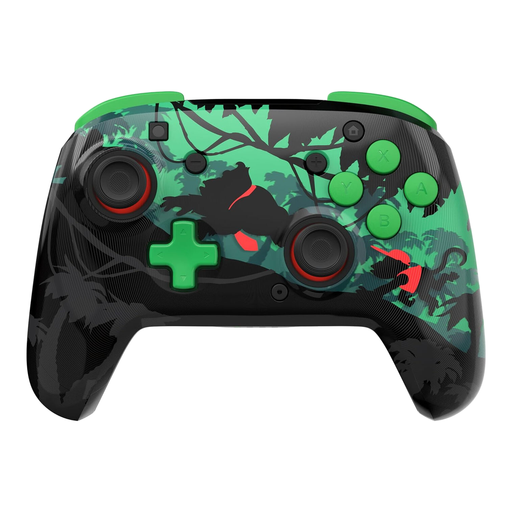
Turtle Beach Rematch Wireless for Nintendo Switch, Donkey Kong Reveal
For Switch play, check whether its rear-button assignments cover the actions you want to move. If you intend to use it with Switch 2, check whether your games or setup require the C Button: the product information says this controller does not include it.
View on Joybuy
 No image available
HORI SERIES X Fighting Stick Alpha for Xbox Series X/S
This is an arcade fighting stick rather than a handheld gamepad. If that layout suits your Xbox games, check that its assignable buttons can perform the particular commands you need and that you can use its configuration method on your setup.
View on Joybuy
Questions about remapping and compatibility
Can I configure an Xbox controller over Bluetooth on Windows?
Do not assume Bluetooth pairing enables configuration. Xbox Support says most Xbox Accessories app features are unavailable over Bluetooth; for Elite Series 2 configuration on Windows, check the supported USB or Xbox Wireless Adapter connection before buying.
Will DualSense Edge retain all its PS5 features on a PC?
Not necessarily. PlayStation says features vary by device and game: adaptive triggers require game support, and haptic feedback on PC may require a USB connection. Check the features you care about for your intended game and connection.
Do Ultimate 2 Wireless and Ultimate 2 Bluetooth support the same platforms?
No. 8BitDo lists Ultimate 2 Wireless for Windows, Android, SteamOS and Apple platforms, while Ultimate 2 Bluetooth is listed for Switch 1/2 and Windows. Match the full variant name to your devices.
When does an adaptable-input controller make more sense than paddles?
Consider one when you need a different physical arrangement or compatible external controls, rather than simply moving actions to rear buttons. PlayStation’s PS5 Access controller has 3.5 mm expansion ports; Xbox describes 3.5 mm and USB connections for external devices on its Adaptive Controller. Check the platform and additional devices your layout requires.


