Start with the platform you play on and what you need to change: button assignments, access to extra inputs or the physical position of the controls. DualSense Edge offers remapping in a conventional PS5 controller shape, while the PS5 Access controller is a different route when placement or external controls matter. Xbox Elite Series 2 suits Xbox and Windows players who want saved profiles, provided they can use the required connection to configure it on Windows; PC-first alternatives need their own compatibility check.
Who needs configurable controls?
PS5 players changing their control layout
Rear buttons and switchable assignments may help if a conventional handheld controller still works for you. If button position, placement or external switches are the difficulty, PlayStation’s Access controller offers a different physical setup to consider.
Xbox and Windows players using several layouts
The Xbox Elite Series 2 can save profiles on the controller, according to Microsoft Xbox Support. If you configure it on Windows, plan for a USB connection or compatible Xbox Wireless Adapter rather than Bluetooth alone.
PC-first players seeking extra inputs
A controller such as the 8BitDo Ultimate 2 Wireless offers remappable extra buttons and profiles for its listed systems. Check your exact operating system; PC support does not establish PS5 or Xbox-console compatibility.
What should you check before choosing?
Confirm where you play and how you will configure the controls before deciding whether extra buttons or a different physical layout addresses the problem.
| Priority | What to check | Your needs |
|---|
| Platform support |
Check the exact console or operating system, connection method and controller-input support in your games. A connection alone does not establish that every feature works. |
I need the controller and the controls I plan to use to work where I actually play, not just pair with the device. |
| Remapping and profiles |
Find out where assignments are created and where profiles are saved. Microsoft Xbox Support says the Elite Series 2 stores up to three profiles on the controller; PlayStation describes PS5 settings for configuring DualSense Edge profiles. |
If I change games or devices, I want to know whether I can switch prepared layouts and what I will need to edit them. |
| Physical layout |
Decide whether rear inputs on a handheld pad are enough. For a different arrangement, check the Access controller’s button caps, stick position, placement and compatible external controls against your intended setup. |
Are the commands merely awkward to reach, or do I need the controls themselves positioned differently? |
| Setup connection |
Check the configuration app and its required connection. Microsoft Xbox Support says Windows configuration through Xbox Accessories requires USB or a compatible Xbox Wireless Adapter rather than Bluetooth alone. |
I want to be able to set up my mappings with the PC connection I can use. |
| Settings and accessories |
Check whether a chosen setting changes another feature and which accessories your arrangement requires. PlayStation documents that medium or shallow DualSense Edge trigger stops disable trigger effects; some Access setups call for separately chosen external controls or mounting. |
Shorter trigger travel may matter more to me than trigger effects, or I may need to plan the whole physical setup rather than the controller alone. |
Common buying mistakes
-
Assuming Bluetooth pairing covers configuration
A controller may connect while its remapping app or particular features remain unavailable through that connection. Microsoft Xbox Support specifies USB or a compatible Xbox Wireless Adapter for Elite Series 2 configuration on Windows.
Check your exact platform, planned connection and game support alongside the configuration instructions for the controller variant.
-
Expecting rear buttons to change the controller’s shape
Rear inputs offer another way to activate commands on a conventional handheld pad. They do not provide the adjustable placement and external-control options documented for PlayStation’s Access controller.
Identify whether you need easier access to commands or a different physical arrangement, then check the relevant controls and placement options.
-
Overlooking a setting’s trade-off
PlayStation documents that medium or shallow trigger-stop settings on DualSense Edge disable trigger effects, which may matter in games that use them.
Decide whether shorter trigger travel or trigger effects matter more in the games you regularly play.
DualSense Edge replacement stick modules are sold separately.
Relevant controller brands
PlayStation
Two distinct PS5 routes: DualSense Edge retains a conventional handheld format, while Access supports a more adjustable physical arrangement.
- Sony Interactive Entertainment documents remappable rear buttons and configurable profiles for DualSense Edge.
- The Access controller supports compatible external controls through four 3.5 mm expansion ports.
- Check device and game support for the particular features you intend to use; PS5 documentation does not establish Xbox-console compatibility.
Xbox
An Xbox-console and Windows route using Xbox Accessories for controller configuration, including the Elite Series 2’s saved profiles.
- Microsoft documents button mapping and up to three custom profiles saved on the Elite Series 2 controller.
- On Windows, Xbox Accessories configuration requires USB or a compatible Xbox Wireless Adapter, according to Microsoft Xbox Support.
8BitDo
The Ultimate 2 Wireless is a configurable option for the Windows, SteamOS, Android and specified Apple systems listed by 8BitDo.
- 8BitDo lists remappable R4/L4 buttons and three custom profiles for this model.
- Its stated compatibility does not establish PS5 or Xbox-console support; check the exact operating-system version before choosing it.
Configurable controllers on Joybuy
These options are conventional remappable controllers: an Xbox and Windows model, a PS5 model, and a modular controller listed for PS5, PS4 and Windows. If you need a different physical placement or external switches, assess an adaptive setup on those requirements instead.
 Image unavailable
Microsoft Xbox Elite Wireless Controller Series 2
For Xbox or Windows players who want remappable controls and layouts saved on the controller. Microsoft Xbox Support documents up to three stored profiles; configuring them through Xbox Accessories on Windows requires USB or a compatible Xbox Wireless Adapter, not Bluetooth alone. Check support for the controls you want in your games.
View on Joybuy
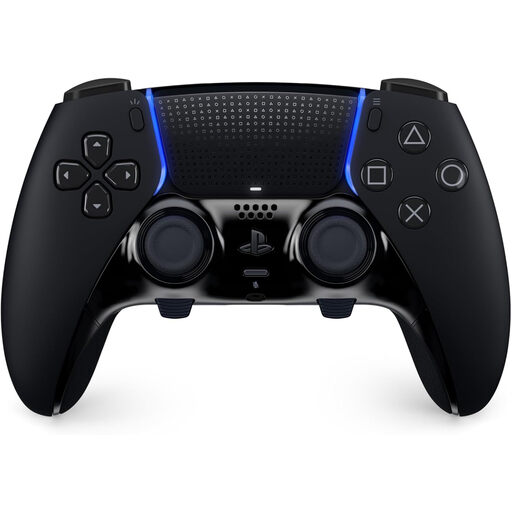 Image unavailable
Sony DualSense Edge PS5 Wireless Controller – Midnight Black
For PS5 players who can use a conventional handheld layout but want remappable inputs, two rear buttons and switchable profiles. The listed controls include stick-sensitivity and trigger-travel settings. PlayStation documents that medium or shallow trigger stops disable trigger effects; check device and game support before relying on particular features elsewhere.
View on Joybuy
 Image unavailable
Turtle Beach Victrix Pro BFG Reloaded Wireless Modular PlayStation Controller – White
For players considering interchangeable control arrangements as well as button mapping. The listing identifies PS5, PS4 and Windows PC support and mapping through the Victrix Control Hub app. Confirm this variant’s connection modes, how its mappings work on your intended platform, and support in your games before buying.
View on Joybuy
Frequently asked questions
Will a remappable controller work with every game on its platform?
Not necessarily: confirm controller-input support and the particular features you want in each game. PlayStation notes that some controller features vary by device and that adaptive triggers depend on game support.
Where are remapped layouts saved?
That depends on the controller. Microsoft Xbox Support says the Elite Series 2 saves up to three profiles on the controller. PlayStation describes creating DualSense Edge assignments in PS5 settings and switching assigned profiles with controller shortcuts; Access controller profiles are also configured through PS5 settings.
Can I configure Xbox Elite Series 2 on Windows over Bluetooth?
No, not through the Xbox Accessories app over Bluetooth. Microsoft Xbox Support instructs Windows users to connect by USB or a compatible Xbox Wireless Adapter for configuration.
When should I consider an adaptive controller rather than rear buttons?
Consider an adaptive layout when you need to change the physical position or type of controls, rather than just bring existing commands closer to your fingers. PlayStation’s PS5 Access controller offers configurable caps, adjustable stick position and ports for compatible external controls; check the complete arrangement and accessories your setup requires.


