Start with the console, PC or mobile device you play on: remapping options and configuration tools differ between platforms. If you only need to move a few button functions, supported console settings or an official app may be enough; consider a configurable controller when you need quicker profile changes or a different physical layout. Check the exact model, configuration connection and game settings before replacing your controller.
Who needs remappable controls?
Console players changing a few buttons
If the standard layout makes particular actions awkward, check whether your supported controller can use console-level mapping or an official configuration app before choosing different hardware. Xbox and Nintendo document these routes for their supported controllers.
Players switching layouts between games
Separate profiles matter when different games call for different assignments. PlayStation documents profile shortcuts for DualSense Edge, while Nintendo says its button mappings are stored on the console rather than carried by the controller to another console.
Players changing the physical layout
Moving a button function may not put the control where you want to press it. Depending on the platform and exact model, configurable hardware can offer additional inputs or differently placed controls; PlayStation documents optional external inputs for its PS5 Access controller.
What should you check before buying?
Check the game’s own control options, then confirm that both the controller and its configuration method work with your platform. Profiles and extra physical inputs become deciding factors when changing standard button assignments is not enough.
| Concern |
What to check |
Who this matters to |
| Platform and configuration |
Match the exact model to your device and check which app, operating system and connection can change its assignments. |
If I play on one device but configure controls on another, I need both steps to work before other features matter. Around 36% of consumers put platform and configuration compatibility first. |
| Saved layouts |
Check where profiles are stored and whether you can switch them when needed. PlayStation documents Fn-button profile shortcuts for DualSense Edge; Nintendo says Switch mappings stay on the console. |
Moving between games with different controls makes rebuilding a layout each time inconvenient. For around 29% of consumers, ready-to-use profiles are the primary need. |
| Physical inputs |
Confirm which additional buttons, adjustable controls or external inputs the exact controller supports on your platform. |
If a reassigned action is still difficult to reach, I need to change where the input sits, not just what it does. Differently placed or additional controls come first for around 21% of consumers. |
| Game controls |
Open the intended game’s control settings and check relevant system-mapping limits before choosing new hardware. |
When one game causes the difficulty, I want to know whether its own settings solve it before replacing my controller. Around 14% of consumers make that check their first priority. |
Common buying mistakes
-
Assuming a gameplay connection also supports configuration
Xbox says most XBOX Accessories app features are not supported over Bluetooth on Windows. 8BitDo specifies a wired USB or 2.4G connection for configuring its Ultimate 2 Bluetooth controller through Ultimate Software on Windows or macOS.
Check the connection needed to edit mappings, as well as the connection used to play, and confirm that you have the required cable or adapter.
-
Buying hardware before checking the game
The game may have a control option that addresses the particular action you want to change. Nintendo’s Switch 2 guidance also directs players to check a game’s own settings for related options.
Look through the intended game’s controls first, then decide whether changing the controller’s assignments or physical layout would add something useful.
-
Expecting a Switch mapping to travel with the controller
Nintendo says button mappings are saved on the console. Pairing the controller with another console returns its controls to the default mapping there.
If you use more than one console, plan your layouts on each one rather than treating a system mapping as a portable controller profile.
-
Treating similar model names as identical
8BitDo lists different platform support for the Ultimate 2 Wireless and Ultimate 2 Bluetooth controllers: the former includes Windows and Android, while the latter lists Switch 1/2 and Windows.
Match the complete model name to its compatibility and software instructions before relying on a feature described for another Ultimate controller.
Relevant brands and configuration routes
PlayStation
For PS5, PlayStation documents two distinct hardware routes: DualSense Edge for custom assignments and switchable profiles, and the Access controller for a more configurable physical layout.
- DualSense Edge supports custom button assignments and profile shortcuts; Access offers configurable controls and four 3.5 mm expansion ports for optional inputs.
- Both routes are PS5-focused. Check the controls needed for your games and any separately obtained external devices before choosing Access.
Xbox
Xbox provides an official configuration route through the XBOX Accessories app on Xbox consoles and Windows PCs, with options varying by controller.
- The app covers button remapping and profiles, with additional mapping options on Elite Series 2 and Adaptive Controller hardware.
- Xbox says the app does not support non-Xbox devices or Xbox 360 controllers. Most app features are not supported over Bluetooth on Windows.
Nintendo
Nintendo offers console-level button mapping for supported Switch and Switch 2 controllers when changing standard assignments is the main aim.
- Supported controllers can use saved mapping configurations on the console.
- Nintendo says mappings do not follow a controller to another console. Certain system buttons and stick-direction-to-button assignments cannot be remapped, and game controls need checking separately.
8BitDo
8BitDo pairs some Ultimate controllers with Ultimate Software for button mapping and profiles, but the device and setup requirements depend on the complete model name.
- 8BitDo documents remapping, profiles and stick or trigger adjustments in its software.
- The Ultimate 2 Wireless and Ultimate 2 Bluetooth have different listed platforms. Configuring the latter through Ultimate Software on Windows or macOS requires wired USB or 2.4G rather than assuming Bluetooth will work.
Joybuy products for PS5 remapping
This PS5 controller is relevant if you want to change button assignments and keep different control profiles for different games.
 No image available
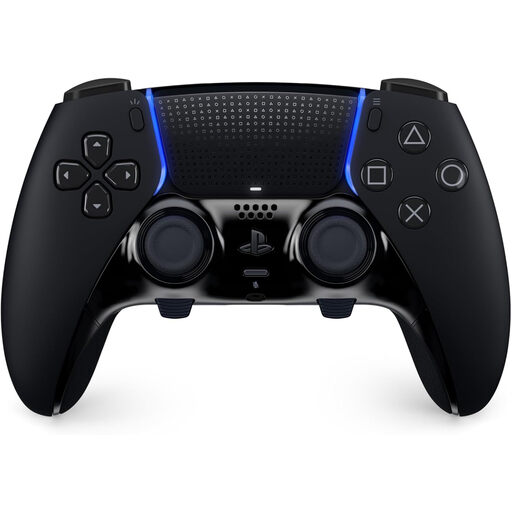
Sony DualSense Edge PS5 Wireless Controller – Midnight Black
For PS5 players who want different layouts between games, DualSense Edge supports custom button assignments and switchable profiles.
PlayStation documents stick-sensitivity settings and Fn-button shortcuts for changing profiles during play. If you intend to configure the controller on a Windows PC, check the supported configuration options before ordering.
View on Joybuy
Frequently asked questions
Will my Switch button mapping move to another console with the controller?
No. Nintendo says the mapping is stored on the console, not the controller. Pairing that controller with another console restores the default button mapping there.
Can I configure an Xbox controller over Bluetooth on Windows?
Do not rely on Bluetooth for most XBOX Accessories app features on Windows. Xbox advises connecting a supported accessory by USB cable or Xbox Wireless Adapter for configuration.
Will Switch 2 system remapping change a game’s own control options?
No. Check the game’s control options separately: Nintendo’s Switch 2 guidance directs players to the game’s own settings for related options rather than treating system settings as a change to every game’s controls.


