Start with the platform you play on, then decide whether you need to move existing button functions or add reachable physical controls. A platform-specific controller can give you saved layouts and extra inputs, while a different-shaped PS5 controller addresses a different layout need; PC software remapping is worth trying when your controller and game support the input style, but it cannot add physical buttons.
Who needs a different layout?
PS5 players changing button positions
If a conventional pad still suits you, DualSense Edge offers assignable back buttons and custom settings documented by PlayStation. If button position, controller orientation or external switches are the issue, PlayStation's Access controller offers a different PS5 layout.
Xbox and Windows players seeking extra inputs
Rear paddles or buttons can put an assigned action at another reachable position. Xbox documents paddle mapping for Elite Series 2; Razer lists four rear buttons and two claw-grip bumpers on the wired Wolverine V3 Tournament Edition. Check the configuration method as well as the controls themselves.
PC players trying another mapping first
If you want to rearrange existing functions rather than add a button, check your controller, launcher and game before replacing the hardware. Steam notes that a gamepad-only input style requires a game that supports gamepads.
What should you check before buying?
Check platform and setup requirements first, then match the physical controls and saved layouts to the games you intend to play.
A familiar pad with remapping
Choose when: You want to keep a conventional handheld layout but put selected actions on back buttons or paddles; DualSense Edge serves PS5, while Elite Series 2 is an Xbox and Windows route.
Bear in mind: Their configuration tools and platform requirements differ, so a feature on one controller does not establish the same setup on another.
A different PS5 layout
Choose when: The position or orientation of controls matters more than retaining a conventional pad shape; PlayStation's Access controller also has ports for compatible external controls.
Bear in mind: This is a PS5-specific route, so confirm that its setup fits the games and devices you intend to use.
PC software remapping
Try when: You already have a controller and mainly want to change what its existing controls do.
Bear in mind: Software cannot create another physical button, and Steam warns that the chosen input style must work with the game.
| Priority | What to check | Your needs |
|---|
| Platform and setup |
Confirm support for your exact console or PC and find out where mappings are edited. Xbox Support says Elite Series 2 configuration in the Windows Xbox Accessories app requires USB or a compatible Xbox Wireless Adapter, not Bluetooth alone. |
I need to set up the controller on the device I actually use, without assuming that wireless gameplay and wireless configuration work the same way. |
| Physical inputs |
Count added back buttons, paddles or compatible external controls separately from remappable standard buttons. Check which actions each added control can take on your platform. |
Moving an action away from a face button matters to me; if I need another reachable position, changing an existing button's function alone will not do it. |
| Saved layouts |
Check whether profiles are saved on the controller or managed through an app, and how you switch them. Xbox Support documents up to three stored Elite Series 2 profiles; PlayStation Support documents up to 30 Access controller profiles, with three available for quick switching. |
My layout changes between games or players, so I want to know how much setup I would repeat. |
| Game input |
For PC software remapping, check the game's supported input style as well as the launcher's configuration. Steam says gamepad-only styles work only with games that support gamepads. |
I would rather test a different mapping on my current controller, provided the game accepts it. |
| Connection and shape |
Check whether the controller is wired and whether its physical layout suits the positions you need. Razer describes Wolverine V3 Tournament Edition as wired; PlayStation's Access controller offers a configurable PS5 layout. |
A cable or a conventional pad shape may affect my choice even when the button mapping meets my needs. |
Which assumptions can lead to the wrong choice?
-
Assuming ‘remappable’ means extra buttons
Changing an existing button's assignment does not create another physical place to press. Added back buttons, paddles or compatible external switches address that separate need.
List the actions you want to move, then confirm the number and mapping options of the added controls on the exact controller.
-
Expecting Bluetooth pairing to handle PC setup
Xbox Support says the Windows Xbox Accessories app does not detect Elite Series 2 over Bluetooth for configuration, even though the controller has wireless connection options.
Plan to configure it using USB or a compatible Xbox Wireless Adapter on Windows.
-
Assuming configuration carries across consoles
The documented configuration routes differ: PlayStation describes Access controller settings for PS5, while 8BitDo lists Ultimate 2 Wireless Controller support for PC-oriented platforms rather than Xbox or PS5.
Check both the exact model's platform list and the device needed to edit its mappings before choosing by button count.
-
Relying on a PC mapping a game cannot use
A launcher may offer a configuration that the game does not accept. Steam specifically limits gamepad-only input styles to games with gamepad support.
Try the intended game, launcher and controller together before relying on software remapping as your only solution.
Which controller ranges are relevant?
PlayStation
Two distinct PS5 routes: DualSense Edge keeps a conventional pad layout, while Access controller offers configurable control positions and expansion ports.
- PlayStation documents DualSense Edge button assignments and Windows profile editing through PlayStation Accessories.
- PlayStation documents Access controller profiles and 3.5 mm ports for compatible external controls on PS5.
- The Access controller documentation here is PS5-specific; do not assume it is a general PC or Xbox controller.
Xbox
Elite Series 2 is an Xbox and Windows option for players seeking remapped inputs and controller-stored profiles.
- Xbox Support documents button remapping through the Xbox Accessories app and up to three profiles stored on Elite Series 2.
- On Windows, Xbox Accessories app configuration requires USB or a compatible Xbox Wireless Adapter rather than Bluetooth alone.
Razer
Wolverine V3 Tournament Edition is an Xbox-and-PC route for players considering additional physical controls.
- Razer lists four rear buttons and two claw-grip bumpers as remappable controls on this model.
- Razer describes this model as wired; check that a cable suits where you play.
8BitDo
Ultimate 2 Wireless Controller is a PC-oriented option for buyers considering software key mapping.
- 8BitDo documents key mapping and profiles in Ultimate Software V2.
- Check the exact platform and software requirements; 8BitDo's cited compatibility listing does not establish Xbox or PS5 support.
Joybuy controller options
These controllers are options for changing a familiar pad's layout or button assignments on the platforms named for each model. Check the exact bundle when added physical controls are central to your choice.
 No image available
Microsoft Elite Wireless Controller Series 2 for Xbox and PC
Consider this Xbox and Windows route if remapped controls and switching between layouts matter. Xbox Support documents up to three profiles stored on Elite Series 2. For Windows app configuration, use USB or a compatible Xbox Wireless Adapter; check the exact listing against your intended Xbox or PC before ordering.
View on Joybuy
 No image available
Sony DualSense Edge wireless controller for PS5, White
For a conventional PS5 pad with another reachable button position, PlayStation documents assignable back buttons on DualSense Edge. PlayStation Accessories also supports editing its profiles on Windows PC; check game support before counting on particular haptic or trigger effects.
View on Joybuy
 No image available
Turtle Beach Victrix Pro BFG Reloaded wireless modular PlayStation controller, White
The modular layout makes this worth examining if changing control positions matters as much as changing assignments. Before buying, confirm which modules and mapping options come with this configuration, and whether its profile-switching method meets your needs.
View on Joybuy
 No image available
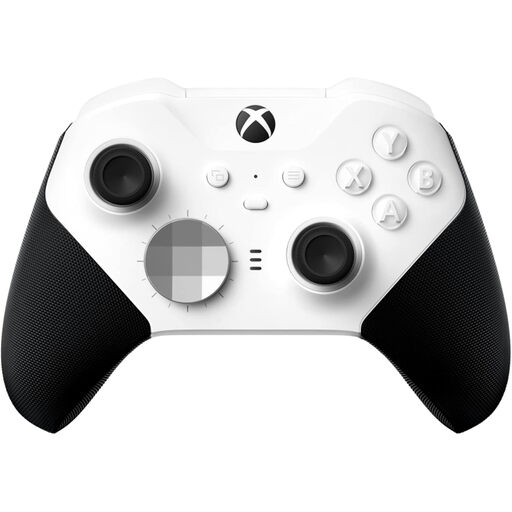
Xbox Elite Wireless Controller Series 2 Core, White
This Core variant is an option to examine for Xbox or Windows button mapping. If extra reachable inputs are essential, check the exact bundle for paddles and other included controls rather than assuming it matches another Series 2 package. Windows Xbox Accessories app configuration requires USB or a compatible Xbox Wireless Adapter.
View on Joybuy
Common questions
Does remapping give me more physical controls?
No: reassigning a standard button changes what it does, not how many buttons you can reach. To add another position, look for included back buttons or paddles, or compatible external controls such as those PlayStation documents for the PS5 Access controller.
Can I configure Xbox Elite Series 2 over Bluetooth on Windows?
Not through the Windows Xbox Accessories app. Xbox Support says to use USB or a compatible Xbox Wireless Adapter for configuration because the app does not detect this controller over Bluetooth.
Can I set up DualSense Edge profiles on a PC?
Yes. PlayStation Support says PlayStation Accessories on Windows PC can create, edit and switch DualSense Edge custom profiles. Check that this is the controller and setup you intend to use rather than assuming the same software works with every PS5 controller.
Will PC software remapping work in every game?
No. Steam says gamepad-only input styles require a game with gamepad support. Check the intended game, launcher and controller together before relying on a software mapping instead of added physical controls.


