Try the button-assignment settings on your console or PC first if changing what an existing button does would solve the problem. Consider rear buttons when an action needs a different physical position, or an adaptive setup when the shape, reach or placement of conventional controls is the barrier. Before buying, check the exact controller, platform, connection method and games against the functions you need.
Who needs a different layout?
Players who need different button assignments
If the existing controls are within reach but a game action sits on an awkward button, try reassigning that action before changing controllers. PlayStation documents PS5 button-assignment settings, while Xbox documents remapping for compatible controllers through Xbox Accessories.
Players who need rear inputs
If pressing a face button means moving a thumb away from a stick, the position of a rear button or paddle may matter more than remapping alone. Check whether the specific action can be assigned to that controller’s rear control.
Players arranging controls around their reach
When a conventional controller’s shape or button positions are the obstacle, repositionable inputs or compatible external switches may be more relevant than paddles. PlayStation’s Access controller for PS5 offers configurable controls and expansion ports for compatible accessories.
What matters when choosing?
Start with the action you want to change: does it need a different assignment, a different physical position, or a layout that works across your particular devices and games?
| Concern |
What to check |
Who this matters to |
| Physical control position |
Identify the difficult action and check whether it can be assigned to the intended rear button or compatible external input. |
If an action is hard to reach during play, changing its assignment on the same buttons may not help; about 36% of consumers put a new physical control position first. |
| Platform and profile fit |
Check the exact model’s configuration app, supported devices, setup connection and any game-dependent features. |
Moving between a console, PC or several games makes a usable saved layout important; roughly 36% of consumers primarily need their mappings and profiles to fit that setup. |
| Existing settings |
Try the available button-assignment options with the games you play before deciding whether hardware must change. |
If the current controller is comfortable to hold, a reassigned button may be enough; around 28% of consumers put solving the layout problem through existing settings first. |
Layout and compatibility pitfalls
-
Treating remapping as an extra physical control
Reassigning a face button changes its function, not where your finger must reach. Rear buttons and adaptive inputs address different placement needs.
Try the existing layout settings, then decide whether the remaining difficulty is the button’s physical position.
-
Assuming every paddle accepts every function
Mapping limits vary by model. SCUF Gaming says Reflex paddles cannot be assigned to Create, Options, Home or trigger functions.
Check your intended action against the exact model’s mapping options before choosing it.
-
Relying on Bluetooth for Windows configuration
Microsoft says most Xbox Accessories app features are not supported over Bluetooth on Windows.
Check which connection the app requires for the settings you plan to change.
Configuration may require a compatible USB cable or Xbox Wireless Adapter.
-
Equating PC connection with full feature support
PlayStation says some DualSense Edge features vary by device and game; certain PC features may also require USB.
Check the specific feature, connection and game you intend to use, rather than relying on PC connectivity alone.
Brands to consider
PlayStation
For PS5, PlayStation offers button-assignment settings, the DualSense Edge for remappable controls and back buttons, and the Access controller for a more adaptable input arrangement.
- DualSense Edge provides mappable back buttons and switchable profiles; PlayStation Accessories can customise it on PC.
- On other devices, feature availability can depend on the game and connection. Check the particular PC functions you need.
Xbox
Xbox Accessories provides a configuration route for compatible Xbox controllers on Xbox consoles and Windows. Elite Series 2 adds paddle, Shift-input and profile options.
- Microsoft documents button remapping and profiles for supported controllers through Xbox Accessories.
- The app is available on Xbox consoles and Windows; Microsoft says most of its features are not supported over Bluetooth on Windows.
SCUF
SCUF’s Reflex line is a PS5 controller option for players considering removable, remappable rear paddles and onboard profiles.
- SCUF Gaming describes removable paddles and three onboard profiles for Reflex.
- SCUF Gaming says its Reflex paddles cannot be mapped to Create, Options, Home or trigger functions.
Controllers on Joybuy
These controllers cover remappable or rear-button layouts for PlayStation, Windows PC and Nintendo Switch play, depending on the model. Choose by the devices and actions you actually need; a hardware selection is not a substitute for checking whether existing settings already solve the problem.
 Image unavailable
Sony DualSense Edge PS5 Wireless Controller – White
Consider this model for PS5 play when you want to move supported actions to rear controls and switch between prepared layouts.
- Button remapping, two interchangeable back buttons and multiple profiles are described for this model.
- The listing names Windows PC compatibility. PlayStation advises checking device, game and connection support for the particular features you want to use.
View on Joybuy
 Image unavailable
Turtle Beach Victrix Pro BFG Reloaded – White
Consider this modular controller if you play on PS5, PS4 or Windows PC and want to change both button mappings and the installed control module.
- The listing describes button mapping through Victrix Control Hub and interchangeable modules for different play styles.
- Changing modules involves selecting and installing one. If saved profiles matter, confirm that feature, the mapping options and app support for your platform before buying.
View on Joybuy
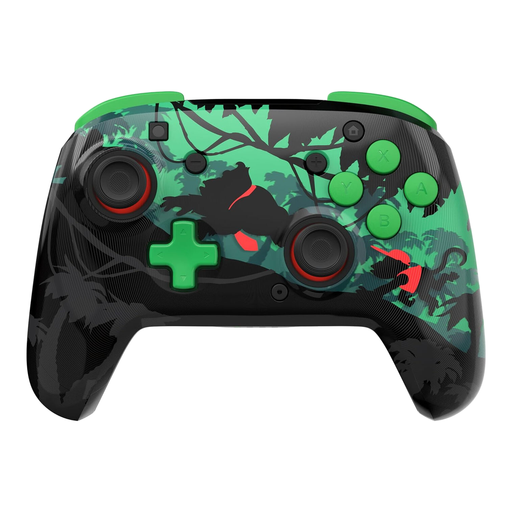 Image unavailable
Turtle Beach Rematch Wireless for Nintendo Switch – Donkey Kong Reveal
Consider this Switch-family controller when placing a supported action on a rear button is the main reason to change pads.
- The listing describes two mappable rear buttons.
- Check whether they accept the actions you need. The listing also states that this model lacks the C Button for Switch 2.
View on Joybuy
Frequently asked questions
Will a remappable controller give every game the layout I want?
Not necessarily: remapping supported controller inputs does not ensure that every game-specific feature works. PlayStation says certain DualSense Edge features vary by device and game, and some PC features may require USB. Check the game and controller documentation for the function you need.
Do rear paddles create new game commands?
On DualSense Edge and SCUF Reflex, rear controls are used to assign supported existing inputs, not to create unlimited new game commands. PlayStation describes DualSense Edge back buttons as mappable to many inputs; SCUF Gaming excludes several functions from Reflex paddle mapping.
Can I configure an Xbox controller over Bluetooth on Windows?
Do not rely on Bluetooth for all Xbox Accessories settings: Microsoft says most app features are not supported through that connection on Windows. Check whether you need a USB cable or Xbox Wireless Adapter for the configuration you intend to use.
When does an adaptive controller make more sense than paddles?
Consider an adaptive arrangement when the problem is reaching or positioning controls, avoiding accidental presses, or using compatible external switches—not simply moving one action behind a conventional pad. PlayStation’s Access controller for PS5 has configurable inputs and four 3.5 mm expansion ports for compatible accessories.


