Remote workers with unreliable call Wi-Fi
If calls falter in the work room but the laptop works well near the router or on Ethernet, investigate the wireless link before changing the broadband service.


Start by checking whether the problem is the Wi-Fi inside your home or the broadband connection itself. For a fixed laptop near the router, Ofcom advises trying Ethernet for a more reliable connection than Wi-Fi; consider mesh equipment for weak coverage in the work room, and check services at your address before changing broadband. Treat mobile data as a fallback only after checking indoor coverage, device compatibility and the plan’s terms.
If calls falter in the work room but the laptop works well near the router or on Ethernet, investigate the wireless link before changing the broadband service.
A wired desk setup may need an adapter. Check the laptop connector, operating system, driver requirements and employer approval before choosing one.
A mobile connection is worth considering when work cannot wait for a fixed-line repair, provided the relevant network works indoors and the plan permits the intended use.
Test the connection where you work, then choose equipment or a service change according to where the problem occurs.
| Priority | What to check | Your needs |
|---|---|---|
| Wired reliability | Try the laptop near the router or over Ethernet. Ofcom advises that a direct Ethernet connection should be faster and more reliable than Wi-Fi; check the laptop port and any adapter requirements. | Calls or online tasks are unreliable at my usual desk, and I can run a cable to the router. |
| Work-room Wi-Fi | Compare the connection near the router with the work room. Check mesh connection requirements, node placement and whether you need Ethernet ports or wired backhaul. | A cable to my desk is impractical, but wireless access weakens in the room where I work. |
| Broadband service | If a wired connection is also inadequate, check faults and the services available at your property. Ofcom’s checker reports location-specific broadband availability; predicted service is not a guarantee of in-home performance. | My connection still falls short when Wi-Fi is taken out of the test, so changing the service may be relevant. |
| Mobile fallback | Check the underlying network’s predicted indoor coverage, then test it at the work location if possible. Confirm device support, data allowance, tethering and permitted-use terms for the exact plan. | I need a way to stay connected during a fixed-line outage without assuming that an outdoor coverage result will hold indoors. |
A different broadband service will not by itself improve the wireless signal in a distant work room.
Test near the router or over Ethernet first. If that connection is adequate, investigate router placement and Wi-Fi coverage before changing the service.
The adapter may need operating-system support or a driver, and a managed work laptop may restrict new hardware or software.
Confirm the exact port, operating system and driver requirements with the adapter maker, and ask your employer’s IT team before using it on a managed device.
A required driver or approval can delay a wired setup.
Ofcom says mobile coverage results are guides: reception can vary locally. A data-plan label also does not establish whether your intended hotspot or work use is permitted.
Check the relevant network indoors, test it where you work if possible, and read the exact plan’s allowance, tethering and permitted-use terms.
Mesh units still need a suitable connection to the existing broadband equipment; the way they connect differs by model and service setup.
Identify your modem or router arrangement, then check the prospective system’s connection type, ports and any cabling needed between units.
TP-Link makes Deco mesh systems and routers relevant to home Wi-Fi coverage.
NETGEAR’s Orbi range is a reference point for shoppers considering mesh coverage across several rooms.
UGREEN is relevant when a USB-C laptop needs an Ethernet adapter for a fixed desk connection.
These mesh systems are options when Wi-Fi coverage at the work location needs attention; the mobile hotspot is an option to assess for fallback use. Check your broadband setup or mobile plan before choosing equipment.
 No image available
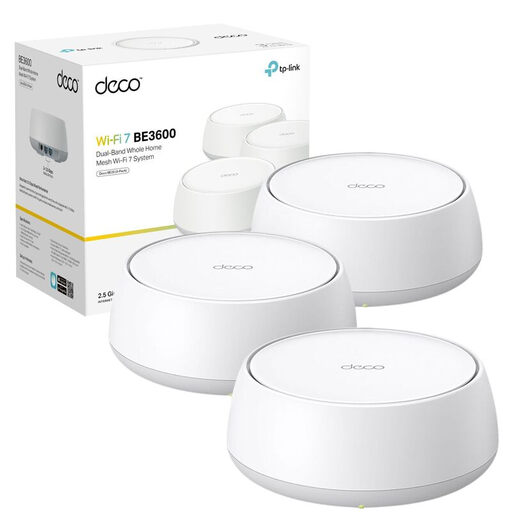
A three-unit mesh option to consider when Wi-Fi is weak across rooms. The title specifies dual-band BE3600 and 2.5Gbps Ethernet; confirm how it connects to your existing modem or gateway. Those figures do not establish the speed you will receive at your desk.
 No image available
This three-unit mesh system is relevant when the work room has weak Wi-Fi rather than an inadequate incoming broadband connection. Confirm that its connection and setup requirements fit your existing broadband equipment.
 No image available
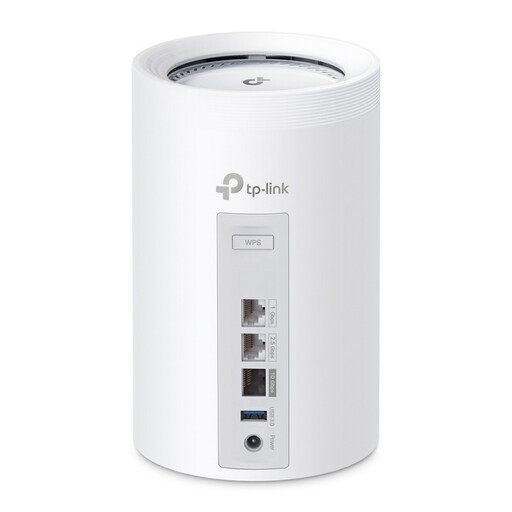
A three-unit option for considering Wi-Fi coverage across several rooms. Check its connection requirements against your modem or router and confirm the ports needed for any wired devices; BE3600 does not predict your work-room speed.
 No image available
A three-unit mesh option for a work area affected by weak Wi-Fi. Before choosing it, confirm the Ethernet ports, backhaul arrangement and compatibility with your broadband equipment; BE9300 is not a measured speed at your desk.
 No image available
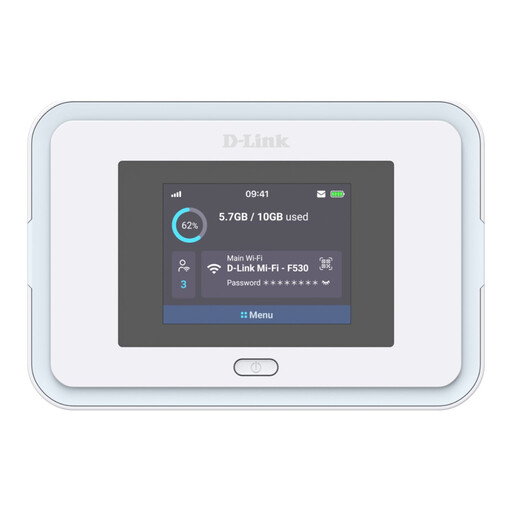
A mobile-device option to assess for temporary fixed-line outages. Check its compatibility with your intended UK network and SIM, indoor coverage where you work, and the plan’s data and permitted-use terms before relying on it.
Yes, if the laptop can reach the router and Wi-Fi is the suspected problem. Ofcom advises that connecting a computer directly by Ethernet should give a faster, more reliable connection than Wi-Fi. If the wired connection is also inadequate, check for service faults and look up broadband availability at your property.
Check the laptop port, the exact adapter’s operating-system compatibility and any driver requirement. Ask your employer’s IT team before connecting hardware or installing drivers on a managed device.
Mesh may help if weak wireless coverage in the work room is the problem, but it cannot increase the broadband service entering the home. Test near the router or over Ethernet first, then check how the chosen mesh system connects to your existing equipment.
It can be a temporary fallback if the network works indoors and your phone and plan support the intended tethering use. O2 advises against long-term or high-volume phone-hotspot use; EE says tethering uses the plan’s data allowance. Check your own provider’s allowance and permitted-use terms before relying on it for work.
No. Ofcom says its mobile coverage results are guides and performance can vary locally. Use them to identify networks to consider, then test the intended connection at your work location if possible.