Who is this for?
The useful choice depends on where work devices sit, whether a cable can reach them and which services rely on the existing router.
Households with remote workers in separate rooms
If calls or work access falter when several people are online, compare the connection near the router with the connection in each work room. Ofcom notes that the number of people using a household connection at once can affect it; adding Wi-Fi coverage will not resolve every capacity or service problem.
People working in a Wi-Fi weak spot
An upstairs room, extension or room beyond dense walls may need a wireless source closer to the desk. Whether Ethernet can reach that area is the key distinction between a wired access point or backhauled mesh node and a wireless mesh arrangement.
Homes keeping an ISP hub and Digital Voice
If the home phone uses BT Digital Voice, plan improvements around the existing hub unless a replacement arrangement is confirmed. BT says its hub must remain switched on and connected to broadband for Digital Voice to work.
What should you check first?
Locate the failing part of the connection before choosing a route, then match the work rooms to the cable paths and equipment the household can accommodate.
| Priority |
What to check |
Your needs |
| Find the fault |
Compare the affected device on Wi-Fi near the router and, if practical, over Ethernet. Check whether other devices fail, when interruptions occur and whether the provider reports an outage. |
I want to know whether the trouble is in my home Wi-Fi, the broadband service or a work application before buying equipment. |
| Fixed work desks |
Check for a usable cable route or Ethernet outlet and enough router ports. A switch adds wired ports where an Ethernet connection reaches the desk area; it does not create Wi-Fi. |
For a desk that stays in one place, I can use a cable if there is a practical route to it. |
| Wi-Fi across rooms |
Check router placement and where mesh nodes could receive a usable signal. If Ethernet reaches the weak area, consider a wired access point or a mesh model with supported Ethernet backhaul. |
Calls take place beyond the router's good coverage, but work devices still need Wi-Fi in those rooms. |
| Shared connection |
Compare interruptions with other household activity and the incoming service, including upload performance relevant to calls. Ofcom says households with several people online may need a higher-capacity broadband service. |
Several of us work or stream at once, so stronger signal in one room may not address the whole problem. |
| Existing hub and phone |
Confirm the add-on's operating mode behind the ISP hub. Before replacing the hub, check the provider's connection requirements and any Digital Voice arrangement; BT says its Digital Voice hub must stay powered and connected. |
I want better coverage without interrupting the broadband connection or a home phone that depends on the hub. |
| Power for access points |
For an access point powered over Ethernet (PoE), compare its required PoE standard and wattage with the switch port and total power budget. Ubiquiti advises allowing more available PoE power than the connected devices require in total. |
A wired access point could reach my work room, provided the chosen equipment can power it. |
| Powerline trial |
Test adapters in the intended sockets during normal household use and work calls. Ofcom says results depend on the home's electrical wiring; a stated throughput figure cannot establish performance in a particular room. |
Running network cable is impractical, and I need to find out whether the wiring in this home makes powerline usable. |
Relevant brand references
These examples illustrate different setup requirements; a brand name alone does not establish coverage or compatibility in a particular home.
TP-Link Deco
Deco is TP-Link's multi-node mesh range for adding Wi-Fi coverage around a home.
- TP-Link describes Deco nodes as using one network name, which may suit devices moving between work rooms.
- For Ethernet backhaul, check the exact model and TP-Link's wiring guidance for its operating mode; the cable layout is part of the setup decision.
NETGEAR
NETGEAR's switch range includes options for adding wired ports and models with PoE ports for compatible powered devices.
- NETGEAR lists four PoE+ ports and an 83 W total PoE budget for the GS305PPv3.
- Port count and PoE provision vary by model; compare the chosen switch with every device it needs to connect and power.
Ubiquiti UniFi
UniFi access points are a consideration for a planned wired Wi-Fi installation with suitable placement and power.
- Ubiquiti's PoE guidance gives a clear planning check: available power must exceed the connected devices' combined requirements.
- Check the exact access point's power and management requirements rather than assuming every UniFi model uses the same setup.
Joybuy options for different network routes
These options cover mesh systems for multi-room Wi-Fi, a powerline kit to test where cabling is impractical, and a switch for a planned Ethernet route. Choose the route after checking the connection problem; a switch alone will not add wireless coverage.
 No image available
TP-Link Deco BE22 (3-Pack) BE3600 Wi-Fi 7
This three-unit mesh system is an option when work rooms need Wi-Fi beyond the existing router's useful coverage. The listing describes dual-band Wi-Fi 7, wired or wireless backhaul and two Gigabit Ethernet ports per unit. Confirm the intended operating mode and wiring behind your ISP hub, particularly if it supports Digital Voice; the listed attributes do not establish call quality in your rooms.
View on Joybuy
 No image available
NETGEAR Orbi 370 RBE373 WiFi 7 (3-Pack)
A router and two satellites offer a mesh layout for work rooms away from the main router. The listing describes dual-band Wi-Fi 7 and a 2.5Gbps LAN port on each satellite for a nearby wired device. Confirm how the system would operate with your existing modem or ISP gateway before changing the setup; building materials, traffic and devices affect coverage.
View on Joybuy
 No image available
TP-Link Deco BE25 Wi-Fi 7 (3-Pack)
This three-unit mesh option addresses Wi-Fi coverage across several rooms. The listing specifies dual-band Wi-Fi 7 and 2.5Gbps Ethernet ports. Before planning a wired-backhaul layout or placing it behind an ISP hub, confirm the exact model's operating mode and wiring guidance; Ethernet port speed does not establish the speed of the incoming broadband service.
View on Joybuy
 No image available
TP-Link TL-WPA8631P KIT AV1300 Powerline Wi-Fi
This kit uses the home's electrical wiring to provide connections in another room where a network cable is impractical. The listing describes dual-band 802.11ac Wi-Fi, three Gigabit Ethernet ports and an integrated power socket; OneMesh integration requires a OneMesh router. Plug the adapters directly into wall outlets as instructed and test them in the intended rooms: Ofcom says powerline results depend on the wiring.
View on Joybuy
 No image available
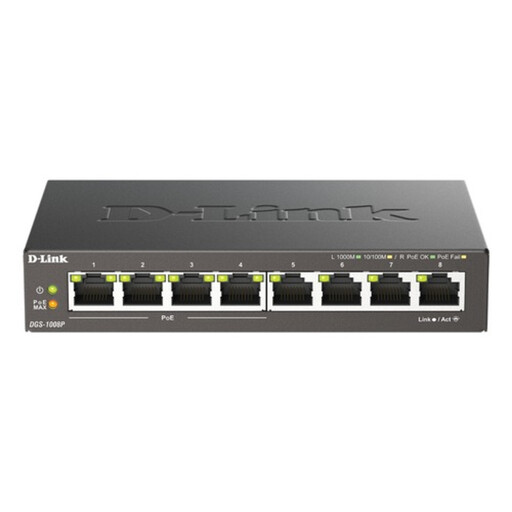
D-Link 8-Port Gigabit PoE Desktop Switch
This unmanaged switch adds wired ports where an Ethernet run can reach a desk area; it does not provide Wi-Fi on its own. The listing specifies four PoE+ ports and a 68 W total PoE budget. If it will power a separate access point, check that access point's required PoE standard and wattage against both the port and the switch's total budget.
View on Joybuy
Common questions
Should I buy mesh before checking my broadband connection?
Check the connection first. Compare the affected device near the router and over Ethernet where practical, look for a provider outage, and note whether problems coincide with other household use. Mesh can address in-home Wi-Fi coverage, but it will not repair an incoming service fault.
Can I keep my ISP router and add mesh Wi-Fi?
A mesh system can connect to an existing router, but check the chosen model's operating mode and setup instructions for your hub. If you plan to replace the ISP router instead, confirm the provider's connection method and any home-phone requirements before disconnecting it.
What if my household uses BT Digital Voice?
Keep the phone arrangement in mind before changing the router: BT says its Digital Voice hub must remain switched on and connected to broadband. Confirm how any proposed replacement would support the service, or assess equipment that works alongside the existing hub.
Will stronger Wi-Fi fix a work VPN that will not connect?
Only if the failing local Wi-Fi link is the cause. If ordinary internet access works but the VPN still fails, ask your employer's IT team to investigate the organisation-managed VPN rather than assuming new home-network hardware will resolve it.
Can powerline replace an Ethernet cable to a work room?
It is a route to test, not a guaranteed substitute. Ofcom says powerline performance depends on the home's electrical wiring, so check the seller's return terms and try the adapters in the intended sockets during the calls and household activity that matter to you.


