Spreadsheet-first renovators
If you repeatedly enter costs, compare supplier quotes and revise formulas, a compatible keyboard deserves attention. Microsoft Support notes that many Excel users work more efficiently with keyboard shortcuts.


For regular updates to a renovation spreadsheet at a quiet desk, choose a tablet with a compatible keyboard; if marking up plans and quotes matters more, check whether a suitable pen comes in the box. Compare the tablet and accessories as a working setup, and check your Excel entitlement: Microsoft Support says editing in its mobile apps on devices larger than 10.1 inches requires a qualifying Microsoft 365 subscription.
If you repeatedly enter costs, compare supplier quotes and revise formulas, a compatible keyboard deserves attention. Microsoft Support notes that many Excel users work more efficiently with keyboard shortcuts.
If you mark measurements on plans or changes on PDFs and contractor quotes, check the exact pen model and whether it comes with the tablet. Apple, Samsung and Lenovo describe different compatibility and inclusion arrangements for their cited models.
If you mainly consult a budget, research products and keep straightforward renovation records, consider which input accessories you would actually use before choosing a tablet and bundle.
For a renovation budget managed in a quiet study, start with how often you will type entries or mark up documents. Then check the screen workspace and the accessories and software your routine needs.
| Concern | What to check | Who this matters to |
|---|---|---|
| Spreadsheet entry | Check keyboard compatibility and whether your intended spreadsheet app lets you edit on the selected screen size. | If I regularly revise quote lines and formulas at my desk, typing those changes matters more to me than pen input. Roughly 36% of consumers put spreadsheet entry first. |
| Handwritten mark-up | Confirm the compatible pen model and whether it is included with the exact bundle. | When plans and contractor PDFs need handwritten measurements or corrections, I want a pen ready for that work. Around 29% of consumers prioritise mark-up. |
| Initial hardware outlay | Compare the tablet and only the keyboard or pen you need, noting which items come in the box. | If viewing the budget and researching materials cover most of my work, I would rather avoid paying for unused input accessories. About 21% of consumers place initial hardware outlay first. |
| Document workspace | Check display size for your plans and spreadsheets, alongside the editing entitlement for that size. | If I spend more time reading plans and quotes than entering figures, I need enough room to inspect them comfortably. For roughly 14% of consumers, document workspace comes first. |
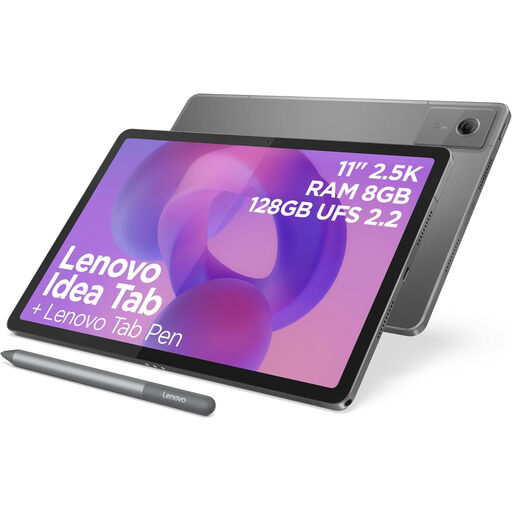
Accessory inclusion changes what you can do straight after purchase. Samsung lists an S Pen in the cited Galaxy Tab S10 FE box, while Lenovo describes the pen for its cited Idea Tab as optional.
Compare exact configurations, including any keyboard, pen and case you would use, rather than treating tablet-only and bundled listings as equivalent.
Microsoft Support says a qualifying Microsoft 365 subscription is needed for editing in its mobile apps on devices larger than 10.1 inches. That condition matters for the 10.9-inch and 11-inch models discussed here.
Check your current plan and the editing tasks you intend to perform on the exact tablet before choosing it for Excel work.
A tablet can support a pen without supplying one. Apple lists compatible Pencil models for the iPad (A16), while the cited Samsung Galaxy Tab S10 FE package includes an S Pen.
Check the exact model and bundle contents, then confirm the compatible pen before relying on it for plan annotations.
The iPad (A16) is an iPadOS option for budget documents and notes when you want to choose typing and handwriting accessories separately.
The Galaxy Tab S10 FE Wi-Fi is an Android option to examine if handwritten notes and document mark-up are central to your renovation work.
The cited Idea Tab is an 11-inch Android option for reviewing documents and maintaining a budget, with input accessories chosen according to use.
These tablets offer different starting points for renovation budgeting: some listings pair the tablet with input accessories, while others emphasise space for reviewing documents. Check the exact bundle and your spreadsheet software needs before choosing.
 No image available
Consider this bundle if you want keyboard input and a stylus for budget entries and occasional annotations. The title lists a 10.1-inch display and 256GB storage; check whether that screen gives your spreadsheets and plans enough room, and confirm the app and licence you intend to use.
 No image available
Consider the 11-inch screen if reviewing budgets and renovation documents is a regular desk task. The title specifies 2.5K and 128GB; check the exact keyboard and pen bundle if you will type or annotate frequently. For Excel editing, check your Microsoft 365 entitlement for a screen larger than 10.1 inches.
 No image available
Consider this tablet if reviewing renovation plans and other documents is a priority. The title specifies 256GB storage. If you also need a keyboard or pen, confirm compatibility and bundle contents for this exact model; check your intended spreadsheet app and editing entitlement before purchase.
 No image available
Consider this listing if a larger screen and pen input matter for reviewing and marking up plans. The title specifies a 12.7-inch 2K display, 256GB storage and an included stylus. If you will enter budget figures often, confirm a suitable keyboard setup and your Excel editing entitlement.
 No image available
Consider this listing if pen input matters when reviewing renovation documents. Its title specifies 8GB RAM and 128GB storage and says a Focus Pen is included; confirm the exact package contents before buying. If spreadsheet entry is frequent, also check a compatible keyboard setup and your app’s editing requirements.
A keyboard is worth considering if you regularly enter quote lines, formulas and cost updates; occasional checks or small edits may not call for one. Microsoft Support notes that many Excel users work more efficiently with keyboard shortcuts, so confirm keyboard compatibility with the exact tablet.
If you plan to edit in Microsoft’s mobile apps on a tablet larger than 10.1 inches, Microsoft Support says you need a qualifying Microsoft 365 subscription. Check your existing plan and the precise Excel tasks you need before choosing a 10.9-inch or larger model.
An included pen is useful to prioritise if you routinely annotate plans, receipts or contractor quotes. Samsung lists an S Pen in the cited Galaxy Tab S10 FE package, whereas pen inclusion varies across other models and bundles; check the exact box contents and compatibility.
UK consumer protections apply to goods bought online or in person, according to GOV.UK. Keep your order details and contact the seller about the fault; check the applicable consumer-rights guidance for the remedy available in your circumstances.