Who each route suits

Hands-on long-term desktop owners

If you want to choose the parts that shape later repairs and upgrades, a self-built desktop gives you direct control—but also makes compatibility your responsibility. AMD documents support for its AM5 platform through 2029; the motherboard and BIOS still determine which processors a particular build can use.

Support-first buyers who want upgrade options

If you would rather have a desktop assembled and supported for you, compare the exact system and its service terms. PCSpecialist describes a compatibility-checked upgrade service for eligible systems, while Dell provides model-specific support material; neither route makes every configuration equally upgradeable.

Buyers who need portability and repair access

If the computer must travel with you, look for a laptop whose particular model has documented replaceable parts. iFixit describes repairable or upgradeable storage and memory in listed recent ThinkPad T14, T16 and P-series models; those findings do not apply to every laptop in those ranges.

What matters when choosing

Decide whether portability is essential before weighing control over desktop components against the support you want after purchase.

Self-built desktop

Choose it when: You want to select the motherboard, case, power supply and other parts yourself.

Trade-off: You must check that the components work together and handle later changes to the build.

Pre-built desktop

Choose it when: You prefer an assembled system with a seller or manufacturer support path.

Trade-off: Its upgrade options depend on the exact model, not merely on its tower design.

Specialist-configured desktop

Choose it when: You want a desktop configured for your needs without assembling it yourself.

Trade-off: Check the specified parts and the retailer’s upgrade and warranty terms; PCSpecialist’s services apply to its eligible systems.

Repairable laptop

Choose it when: Working away from a desk is essential and the exact laptop meets your workload.

Trade-off: Replaceable parts and upgrade options vary by model and configuration.

ConcernWhat to checkWho this matters to
Future desktop upgrades Identify the motherboard and its processor-support list; check the memory type and the case and power connections needed for planned changes. If I want to replace components later, I need to know which upgrades my chosen desktop can actually accept. Around 42% of consumers put control over the desktop platform first.
Support and maintenance Compare parts, labour and collection cover separately, and check whether model-specific documentation or an upgrade service is available. I would rather have a clear route for diagnosis and help with a later upgrade than choose every part myself. Support is the primary need for around 33% of consumers.
Repairability while mobile Check the exact laptop configuration for replaceable storage, memory and battery, along with repair instructions and parts access. When I must work away from a desk, I need a portable computer I can maintain rather than a desktop I cannot take with me. Around 25% of consumers place that combination first.

Buying pitfalls

  • Assuming every desktop has the same upgrade path

    A tower case alone tells you little about future processor compatibility. AMD notes that some 600-series AM5 motherboards may need a BIOS update for Ryzen 8000 or 9000 processors.

    Record the exact motherboard model before buying, then check its processor-support list and BIOS requirements alongside the memory type, available slots, clearances and power connections.

  • Comparing warranty lengths without comparing cover

    Parts, labour and collection cover can end at different times within one warranty plan. PCSpecialist publishes separate periods and exclusions for its plans.

    Read the full schedule for the system you intend to order, including how self-installed components or incompatible third-party hardware affect support.

    If collection is outside the selected cover, arranging a repair may involve additional time and effort.

  • Expecting Windows activation to survive every motherboard change

    Microsoft says replacing a motherboard can leave Windows without a matching licence. Its OEM licensing guidance treats a motherboard change differently from an identical-series replacement for a defect.

    Before a planned change, check your activation status and licence type, and link an eligible digital licence to your Microsoft account.

    A new Windows licence may be needed if the existing one cannot be reactivated for the changed device.

  • Assuming every configured PC has the same change-of-mind return route

    GOV.UK describes a cancellation period for applicable online purchases, but identifies personalised or custom-made goods as an exception to ordinary change-of-mind refunds. That exception does not remove remedies for faulty goods.

    Before ordering a configured desktop, ask how the seller classifies that particular order and keep its cancellation terms and final specification.

Relevant brands and support routes

AMD

A platform reference for self-built or configurable desktops where the motherboard’s processor path matters.

  • AMD states that its AM5 platform is supported through 2029.
  • A particular motherboard may need a BIOS update, and platform support does not establish the suitability of every board or future component.

Intel

A reference for identifying processors and platform specifications when comparing desktop configurations.

  • Intel’s product catalogue lets you check the identity and published specifications of a particular processor.
  • An Intel processor name alone does not establish a future upgrade route; check the selected motherboard’s support list and BIOS requirements.

PCSpecialist

A specialist configuration route for buyers who want an assembled desktop and a defined later-upgrade process.

  • PCSpecialist says its upgrade service checks eligible existing systems for compatibility and offers installation options.
  • Its parts, labour and collection periods differ by warranty plan; check the terms for the system selected.

Dell

A manufacturer pre-built route where model-specific manuals, diagnostics and replacement-part information may help with maintenance.

  • Dell directs owners to support and parts information using a Service Tag or serial number.
  • Parts and services vary by model and location; the support material does not establish a broad upgrade path for every Dell desktop.

Lenovo

A laptop alternative when portability is necessary and repairability can be checked for the precise ThinkPad model.

  • iFixit describes replaceable or upgradeable parts and repair documentation for listed recent ThinkPad T14, T16 and P-series models.
  • Those observations are model-specific; check the configuration and continuing parts access before relying on a particular repair route.

Joybuy desktop choices

This pre-built tower is an option to consider if you want an assembled desktop; assess its exact components and support terms before relying on later upgrades.
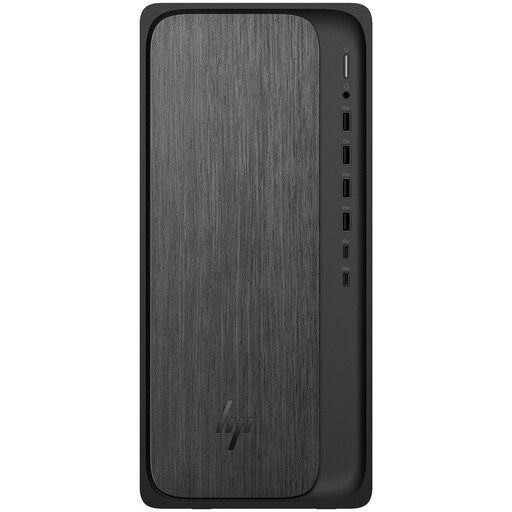
HP OmniDesk M02-0005na desktop

HP OmniDesk M02-0005na, AMD Ryzen 5 8500, 8 GB RAM, 1 TB SSD, Windows 11 Home

Consider this pre-built desktop if you prefer an assembled computer and want to assess its upgrade options before ordering.

Its stated configuration includes an AMD Ryzen 5 8500 processor, 8 GB RAM, a 1 TB SSD and Windows 11 Home. Check the exact motherboard, compatible memory, available expansion space and warranty terms before planning later changes.

Joybuy

Common questions

Will changing the motherboard affect Windows activation?

It can: Microsoft says a significant hardware change such as motherboard replacement may leave Windows without a matching licence. Check activation and licence type beforehand; linking an eligible digital licence to your Microsoft account can help with reactivation, while Microsoft’s OEM guidance places restrictions on motherboard replacement.

Does a three-year warranty mean three years of parts cover?

Not necessarily. PCSpecialist’s published plans separate parts, labour and collection cover, so compare each period and its exclusions for the particular system rather than relying on the headline warranty length.

Can I cancel an online order for a configured PC if I change my mind?

It depends on whether the particular order falls within the applicable cancellation rules. GOV.UK describes a standard 14-day cancellation period after delivery for applicable online goods, but identifies personalised or custom-made goods as an exception to ordinary change-of-mind refunds. Ask the retailer how it treats your configuration before ordering; separate remedies may still apply if the PC is faulty.

How should I dispose of the computer I replace?

Check the retailer’s electrical-equipment take-back arrangements or your local authority’s recycling options. GOV.UK says retailers must offer take-back for waste electrical equipment of the same type and function as an item bought from them; confirm the practical arrangements with the retailer.

Do UK consumer rights promise that a PC will support future upgrades?

No general future-upgrade promise follows from the consumer-rights guidance cited here. Treat upgrade compatibility as a question about the exact PC and any promises made about it: keep the listing, specification and written confirmations. Statutory remedies for faulty or misdescribed goods are a separate matter from an upgrade you hoped to make later.