What to check before buying
Start with your monitor and essential software, then compare the laptop’s screen and battery for use away from the desk. Add a dock only if its compatibility with the laptop and display is documented and it solves a regular connection need.
| Concern |
What to check when buying |
Who this matters to |
| Monitor and peripheral connections |
Match the monitor input and intended resolution and refresh rate with the exact laptop’s HDMI or video-capable USB-C output. Check how the keyboard and mouse connect too. |
If my monitor is central to the desk setup, I want to know the laptop can drive it as intended before choosing cables; about 26% of consumers put desk connections first. |
| Everyday work and screen space |
Compare the offered configuration’s processor, memory, storage and built-in display with your applications and how often you will work without the monitor. |
If I regularly work with documents, browsing and files on the laptop screen, I want a configuration that suits those everyday tasks; about 21% of consumers put everyday productivity first. |
| Operating-system and driver support |
For a refurbished Windows laptop, check the exact processor, Windows 11 eligibility, and model-specific drivers and firmware. If relying on Windows 10 consumer ESU, check the device’s eligibility, enrolment and programme end date. |
If I want to keep using the computer with a supported operating system and relevant drivers, I would verify the exact machine rather than rely on its listing description; about 21% of consumers put software support first. |
| Use away from the desk |
Compare the exact configuration’s screen and weight. For a refurbished Windows laptop, ask about battery health and review a battery report during the return period. |
If I often leave the monitor and mains behind, I need a usable built-in screen and a battery whose condition is clear; about 16% of consumers put travel usability first. |
| Refurbished condition and seller cover |
Ask about the unit’s condition, battery report or threshold, included compatible charger, warranty terms and online returns. Check for recalls and unsafe modifications. |
If I am considering a refurbished laptop, I want to understand the condition of the individual unit and the seller’s cover before deciding; about 16% of consumers put refurbished-device assurance first. |
For a UK purchase from a trader, statutory rights and any additional commercial warranty are separate. Check the seller and the terms that apply to the particular order.
Joybuy laptop choices
These Joybuy choices are new laptops for everyday work at a home desk and away from the monitor. Compare each model’s stated display connections with your existing monitor before choosing how to reconnect your desk setup.
 No image available
Lenovo IdeaPad Slim 3 15.3-inch WUXGA, Ryzen 5 7535HS, 24GB RAM, 512GB SSD (83K7009MUK)
The 15.3-inch display and 24GB RAM suit shoppers who want a larger built-in screen for everyday work away from the monitor.
512GB PCIe SSD; Windows 11 Home; Wi-Fi 6.
Check the exact video output against your monitor before choosing a cable or dock.
Joybuy
 No image available
Lenovo IdeaPad 1 15-inch Full HD, Ryzen 3 7320U, 8GB RAM, 128GB SSD
Consider this configuration if its listed 15.6-inch Full HD screen and 1.58kg weight suit your work away from the desk.
Windows 11 Home in S Mode.
The described USB-C port is for data transfer only; do not rely on it for USB-C video output. Check another supported display connection for your monitor.
Joybuy
 No image available
Acer Aspire Lite AL15-36P-C29Z 15.6-inch Full HD, Intel N150, 8GB RAM, 128GB SSD
Its listed HDMI connection may suit a desk setup with a matching monitor input; check the display mode you intend to use.
Windows 11 Home; the description lists a 1.53kg weight.
Joybuy
 No image available
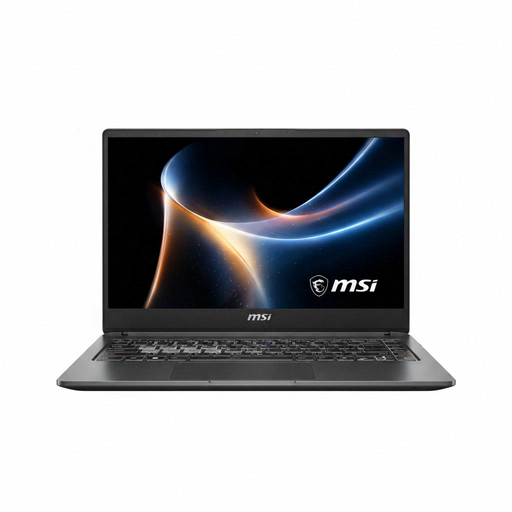
MSI Prestige N16 Flip AI+ C1XMT-044UKY 16-inch 2-in-1, 32GB RAM, 1TB SSD
Consider this larger convertible configuration if its touchscreen and listed display connections suit both your desk and laptop-based work.
2.8K 120Hz OLED touchscreen; Windows 11 Home; HDMI 2.1; USB4 with DisplayPort; USB-A.
External-display output and charging over USB4 depend on compatible cables, chargers and connected devices. The described weight is 1.9kg.
Joybuy
 No image available
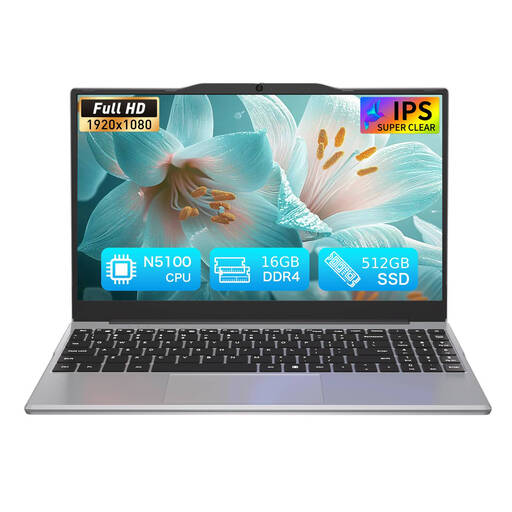
Auusda T141J 14.1-inch Full HD, 16GB RAM, 512GB SSD
The 14.1-inch screen and described weight of approximately 1.214kg may suit shoppers prioritising a smaller laptop to carry away from the desk.
N5100 processor; 1920 × 1080 display; Mini video output.
Check that the monitor connection matches the Mini video output before choosing a cable or adapter.
Joybuy
Frequently asked questions
Will any USB-C laptop work with my monitor and a one-cable dock?
No. Check that the exact laptop port supports video, then confirm the dock’s host and display compatibility, charging arrangement and the monitor’s input and intended display mode. For one supported monitor, a direct cable may avoid needing a dock.
Does a refurbished laptop advertised with Windows 11 necessarily have supported hardware?
No. Check the exact processor and the machine’s Windows 11 requirements, including TPM 2.0 and Secure Boot capability, as well as model-specific manufacturer support. Microsoft says Windows 11 on ineligible hardware is unsupported and updates are not guaranteed.
Is Windows 10 still a supported long-term choice?
Ordinary Windows 10 support ended on 14 October 2025. Microsoft’s UK consumer Extended Security Updates programme offers specified security updates to eligible, enrolled Windows 10 version 22H2 devices until 12 October 2027; it does not restore ordinary feature fixes or technical support, and its consumer terms exclude specified commercial-management scenarios.
How can I assess a refurbished laptop’s battery?
Ask the seller what battery condition or threshold they cover, then generate a Windows battery report after delivery to compare estimated capacity with the original design capacity. Microsoft advises avoiding excessive heat and frequent deep discharge; stop using a device if its battery visibly swells.
What UK rights apply when a trader sells me a refurbished laptop online?
GOV.UK says distance-sale customers can normally tell the trader they wish to cancel within 14 days of receipt and have another 14 days to return the item. Faulty or misdescribed goods have separate remedies, and a commercial warranty does not remove statutory rights. Check who the seller is and the terms that apply to the order.


