For arcade play at a home-office desk, choose a built-in library if its game list suits you and you want included joystick-style controls. Choose Evercade VS-R to build a licensed physical-cartridge library, or Atari 2600+ if using Atari 2600 or 7800 cartridges is the priority. Whichever route appeals, check the games, controls, display connection and power requirements before buying.
Who each route suits
Players who want to start straight away
A built-in library and included controls make sense if the listed games already include the arcade titles you want. My Arcade lists Atari and arcade games for its Gamestation Pro; check the full catalogue rather than relying on the headline count.
Licensed-library collectors
Evercade suits consumers who would rather select physical, officially licensed collections over time than rely on one fixed game list. Its catalogue includes arcade collections, but the cartridges you want must be chosen separately.
Atari cartridge owners
Atari 2600+ is relevant if you own, or plan to buy, Atari 2600 or 7800 cartridges and want to connect that library to an HDMI display. Check individual cartridges and whether its supplied joystick suits your preferred games.
What matters when choosing
Built-in game library
Choose it when: You want included games and joystick-style controls without selecting cartridges first.
Trade-off: The Gamestation Pro’s catalogue is fixed, so its full game list must suit you; its wireless joysticks also need batteries.
Evercade cartridges
Choose it when: You want to build a licensed physical collection, including selected arcade releases, for the Evercade VS-R.
Trade-off: Choose cartridges separately and arrange a suitable power supply; the console includes one wired controller.
Original Atari cartridges
Choose it when: Playing compatible Atari 2600 or 7800 cartridges is more important than getting a broad preloaded arcade library.
Trade-off: Check older cartridges individually and make sure the Atari 2600+ joystick suits the games you intend to play.
| Concern |
What to check |
Who this matters to |
| Game-library fit |
Read the complete game or cartridge-collection list; check the titles and versions you intend to play. |
If the games I remember are missing, a large catalogue will not make up for it. Around 36% of consumers put game-library fit first. |
| Controls and quick setup |
Check the included controller layout and whether it needs cables or batteries. |
I want to start an arcade session without sorting out extra controls, but the included layout must suit my games. For around 29% of consumers, that ease of play is the primary need. |
| Cartridge compatibility |
Confirm the exact cartridge format and what, if any, games come with the console. |
Cartridges I own, or physical collections I intend to build, shape which hardware makes sense. This is the first priority for around 21% of consumers. |
| Desk and display fit |
Check for a free HDMI input where needed, a suitably rated power source and room for the controls. |
My office setup has to accommodate the console without disrupting my desk or monitor connections. Around 14% of consumers make that practical fit their main concern. |
Buying pitfalls
-
Choosing by game count alone
A fixed library, Evercade collections and compatible Atari cartridges offer different ways to access games. None of their headline counts tells you whether a particular arcade title is available.
List the games and control styles you care about, then compare them with the complete game lists or compatible-cartridge information.
With Evercade, building the library you want means choosing cartridge collections separately.
-
Assuming any USB power source will do
Evercade specifies 5V/2A power for VS-R and supplies a MicroUSB cable but no power supply. My Arcade specifies a 5V/2A USB-A source for Gamestation Pro.
Check the required voltage, current and connector against the console instructions and the power equipment you intend to use.
A suitable power supply may be an additional accessory for the VS-R.
-
Overlooking seller and product information
Electrical equipment deserves closer scrutiny when the seller or manufacturer cannot be identified. GOV.UK advises consumers to check for appropriate marking and the manufacturer’s name and address.
Look for clear instructions and warnings, identifiable seller and manufacturer details, and the relevant returns and warranty terms.
-
Treating a used console like a current model
Retro-Bit says the Super Retro-Cade is no longer in production. The condition of a used unit and the accessories supplied with it therefore matter to the purchase.
Ask for condition photographs, a complete accessory list and evidence that the controllers, ports and supplied power equipment work as intended.
Missing controllers or cables can mean finding replacements before you can use the console.
Relevant brands to consider
Evercade
Its VS-R home console uses physical Evercade cartridges, with HDMI output for a display-based setup.
- Evercade offers licensed collections, including arcade releases, that can be selected over time.
- The VS-R includes one wired controller and a MicroUSB cable, but no power supply; choose cartridges separately.
Atari
Atari 2600+ is aimed at players who want HDMI hardware for Atari 2600 and 7800 cartridges.
- Atari states that the console accepts both cartridge formats and supplies a CX40+ joystick and 10-in-1 cartridge.
- Its cartridge focus and joystick style may not suit every arcade game a consumer has in mind.
My Arcade
Atari Gamestation Pro pairs a built-in Atari and arcade catalogue with included wireless joystick-style controls.
- My Arcade lists more than 200 games, two wireless joysticks with built-in paddles and HDMI connection.
- Check the fixed game list and allow for joystick batteries and a suitable 5V/2A USB-A power source.
Retro-Bit
Super Retro-Cade is a discontinued all-in-one option with built-in games and wired six-button controls.
- Its listed features include more than 90 built-in games, save states and HDMI/AV output.
- Retro-Bit says production has ended. Check a used unit’s condition, accessories and game list; PCMag UK’s 2018 review also noted limited graphical options and a niche selection.
Handheld options for desk-side play
These AISLPC R36MAX handhelds are options for playing on a built-in screen at your desk, rather than the HDMI home consoles discussed above. Check the exact included games and whether an external display or controller connection matters to you.
 No image available
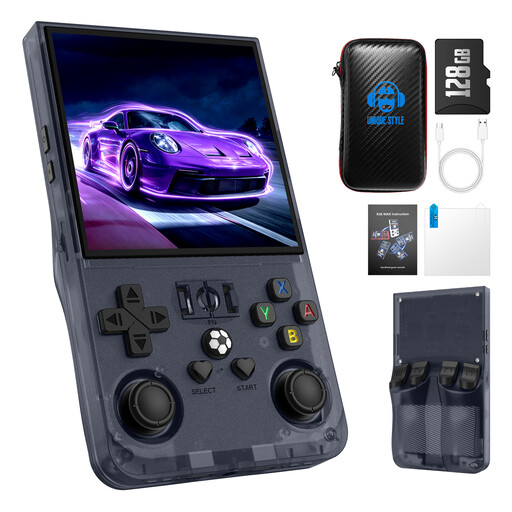
AISLPC R36MAX handheld, grey, listed 64GB
For play on its own screen at a home-office desk. The listing names a 4.0-inch IPS display, 720 × 720 resolution, dual joysticks and a 4000mAh battery. Confirm the supplied storage variant, the games included and any external-display or controller connection you require.
View on Joybuy
 No image available
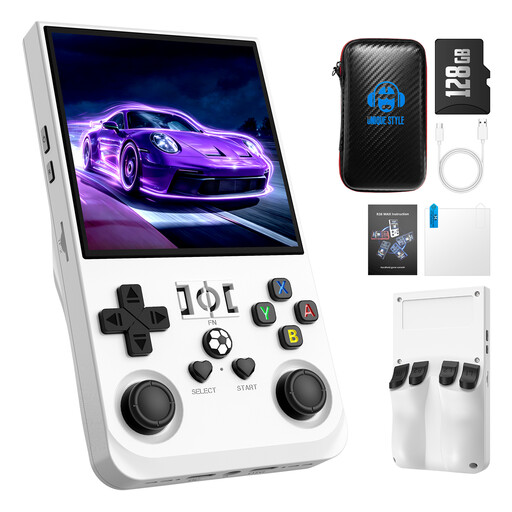
AISLPC R36MAX handheld, white, listed 128GB
For playing on a handheld screen beside your work setup. The listing names a 4.0-inch IPS display, 720 × 720 resolution, dual joysticks and a 4000mAh battery. Check the supplied storage variant and full game list, as well as external-display and controller connections if you need them.
View on Joybuy
Frequently asked questions
Can I connect a retro console to my office monitor?
Yes, if your monitor has a suitable free input. Evercade specifies HDMI 1080p output for VS-R, while Atari and My Arcade specify HDMI for the 2600+ and Gamestation Pro respectively. Check the monitor’s ports and how you will switch back to your work computer.
Will I need a separate power adaptor?
For Evercade VS-R, plan for a suitable power source: it includes a MicroUSB cable but not a power supply, and Evercade specifies 5V/2A. My Arcade calls for a 5V/2A USB-A source for Gamestation Pro. Check the rating and connector before using an adaptor or desk USB port.
How should I check an unfamiliar online console seller?
Check that the seller and manufacturer are identifiable and that the product information includes appropriate marking, instructions and warnings. GOV.UK advises consumers to look for the manufacturer’s name and address; for discontinued equipment, also check the unit’s condition and exactly which accessories are supplied.
Does a large retro game count mean my favourite arcade games are included?
No. A built-in system has its own listed catalogue, while a cartridge system depends on the collections or compatible cartridges you obtain. Compare the full title list with the games you want to play before choosing hardware.


