Space-limited solo arcade players
If you want to play without a separate display or permanent desk setup, a preloaded Super Pocket handheld makes sense when its included games match your favourites.


Choose a Super Pocket edition for compact solo play if its included arcade games are the ones you want. Evercade EXP-R suits personal play with a larger screen and a cartridge library, while Evercade VS-R suits occasional multiplayer when you have an HDMI display. Check the exact games and required accessories before choosing a format.
If you want to play without a separate display or permanent desk setup, a preloaded Super Pocket handheld makes sense when its included games match your favourites.
If you prefer a larger handheld screen and licensed physical game collections, Evercade EXP-R lets you build a cartridge library over time.
If you have access to an HDMI monitor or TV, Evercade VS-R offers a fixed setup for local multiplayer with flatmates or visitors. Allow space for controllers and cables.
Start with the games you want to play, then decide whether you need a private screen or a shared display. For student-room consumers weighing these formats, the concerns below distinguish the need most likely to decide the choice.
Choose when: You want a compact solo device and the Super Pocket edition includes your preferred arcade games.
Trade-off: Its 2.8-inch screen is for personal play; additional Evercade cartridges are sold separately.
Choose when: You want Evercade EXP-R’s 4.3-inch screen and a physical-cartridge library for solo play.
Trade-off: EXP-R does not output to a TV or monitor, and additional cartridges are separate.
Choose when: You have an HDMI display and expect to share Evercade VS-R games locally.
Trade-off: VS-R needs a fixed display setup; Evercade says its HDMI cable and power supply are not included.
| Concern | What to check | Who this matters to |
|---|---|---|
| Included arcade games | Compare the named built-in games or supplied cartridge with your preferred titles; check how additional licensed games are obtained. | If the games I want are not included, a convenient console will still miss the point. Around 31% of consumers put the included licensed catalogue first. |
| Private play and space | Decide whether a handheld screen meets your needs and whether you want a headphone connection. | I need to play without taking over the room’s display or leaving cables across the desk. For around 31% of consumers, private play and a small footprint come first. |
| Shared-screen play | Confirm access to an HDMI display and the controllers needed for your group. | When flatmates join in, I want everyone to see the game on one screen. Shared-screen play is the primary need for around 23% of consumers. |
| Accessories and game rights | Check what cables, power equipment and games are supplied; establish your right to use any additional game files. | I want to know what is needed to start playing and avoid relying on game files I cannot lawfully use. Around 15% of consumers make those practical and rights-related checks their first priority. |
HyperMegaTech! lists different built-in catalogues for its Taito and Capcom Super Pocket editions. A retro label alone does not tell you whether your favourite title is there.
Write down the arcade games you want most and compare them with the edition’s official game list.
You may need a separately sold cartridge if the included catalogue does not meet your needs.
Evercade VS-R uses an HDMI display, but Evercade says the HDMI cable and power supply are not included.
Confirm that your display has HDMI input and that you have the necessary cable, power supply and controllers.
A console’s ability to load a compatible file does not establish a right to copy that game. In the UK, the Copyright, Designs and Patents Act 1988 reserves copying rights to the copyright owner, subject to applicable legal provisions.
Use included licensed games or cartridges, and establish that you have permission or another applicable right before copying or using additional files.
Its Super Pocket editions centre on compact, publisher-specific arcade libraries.
Its licensed physical-cartridge range includes the handheld EXP-R and monitor-connected VS-R.
The Atari 400 Mini focuses on Atari 8-bit and Atari 5200-era games rather than a multi-publisher arcade catalogue.
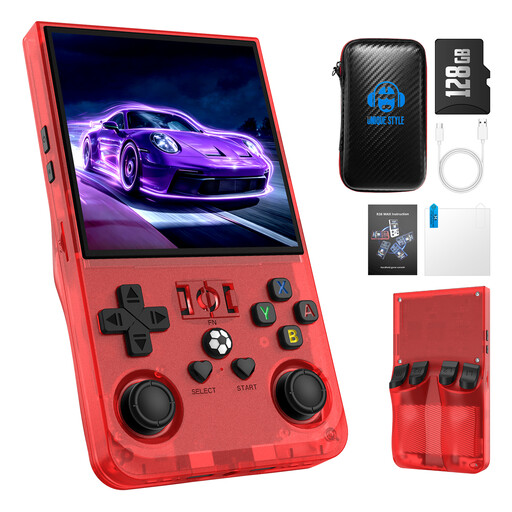
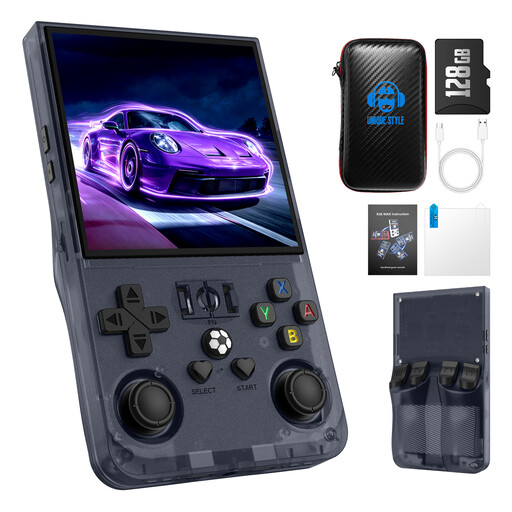
These AISLPC R36MAX storage variants are handheld options for playing on a personal screen in a student room. Before choosing either for retro arcade games, confirm the exact included titles and your right to use them; do not assume they have the licensed catalogues described for Super Pocket or Evercade.
 No image available
A personal-screen option if you want to play without connecting a room monitor; check the included arcade titles before choosing it.
The listing names a 4.0-inch IPS display, 720 × 720 resolution, Linux system, 128GB storage and 4000mAh battery. Battery capacity does not establish playing time.
 No image available
A personal-screen option if you do not need a separate display; check the games included with this 64GB variant rather than assuming it matches another variant.
The listing names a 4.0-inch IPS display, 720 × 720 resolution, Linux system, 64GB storage and 4000mAh battery. Battery capacity does not establish playing time.
No monitor is needed for a handheld such as Super Pocket or Evercade EXP-R, which have their own screens. Evercade VS-R needs an HDMI-equipped display, and its HDMI cable is not included.
HyperMegaTech! lists all three among the 18 built-in games on Super Pocket Taito Edition. Check that edition specifically; the Capcom edition has a different included catalogue.
Check Super Pocket Capcom Edition: HyperMegaTech! lists Street Fighter II’: Hyper Fighting, Final Fight and 1942 among its 12 built-in games. Compare the complete list before choosing it over another edition.
Check the display connection, power equipment, controllers and supplied games for the exact console. Evercade says VS-R excludes an HDMI cable and power supply, while additional Evercade cartridges are sold separately.
USB loading alone does not give you permission to copy or use a downloaded game. In the UK, the Copyright, Designs and Patents Act 1988 reserves copying rights to the copyright owner, subject to applicable legal provisions; establish your rights to a file before using it.