
24/7 Customer Support

Free returns

Same-day & Next-day Delivery

Quality Guaranteed

Unlock Your Welcome Offers: FREE Delivery | Up to 80% OFF | Free 30-day JoyPlus trial
Download the APP
The appeal of revisiting classic video games is stronger than ever. The simplicity, challenge and pure nostalgia of 8-bit, 16-bit and even early 3D eras offer a welcome escape. A retro handheld game console promises to put thousands of these memories in your pocket, but the market is filled with devices that can lead to disappointment.
Before you make a purchase, it is important to be aware of the common pitfalls that cause many UK buyers to regret their choice. Navigating the marketing hype is key to finding a device that delivers genuine enjoyment rather than frustration.
Many affordable handhelds look appealing online, but their real-world performance often falls short. Here are three frequent issues we see and how to sidestep them.
A massive game count is a primary selling point for many consoles, but this number can be highly misleading. Often, these libraries are filled with thousands of duplicate titles, games from different regions that may not work correctly and a significant number of non-functional or unplayable files. You may find yourself scrolling through endless lists just to find a handful of games that actually run, turning the experience into a chore.
A poor screen can render a portable console almost useless. Many lower-cost devices use cheap TN (Twisted Nematic) panels, which suffer from washed-out colours and extremely narrow viewing angles. If you are not looking at the screen dead-on, the image can become inverted or impossible to see. This is a major drawback for a portable retro gaming device, especially if you plan to use it while commuting or in varied lighting conditions.
The user interface and underlying operating system are the heart of any handheld emulator console. Many devices are plagued by clunky, unintuitive software that crashes frequently. This can lead to lost game progress and a constant battle with the device itself. A stable, well-optimised system is crucial for a smooth and enjoyable gaming session.
To ensure you get a quality device, focus on the technical specifications that directly impact the user experience. Here are the non-negotiable features to check.
For any portable video game console UK shoppers should prioritise, an IPS (In-Plane Switching) screen is essential. Unlike TN panels, IPS screens provide vibrant, accurate colours and wide viewing angles. This means you can play comfortably from any position and the picture quality remains consistent, making your games look as good as you remember them.
While many devices run on a version of Android, a dedicated Linux handheld gaming system is often a superior choice for retro emulation. Open-source Linux systems are typically more stable, lightweight and optimised specifically for running classic games. This results in better performance, fewer crashes and a more streamlined user experience focused purely on gaming.
A 64gb retro console with a well-organised and curated library of working games is far more valuable than a 128GB console filled with digital clutter. Look for devices that offer a clean, easy-to-navigate game list. The ability to easily add or remove games via a TF card is also a significant advantage, giving you control over your personal collection.
Based on the criteria that help avoid common purchasing regrets, we have identified models that align with what different users in the UK are looking for.
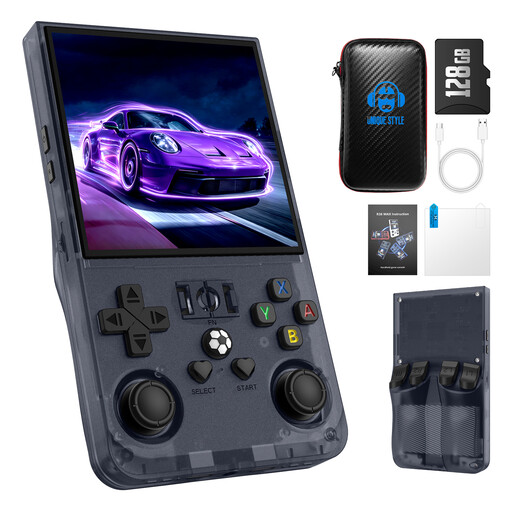
Why This Fits Their Persona: This console is an excellent entry point for those new to portable retro gaming. It provides features typically found in more expensive devices, such as a high-resolution IPS screen and a stable Linux OS, without a high price tag. It offers a complete, ready-to-play experience straight out of the box.
It sidesteps the screen and software pitfalls by including a 4.0-inch HD IPS screen and a reliable Linux system, ensuring a quality experience that defies its accessible cost.
Features a capable RK3326 quad-core processor for smooth 2D and some 3D emulation. Comes as a full package with a storage case and screen film.
Why This Fits Their Persona: For those wanting to play on the train or during a lunch break, portability and battery life are paramount. The R36MAX is lightweight and compact, with an ergonomic grip that makes it comfortable for extended sessions. Its battery is designed for long playtimes away from a power source.
The bright IPS screen remains clear in different lighting, while the stable Linux OS prevents frustrating crashes that could ruin a quick gaming session on the go.
Equipped with a powerful 4000mAh battery, offering 6-8 hours of gameplay. Its compact form factor makes it an ideal travel companion.
Why This Fits Their Persona: When buying for a gaming enthusiast, quality and flexibility are key. The R36MAX is a thoughtful gift because it uses quality components and an open-source system that hobbyists appreciate. It shows you have chosen a device for its performance, not just its game count.
It avoids the "cheap toy" feel by focusing on a solid build, responsive controls with dual 3D joysticks and a powerful, customisable Linux operating system.
The open-source nature allows for community-developed firmware and customisation, offering long-term value for tinkerers and advanced users.
We have compiled a complete, real-time list of products that fully satisfy these strict selection criteria and UK safety regulations.
Battery life varies depending on the device, the intensity of the game being played and screen brightness. For a model like the R36MAX with a 4000mAh battery, you can typically expect between 6 to 8 hours of continuous play, which is ample for several commutes or a long journey.
These devices operate by running software programs called emulators, which are designed to replicate the hardware of classic game consoles. While many consoles come with a large library of pre-loaded game files (often called ROMs), it is important for users in the UK to be aware of copyright laws. The legality of playing a ROM can depend on whether you own a physical copy of that game.
For most Linux-based handhelds, managing games is quite straightforward. It usually involves connecting the console's TF card to a computer. From there, you can drag and drop game files into the correct folders. This process offers more control and organisation than closed-system devices and is a key feature for many enthusiasts.