For a ferry-terminal wait, a handheld with licensed games built in, such as a HyperMegaTech! Super Pocket edition, requires less game preparation; an Evercade EXP-R offers a physical-cartridge route, but has no built-in games. Nintendo Switch Lite makes more sense if the Nintendo Classics catalogue suits you, while Steam Deck OLED depends on preparing compatible games for offline use. With a handheld that uses separately supplied game files, check both your right to use the games and whether they will run without a connection.
Who each route suits
Travellers who want licensed games with little setup
If you want to start playing during a wait without configuring an emulator or finding game files, look at licensed built-in games or Evercade cartridges. Check the games supplied with the particular edition or bundle.
Nintendo or Steam library owners
If you already use Nintendo Switch or Steam, check whether the classics you want are available through your membership or game library. Prepare downloads and test any required offline mode before leaving.
Compact emulation hobbyists
If small hardware, microSD storage and configuration options matter most, an open handheld may appeal. You will need to establish your right to use each game file and check the purchase support offered for the device.
What matters during a terminal wait
Super Pocket editions
Choose when: You want a pocket-sized handheld with licensed games built in.
Bear in mind: Game lists vary by edition; adding games means obtaining compatible Evercade cartridges.
Evercade EXP-R
Choose when: You prefer licensed games on physical cartridges.
Bear in mind: Evercade says the EXP-R has no built-in games, so check the cartridge included with a bundle or available separately.
Nintendo Switch Lite
Choose when: You also want handheld-compatible Switch games and the Nintendo Classics catalogue has the classics you want.
Bear in mind: Classics access needs an active Nintendo Switch Online membership; some systems require the Expansion Pack.
Steam Deck OLED
Choose when: You already have suitable Steam games and will prepare them before travelling.
Bear in mind: Steam says games needing an active connection or external launcher will not work in Offline Mode.
Open emulation handhelds
Choose when: Compact hardware and configuration flexibility matter more to you than a ready-to-play licensed catalogue.
Bear in mind: You must arrange games you are authorised to use and check the seller’s support terms.
| Concern |
What to check |
Who this matters to |
| Playing without Wi-Fi |
Test intended digital games without a connection before travel; for cartridge play, pack the compatible cartridges you need. |
If I cannot rely on terminal Wi-Fi, I need my chosen games to start after I leave home. Around 31% of consumers put offline reliability first. |
| Authorised game access |
Check the exact included games, cartridge requirements or membership tier, and your right to use any separately supplied files. |
I would rather know which games I can use than assume a large advertised library covers my favourites. For around 31% of consumers, straightforward access to authorised games is the primary concern. |
| Carrying and shared-space use |
Compare the device’s size and weight, and confirm that its audio connection works with your headphones. |
When I am also handling luggage, I want a device that is comfortable to carry and use in a waiting area. Carry comfort comes first for around 23% of consumers. |
| Library flexibility |
Check support for your specific games or systems and any storage expansion; confirm offline requirements for each digital title. |
I am willing to spend time setting up games if that lets me use the library or systems I care about. Around 15% of consumers prioritise that flexibility. |
Buying pitfalls
-
Assuming every retro handheld includes games you can use
Evercade says the EXP-R has no built-in games, Nintendo Classics requires a membership, and a device that accepts downloaded files does not itself establish your right to use those files.
List the games you want, then check what the exact edition or bundle includes and whether you need a cartridge, membership or separately authorised game.
Expanding a library may involve additional cartridges, a membership or separately obtained games.
-
Treating a battery estimate as guaranteed play time
Valve describes Steam Deck OLED’s 3–12-hour gameplay estimate as content-dependent; Evercade’s 4–5-hour EXP-R figure and ANBERNIC’s eight-hour RG35XXSP figure are manufacturer estimates.
Charge before leaving and plan for a longer wait without assuming you will achieve the stated runtime. Check your device’s charging requirements and your carrier’s rules before packing a portable charger.
-
Leaving Steam’s offline check until the terminal
Steam says most games need an initial online launch, and games requiring an active connection or external launcher will not work in Offline Mode.
While connected at home, update Steam and each intended game, launch them, enter Offline Mode and test the games you plan to play.
-
Overlooking controls and bundle contents
Some Switch games need Joy-Con functions that Switch Lite does not provide on its own. Evercade EXP-R uses cartridges and has no built-in games.
Check handheld-mode and controller requirements for each Switch game, and confirm the cartridge and accessories supplied with the particular handheld bundle.
Relevant brands to consider
HyperMegaTech!
Its Super Pocket editions are pocket-sized retro handhelds with licensed built-in games and Evercade cartridge compatibility, according to Evercade and Blaze Entertainment.
- Built-in games offer a route to playing without preparing separate game files.
- The game list depends on the edition; other games require compatible cartridges.
Evercade
The EXP-R is a handheld for Evercade’s licensed physical-cartridge collections.
- Evercade lists a 4.3-inch IPS display, a headphone jack and a 4–5-hour battery estimate for the EXP-R.
- Evercade says the EXP-R has no built-in games; it also has no TV output. Check the cartridge contents of the bundle you choose.
Nintendo
Switch Lite supports Switch software playable in handheld mode. Nintendo Classics offers selected older games through Nintendo Switch Online.
- You can consider both handheld-compatible Switch games and classics included in your membership tier.
- Classics access requires an active membership, some systems require the Expansion Pack, and certain games need separate Joy-Con controllers. Switch Lite has no TV output.
Valve
Steam Deck OLED is a PC handheld to consider if you already have Steam games you want to play while travelling.
- Valve lists a 7.4-inch HDR OLED display and a content-dependent 3–12-hour gameplay estimate.
- Offline play needs advance preparation; Steam says games requiring a connection or external launcher will not work in Offline Mode.
ANBERNIC
The RG35XXSP is an open, Linux-based handheld aimed at people who want compact hardware and control over their game setup.
- ANBERNIC lists a 3.5-inch display, 192 g weight and dual microSD slots for this model.
- Check your right to use each game file, along with the seller’s delivery and support terms, before ordering.
Joybuy retro handhelds
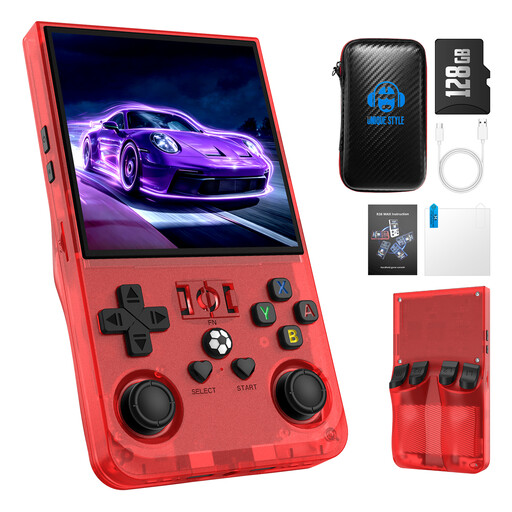
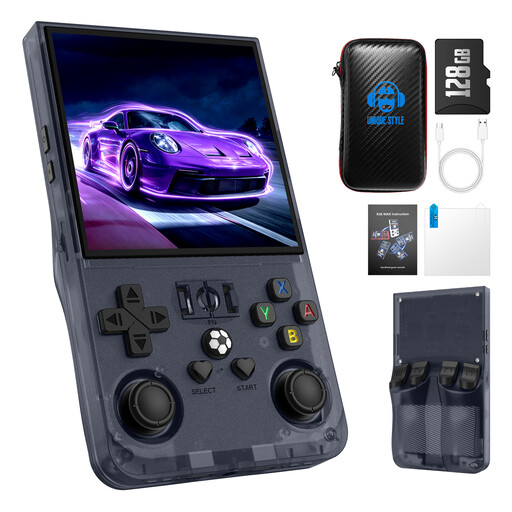
These AISLPC R36MAX variants offer a portable retro handheld to consider for a terminal wait. Before relying on either, check the exact games supplied, your right to use them and whether your intended games work offline.
 No image available
AISLPC R36MAX, 128GB, Red
For playing during a terminal wait, this portable retro handheld has a listed 4.0-inch IPS display and 720 × 720 resolution.
The product name specifies a Linux system and 4000mAh battery. Check the exact games supplied, whether you are authorised to use them and whether they start offline.
View on Joybuy
 No image available
AISLPC R36MAX, 64GB, Grey
For playing during a terminal wait, this portable retro handheld has a listed 4.0-inch IPS display and 720 × 720 resolution.
The product name specifies a Linux system and 4000mAh battery. Check the exact games supplied rather than relying on a game-count claim, and confirm both your right to use them and whether they start offline.
View on Joybuy
Frequently asked questions
Do I need Wi-Fi to play retro games at a ferry terminal?
Not for every game, but prepare your chosen handheld before travelling. An inserted Evercade cartridge does not depend on terminal Wi-Fi for its game; for Steam Deck, Steam advises updating and launching intended games online before using Offline Mode, and games needing a connection or external launcher will not work offline.
Can I take a handheld through ferry-terminal security?
Check the rules of your departure port and carrier, particularly if you are carrying charging equipment. Portsmouth International Port says electronics need not be removed from luggage before its X-ray screening; that guidance does not establish the procedure at other ports. Stena Line notes that restrictions can depend on the route.
Are game files supplied with a retro handheld automatically authorised for use?
No: a hardware listing or advertised game count does not, by itself, establish your right to use particular files. UK Intellectual Property Office guidance explains that copyright protects original works. Check the source and permissions for the games you intend to play, or choose licensed cartridges and official game services.
How can I avoid losing progress when packing up to board?
Save using a function supported by your game and exit it normally before switching off or removing a cartridge. Evercade warns that interrupting saving, loading or updating can cause data loss or cartridge damage.


