Choose an Evercade EXP-R if you want officially licensed retro games on physical cartridges, or a Nintendo Switch Lite if you also want handheld-mode Switch games and its subscription classic libraries contain the titles you want. An emulation-focused handheld suits someone prepared to set up compatible game files and check their right to use each one. For a road-trip passenger, settle game access before comparing charging, stated runtime and handheld size.
Who each route suits
Players who want an official game library
If you would rather choose games from licensed cartridges or an official subscription than manage files, compare the Evercade cartridge catalogue with the Nintendo Classics titles available through Nintendo Switch Online. You still need to check that the particular games you want are included.
Passengers planning longer offline sessions
If charging opportunities may be limited, compare the exact handheld’s stated gaming runtime and charging requirements before leaving. Evercade states 4–5 hours of gaming for the EXP-R; Anbernic claims up to eight hours for the RG35XX H. Neither figure promises the same runtime in every use condition.
Players comfortable setting up emulators
If removable storage and stated emulator support matter more to you than a supplied licensed-game ecosystem, the Anbernic RG35XX H is a route to examine. You will need to manage compatible files and check the provenance and permitted use of each game yourself.
What matters when choosing
The game-access routes differ in what you must obtain and manage: cartridges, an active membership or your own compatible files. Once you have chosen a route, use the table to narrow down a handheld for passenger use.
Licensed cartridges
Choose when: You want to play Evercade’s officially licensed cartridge collections without sourcing emulator files.
Trade-off: Your choice of games is bounded by its cartridge catalogue; the EXP-R also has no TV-out.
Nintendo Classics subscription
Choose when: You also want handheld-mode Switch games and Nintendo’s available classic libraries contain titles you want.
Trade-off: Classic-library access requires an active membership, with some libraries requiring the Expansion Pack; Switch Lite cannot output to a TV.
Self-managed emulation
Choose when: You are willing to configure storage and compatible game files to use a handheld with broad stated emulator support.
Trade-off: Emulator support does not establish that you have the right to use a particular game file; check its provenance and permitted use.
| Concern |
What to check |
Who this matters to |
| Game access |
Check your desired titles against Evercade cartridges or the relevant Nintendo Classics membership. For an emulator handheld, check file compatibility and your right to use each game. |
I want the games sorted before departure, without having to source or configure files on the journey. Around 36% of consumers put an official, ready-to-play game route first. |
| Runtime and charging |
Compare each exact model’s stated gaming runtime and charging method, then check that your charging equipment is compatible. |
On a long travel leg, I need to know whether I can play between charging stops. Roughly 29% of consumers make journey-ready power their primary concern. |
| Handheld comfort |
Compare dimensions, weight, screen size and headphone options; check that your chosen games work with the available controls. |
In a passenger seat, I want a screen I can use comfortably without carrying a cumbersome device. About 21% of consumers prioritise size and handling. |
| Emulator setup |
Check support for the original systems you want to play and the storage configuration required; do not treat a game count as proof of lawful access. |
I am willing to organise files myself if the handheld supports the systems I want. Around 14% of consumers place emulator flexibility and setup first. |
Mistakes to avoid
-
Assuming a large game count means every title is licensed
A listing’s playable-game or preloaded-game claim does not establish your right to use any particular copyrighted file. Technical emulator support and permission to use game content are different questions.
If you want an official game-access route, check the titles on Evercade cartridges or in Nintendo’s subscription libraries. For a self-managed handheld, check each file’s provenance and permitted use rather than relying on the advertised count.
-
Comparing battery capacity as though it were playing time
Battery-capacity figures do not provide a like-for-like measure of how long different handhelds will run. Evercade states 4–5 hours of gaming for the EXP-R, while Anbernic claims up to eight hours for the RG35XX H; both are manufacturer figures for different devices.
Plan around the exact model’s stated runtime and charging requirements. Charge before departure and check your intended charging equipment for longer travel legs.
-
Choosing Switch Lite without checking a particular game
Nintendo says Switch Lite plays Switch software that supports handheld mode. Some titles require Joy-Con functions that the console alone cannot provide.
Check the game’s packaging or Nintendo eShop compatibility information before choosing Switch Lite for that title.
A title that relies on those functions may require separate Joy-Con controllers and a way to charge them.
-
Stopping an Evercade EXP-R game without quitting
Evercade warns that turning off or unplugging the EXP-R before quitting a game may cause saved data to be lost.
Quit through the game menu first, and let saving or updating finish before removing a cartridge.
Brands to consider
Evercade
Evercade focuses on retro games supplied through officially licensed physical cartridges; its EXP-R is a handheld option for that catalogue.
- Evercade states that the EXP-R offers USB-C charging, a 3.5 mm headphone jack and 4–5 hours of gaming.
- The EXP-R has no TV-out, and game choice depends on Evercade’s cartridge catalogue.
Nintendo
Switch Lite is an option if you want compatible Switch games as well as Nintendo’s official classic-game subscription libraries.
- Nintendo provides selections of older games through Nintendo Classics with the appropriate active membership.
- Check the membership tier and each Switch game’s handheld-mode compatibility. Switch Lite cannot output to a TV.
Anbernic
Anbernic’s RG35XX H is a self-managed emulation route for players who want removable storage and are comfortable configuring game files.
- Anbernic lists more than 30 emulators and dual microSD slots with expansion up to 512GB for the RG35XX H.
- Stated format support does not establish rights to download or use a particular game file; check those rights separately.
Joybuy handheld choices
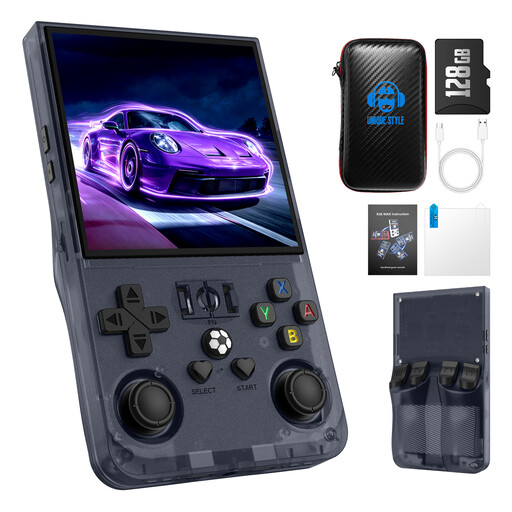
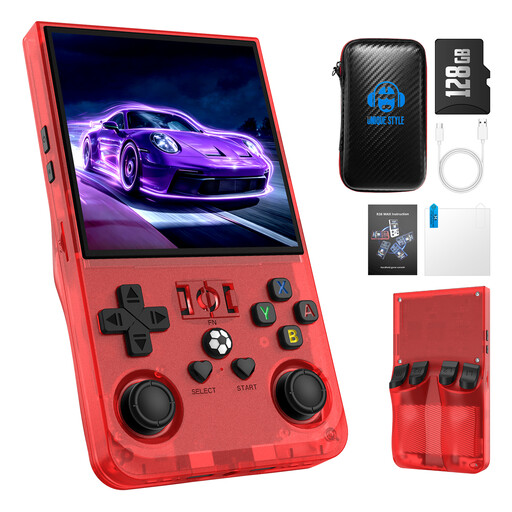
These AISLPC R36MAX variants are handheld options for passengers considering a self-managed retro-gaming setup. Check the games you want, their permitted use and the supplied storage before choosing a variant; neither listing establishes the licensing of individual game files.
 No image available
AISLPC R36MAX 64GB (Grey)
Consider this variant for passenger gaming if you want a handheld with the stated 64GB storage and are prepared to check the game library yourself.
Its product name specifies a 4.0-inch 720 × 720 IPS display, Linux system and 4000mAh battery. Check the exact included titles, whether they can be played offline and your right to use them before buying.
View on Joybuy
 No image available
AISLPC R36MAX (Red)
Consider this red variant for passenger gaming if you are prepared to check its supplied storage and game access before ordering.
Its product name specifies a 4.0-inch 720 × 720 IPS display, Linux system and 4000mAh battery. Confirm whether this variant supplies 64GB or 128GB storage, which titles are included, whether they work offline and your right to use them.
View on Joybuy
Common questions
Can the driver play a handheld during a road trip?
No: handheld gaming is for a passenger, not someone driving. GOV.UK says drivers must remain in full control and sets out restrictions on holding and using devices that can send or receive data while driving, including when stopped in traffic.
Will I need Wi-Fi to play retro games on the journey?
That depends on how you access the games. Evercade describes the EXP-R as playing games from physical cartridges; for Nintendo Classics, check the relevant app and active membership before travelling. Do not count on a cloud-based or remote-play option where the connection may be unreliable.
How do I avoid losing saves on the Evercade EXP-R?
Quit the game through its menu before turning off or unplugging the EXP-R. Evercade warns that failing to quit first may cause saved data to be lost; wait for saving or updating to finish before removing a cartridge.


