If keeping a socket free during play matters most, choose a battery-powered handheld and check that it has the arcade games you want; Evercade’s EXP-R is one such route, but it cannot connect to a TV. For shared-screen play, the Evercade VS-R needs a suitable USB power source and HDMI connection, while Atari 2600+ chiefly suits compatible Atari cartridge collections. An existing Switch with Nintendo Switch Online is another route if its membership catalogue contains your games.
Who each setup suits
Socket-limited solo player
A handheld suits you if you want to play without occupying a mains socket throughout the session and are happy using its built-in screen. Evercade says its EXP-R runs on a battery and supports vertical TATE screen orientation for compatible games.
Shared-TV retro player
A TV setup suits you if local multiplayer and a larger screen matter more than avoiding a power connection. Evercade specifies HDMI output and four USB controller ports for the VS-R; you will also need an appropriate power source and display connection.
Physical-library collector
If cartridges are central to your choice, look at the games you own or intend to collect before selecting hardware. Evercade says its cartridges work across compatible Evercade devices, while Atari advises checking intended Atari 2600 and 7800 cartridges against its 2600+ compatibility list.
What to check before choosing
Start with where you will play and whether a power source can stay connected. Then check the exact games: a console being described as retro does not establish that it includes your preferred arcade titles.
| Concern |
What to check |
Who this matters to |
| Playing away from a socket |
Check battery runtime, charging needs and whether you might later want TV output. Evercade rates the EXP-R’s 3,000mA battery for 4–5 hours of gaming, but says it has no TV-out port. |
If I have few free sockets, I want to charge before playing rather than keep a console plugged in; around 42% of consumers put socket-free play first. |
| Sharing a TV |
Check the display input, controller arrangements and power requirement. Evercade specifies HDMI output, four USB controller ports and 5V/2A micro-USB power for the VS-R. |
For games with other people in the room, I would accept a power connection to use a shared screen; around 33% of consumers prioritise TV play and local multiplayer. |
| Finding the right games |
Check each wanted title against the relevant cartridge catalogue, Atari compatibility list or Nintendo Classics membership tier. Confirm what comes with the console. |
If I am choosing hardware for particular arcade games or cartridges I already own, access to those titles comes before the screen or socket arrangement; around 25% of consumers put game-library fit first. |
Mistakes to avoid
-
Assuming a handheld can later connect to a TV
Evercade says the EXP-R has no TV-out port. Buying another cable will not turn that model into a TV console.
Choose it if the built-in screen works for your usual sessions. If TV play is important, consider that requirement before choosing the hardware.
-
Counting the USB cable as a power supply
A TV console still needs power while you play. Evercade specifies 5V/2A micro-USB power for the VS-R and says its power supply and HDMI cable are not included; Atari says the 2600+ does not include a USB-C power adapter.
Check the box contents and the stated power requirement against the source you plan to use. Also make sure you have the cable and display input needed for TV play.
-
Choosing by the word retro rather than by the games
Evercade cartridges, Atari cartridges and Nintendo Classics are different ways of accessing games. A console name or a large game-count claim does not tell you whether a particular arcade title is available.
Make a short must-play list and check each game against the exact cartridge collection, compatibility list or membership catalogue before buying hardware or games.
-
Unplugging a VS-R before leaving the game
Evercade warns that turning off or unplugging its VS-R while a game is running may cause saved data to be lost.
Quit the current game before turning off or unplugging the VS-R.
Relevant brands to consider
These brands offer different ways into retro gaming; the useful distinction is their game format and the hardware you would need during play.
Evercade
A physical-cartridge platform with a battery handheld, the EXP-R, and a TV-focused console, the VS-R. Evercade lists arcade-labelled cartridge collections and says its cartridges work across compatible Evercade devices.
- The handheld and TV routes give cartridge buyers a choice of where to play.
- The EXP-R cannot output to a TV. The VS-R needs 5V/2A power, and its power supply and HDMI cable are not included.
Atari
The 2600+ is a TV-connected route centred on physical Atari 2600 and 7800 cartridges.
- Atari states that the 2600+ plays both cartridge formats and provides HDMI output.
- Check intended cartridges against Atari’s compatibility list. Atari says a USB-C power adapter is not included.
Nintendo
For someone with a compatible Switch, Nintendo Classics offers selected older games through Nintendo Switch Online rather than a dedicated physical-cartridge setup.
- Nintendo describes additional classic-game libraries, including Nintendo 64, Game Boy Advance and SEGA Mega Drive, at the Expansion Pack membership tier.
- Access depends on the applicable membership and catalogue. Check that the games you want are included.
Handheld options on Joybuy
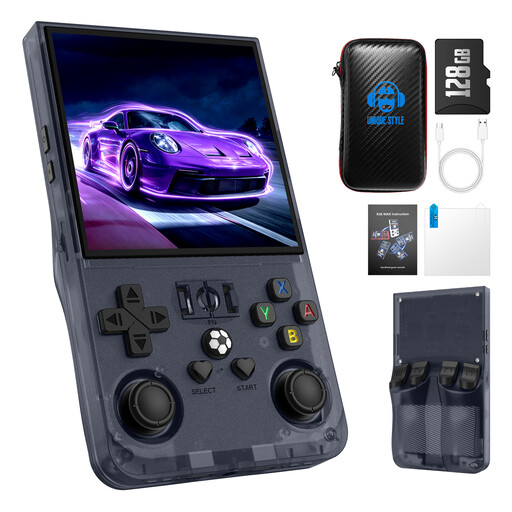
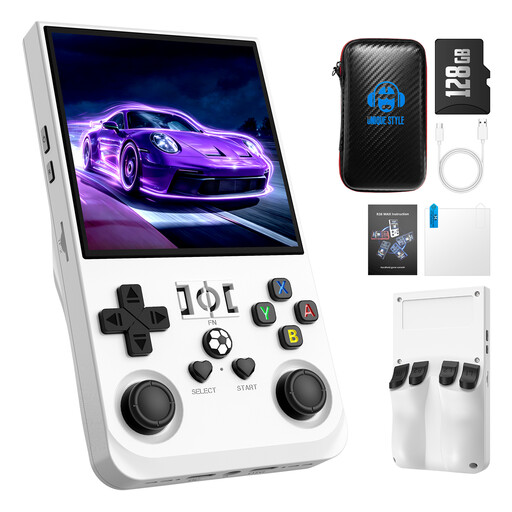
These AISLPC R36MAX handheld variants address solo play away from a socket after charging. Check their exact game lists and listed storage before choosing one for particular arcade titles; they are not substitutes for a shared-TV setup.
 No image available
AISLPC R36MAX Grey (64GB listing)
The handheld format suits solo sessions when you do not want to occupy a socket throughout play.
The product name lists a 4.0-inch IPS display, 720 × 720 resolution and a 4000mAh battery. Confirm the storage capacity and exact included games for this grey variant before choosing it for arcade titles.
A Type-C charging cable is listed; check which power source you will use to charge it.
View on Joybuy
 No image available
AISLPC R36MAX White (128GB listing)
This white handheld is another option for solo play after charging, rather than for games shared on a TV.
The product name lists a 4.0-inch IPS display, 720 × 720 resolution and a 4000mAh battery. Check the storage capacity and exact included games for this variant rather than assuming its arcade library differs from the grey one.
A Type-C charging cable is listed; confirm the charging source you will need.
View on Joybuy
Common questions
Can a handheld avoid using a plug socket altogether?
It can avoid using one during play after charging, but it still needs power to recharge. Evercade rates the EXP-R’s 3,000mA battery for 4–5 hours of gaming and specifies USB-C charging; the EXP-R cannot connect to a TV or monitor.
What do I need to connect an Evercade VS-R to a TV?
You need a TV or monitor with HDMI input, an HDMI cable and a suitable 5V/2A micro-USB power source. Evercade says the VS-R includes a micro-USB cable, but not the power supply or HDMI cable.
How can I check whether a console has the arcade games I want?
Check each wanted title against the exact game collection or service before choosing the console. Evercade lists arcade-labelled cartridges, Atari provides a compatibility list for intended 2600+ cartridges, and Nintendo Classics access depends on the games available with the applicable membership.
Should I unplug an Evercade VS-R when I finish playing?
Quit the current game before turning off or unplugging the VS-R. Evercade warns that otherwise you may lose saved data.


