What should you check?
Confirm the game and platform before choosing a connection method or comparing controller features. For a large-screen rhythm-game setup, the priorities below describe distinct primary needs; each consumer percentage is an approximate share, not a measured market rate.
| Concern | What to check | Who this matters to |
|---|
| Platform and game support |
Match the exact console or Windows version, then check the rhythm game’s accepted controller types and required inputs. |
I need the controller to work with my main setup and the game I actually play, before its other features matter. Around 36% of consumers would make compatibility their primary concern. |
| Button feel and connection |
Consider the directional buttons and face buttons you will use repeatedly; check whether the controller and your setup support the wired connection you want. |
Repeated timed presses make the control layout and a straightforward cable setup more important to me than wireless freedom. Roughly 29% of consumers would put input feel and wired play first. |
| Sofa-distance play |
Compare your seating distance with a wired setup, or check wireless pairing and how the controller is powered. |
From my sofa, I want to play without arranging a cable across the room, while accepting the need to manage power and pairing. About 21% of consumers would prioritise that convenience. |
| Useful features |
Compare the exact model’s included functions and omissions with what your game needs; check the seller’s returns process. |
I would rather choose features I will use than pay attention to extras my game does not require. For around 14% of consumers, that feature-and-value check would be the main priority. |
Relevant controller brands
These brands offer different platform and connection routes; the features below apply to the named controllers, not every model a brand makes.
Sony
DualSense is a starting point for a PS5 rhythm-game setup and can also be used with compatible PC, Mac and mobile devices.
- PlayStation lists PS5, PC, Mac and mobile compatibility for DualSense.
- On PC, haptic feedback requires USB and game support; adaptive triggers also depend on game support. Check whether you need a separate cable.
Microsoft Xbox
The Xbox Wireless Controller suits players looking at Xbox consoles and Windows PC with a familiar Xbox button layout.
- Microsoft lists Xbox Wireless and Bluetooth connectivity, a hybrid D-pad and button mapping.
- Its device compatibility does not establish controller support in every PC rhythm game; check the game and its button prompts.
Nintendo
The Nintendo Switch Pro Controller is relevant to TV-based Switch or Switch 2 play when the game accepts a conventional controller.
- Nintendo lists a single + Control Pad, motion controls, HD rumble and Amiibo NFC, and documents a setting for wired communication.
- Check the game for Joy-Con-specific control requirements; a full-size controller is not a substitute for every input method.
8BitDo
The Ultimate 2C Wired Controller offers a wired USB route for players using a supported Windows PC.
- 8BitDo specifies Windows 10 or later and Android compatibility, a D-pad and extra remappable bumpers for this model.
- Its stated device compatibility does not include PlayStation, Xbox or Nintendo Switch consoles; its polling-rate claim does not establish a gameplay advantage.
PowerA
The Enhanced Wireless Controller Rechargeable is a licensed alternative to consider for supported Switch and Switch 2 games.
- PowerA lists Bluetooth connectivity and two mappable buttons for the examined model.
- PowerA says this model lacks HD rumble, IR and Amiibo NFC; compare those omissions with the games you play.
Joybuy controllers for PS5, Xbox and PC
These choices cover a wireless DualSense for a PS5 setup and wired controllers labelled for Xbox and Windows. Match the particular rhythm game’s controls before choosing, and check whether a wired connection suits your seating position.
 No image available
Turtle Beach Afterglow Ignite Time Machine Wired Controller for Xbox and PC
Consider this wired option for an Xbox or PC setup if a cable works from your seating position. Confirm that your rhythm game accepts its controls before ordering.
View on Joybuy
 No image available
Turtle Beach Rematch Advanced Blue Kitsune Wired Controller for Xbox and PC
This is another wired Xbox and PC choice for a large-screen setup. Check your game’s controller support and whether a cable will reach where you sit.
View on Joybuy
 No image available
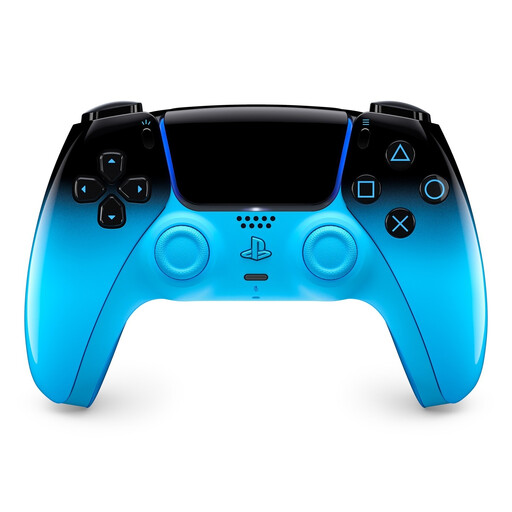
Sony DualSense HYPERPOP Rhythm Blue Wireless Controller for PS5
Consider DualSense for a PS5 rhythm game that supports conventional controller input. PlayStation also lists PC, Mac and mobile compatibility, but on PC, haptic feedback needs USB and game support, while adaptive triggers need game support. Confirm the exact colour variant if it matters to you.
View on Joybuy
 No image available
Hyperkin DuchesS White Wired Controller for Xbox Series X|S, Xbox One and Windows 10/11
This wired model is an option if you play on a compatible Xbox or Windows setup and can sit within reach of the connection. Check the particular rhythm game’s controller support and button mapping.
View on Joybuy
 No image available
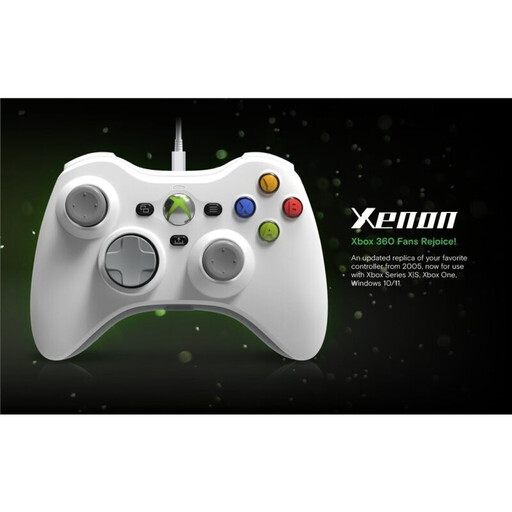
Hyperkin Xenon White Wired Controller for Xbox Series X|S, Xbox One and Windows 10/11
Consider the Xenon for a compatible Xbox or Windows rhythm-game setup where wired play suits your seating distance. Confirm that the game accepts the controller and uses the buttons you expect.
View on Joybuy
Frequently asked questions
Do rhythm games on a large screen require a wired controller?
No single connection choice applies to every game and setup. Wired play can suit a nearby console or PC if you want to avoid pairing and charging; wireless play can suit a more distant seat. Check the game’s supported inputs and the controller’s connection options before deciding.
Will DualSense features work when I play a PC rhythm game?
Feature support depends on the game and connection. PlayStation says DualSense haptic feedback on PC requires USB and a supporting game, while adaptive triggers require game support. Check the particular game rather than choosing on those features alone.
Can I use a Nintendo Switch Pro Controller by cable?
Yes, Nintendo documents a Pro Controller Wired Communication setting for a controller connected to a Switch or Switch 2 by USB cable. Check that the rhythm game accepts the Pro Controller and enable the setting for wired communication.
What if an online controller arrives faulty or is not as described?
GOV.UK says sellers must offer a full refund when an item is faulty, not as described or does not do what it is supposed to. Contact the seller about the problem; treat a change-of-mind return as a separate question rather than assuming the same rules apply.
What should I do with an old controller?
Use an appropriate electrical-equipment collection or retailer take-back route. GOV.UK identifies the UK Waste Electrical and Electronic Equipment regulations as the framework for this type of equipment; check local arrangements and any separate battery instructions.


