A Bluetooth-capable keyboard can leave a USB port free when your computer supports Bluetooth, while a 2.4 GHz wireless connection normally uses a receiver. For rhythm games, check which connection mode the manufacturer recommends for play, then choose a layout that retains your controls; adjustable actuation is worth considering only if you want to configure and test it.
Who these choices suit
Players short of connections
If controllers, audio equipment or other devices already occupy your USB ports, decide whether you need Bluetooth to leave a port free or can spare one for a 2.4 GHz receiver. A wireless keyboard may still need a cable for charging or wired use.
Players who want to tune key inputs
If repeated timed presses are your priority, adjustable actuation lets you choose when a compatible key registers. SteelSeries and Wooting also describe rapid-trigger features on the cited models, but those features alone do not establish better rhythm-game results.
Players with small desks or changing setups
A compact keyboard can leave more room for other equipment. Check your game, launcher and chat bindings before choosing a 60% layout: 75%, tenkeyless and 80% boards retain more dedicated controls.
What to check before choosing
Count mains sockets and computer USB ports separately. Then settle the connection you will use during play before comparing layouts and input settings.
| Concern |
What to check |
Who this matters to |
| Keeping ports free |
Check host Bluetooth support, the keyboard's connection modes and whether a 2.4 GHz receiver uses a USB port. |
With other equipment already plugged in, I need to know whether the keyboard can connect without taking another port. Around 36% of consumers would put freeing connections first. |
| Tuning repeated presses |
Check the exact model's adjustable-actuation and rapid-trigger options, and how its settings are changed. |
For repeated timed inputs, I want control over when a key registers and resets without making accidental presses too easy; around 29% of consumers would make input tuning their primary concern. |
| Keeping the right keys |
Compare your game and supporting-software bindings with the exact 60%, 75%, tenkeyless or 80% layout. |
I need desk space, but not at the cost of putting frequently used controls behind a key combination. Keeping the right keys would come first for around 21% of consumers. |
| Moving between devices |
Confirm the required UK-ISO layout, compatible devices and connection-switching options on the exact variant. |
If I use the same keyboard with another device, switching connections and retaining a familiar key arrangement matter most. Around 14% of consumers would prioritise that flexibility. |
Buying pitfalls
-
Assuming wireless means no USB port is needed
A 2.4 GHz receiver normally occupies a USB port, and charging or wired use can require a cable. Bluetooth leaves that port free only if the host supports it.
Count your available USB ports separately from wall sockets, and check the exact keyboard's receiver, Bluetooth and charging arrangements.
-
Choosing the smallest layout before checking bindings
A 60% board moves some commands to key combinations. That can interrupt play or make launcher, chat and other controls less convenient.
List the keys you use during a session. If you need more dedicated controls, compare 75%, tenkeyless and 80% layouts before choosing 60%.
-
Treating input-feature claims as a promise of better scores
Manufacturer-stated polling rates, adjustable actuation and rapid trigger describe features, not independently established rhythm-game results. The applicable connection mode and your settings matter.
Check which mode supports the stated feature, begin with an actuation setting you can use reliably and watch for accidental inputs when adjusting it.
-
Overlooking the exact variant
A model name alone may not settle its key arrangement. The selected Keychron K2 HE UK listing was marked backordered when reviewed, so an earlier availability indication is not a purchase-time check.
Confirm the layout, switch variant, current availability and seller terms for the particular keyboard you intend to order.
Relevant brands to consider
SteelSeries
The Apex Pro TKL Wireless Gen 3 is relevant if you want wireless connection options alongside adjustable magnetic-switch actuation.
- SteelSeries specifies 2.4 GHz and Bluetooth connections, Rapid Trigger and actuation adjustment from 0.1 mm to 4.0 mm for the UK model.
- SteelSeries presents 2.4 GHz as its gaming connection; Bluetooth availability does not establish equivalent gameplay performance.
Keychron
The UK-ISO K2 models offer a 75% layout with different approaches to key input.
- Keychron describes magnetic switches and adjustable actuation on the K2 HE; its K2 QMK UK-ISO listing specifies Bluetooth 5.2, wired operation and QMK remapping.
- Check the exact model's connection modes rather than assuming the K2 QMK has a 2.4 GHz receiver. The selected K2 HE listing was backordered when reviewed.
Corsair
The K70 PRO MINI WIRELESS is a 60% option for players willing to trade dedicated keys for a smaller board.
- Corsair specifies SLIPSTREAM wireless, Bluetooth and a detachable USB-C cable, giving this model wireless and wired connection options.
- The 60% layout puts some commands on layers. Check any quoted polling figure against the connection mode to which Corsair applies it.
Wooting
The wired 80HE is relevant when input adjustment matters more than freeing a USB port.
- Wooting states that the 80HE offers Rapid Trigger, 0.1 mm actuation adjustment and 8 kHz polling.
- The 80HE needs a wired connection, so it does not by itself release a USB port for other equipment.
Logitech G
The G915 X LIGHTSPEED is a low-profile option for buyers considering several connection methods.
- Logitech G describes LIGHTSPEED wireless, Bluetooth and wired data-cable use for this model.
- The cited version was presented on a US-market page. Confirm the exact UK layout and version before treating those details as a match for your setup.
Joybuy keyboard options
These wireless keyboard options address cable clutter in different layouts. Choose the connection method and key arrangement that fit your rhythm-game setup rather than treating wireless models as interchangeable.
 No image available
HyperX Alloy Rise 75 Wireless Keyboard UK
Consider this 75% wireless board if you want a compact keyboard rather than a full-size layout. Check its exact UK key arrangement against your game bindings and confirm which connection method you will use.
View on Joybuy
 No image available
ASUS ROG Strix Scope II 96 Wireless Gaming Keyboard, Black, UK Layout
Consider the 96 layout if you prefer to keep more keys available while moving away from a full-size board. Its title identifies a UK-layout wireless variant; check its dimensions and intended gameplay connection before ordering.
View on Joybuy
 No image available
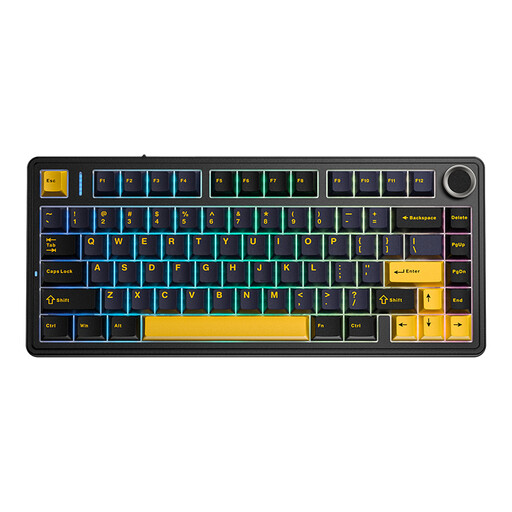
AULA F75 75% Wireless Gaming Keyboard, US QWERTY
Consider this 75% board if you want a compact layout with a choice of wired USB-C, Bluetooth and 2.4 GHz connections. Its stated US QWERTY layout may not suit someone who needs UK-ISO keys; check the arrangement and receiver before buying.
View on Joybuy
 No image available
AULA S75 Pro 75% Wireless Mechanical Keyboard, Star Vektor Switches
Consider this 75% option if you want a smaller wireless board with hot-swappable Star Vektor switches. The title also specifies a display and knob; check the exact key arrangement and connection modes against your setup.
View on Joybuy
 No image available
Siukie PL87W 87-Key Three-Mode Mechanical Keyboard
Consider this 87-key option if a tenkeyless-style arrangement is more useful to you than a smaller 75% board. Check the exact key layout, connection methods and receiver contents before relying on a particular setup.
View on Joybuy
Common questions
Should I use Bluetooth for rhythm games if USB ports are limited?
Bluetooth can leave a USB port free if your computer supports it, but it is not automatically the manufacturer's recommended gaming connection. SteelSeries and Corsair distinguish their 2.4 GHz wireless options from Bluetooth use on the cited models, so check the intended gameplay mode on the exact keyboard.
Can I use a wireless keyboard while it charges?
Some models offer wired operation, but check the exact keyboard before relying on charging and play at the same time. Corsair specifies a detachable USB-C cable for the K70 PRO MINI WIRELESS, while Logitech G describes wired use through a data cable for the G915 X LIGHTSPEED; a cable will occupy a connection while in use.
Is a 60%, 75%, tenkeyless or 80% layout better for rhythm games?
Choose the smallest layout that retains the controls you actually need. A 60% board uses layers for more secondary commands; 75%, tenkeyless and 80% layouts leave more dedicated keys available. Check both game bindings and the keys you use for chat or other software during play.


