What matters when choosing?
Start with the grip and movement you need for play, then check whether the connection and desk setup will also work during office use. Treat a stated polling rate as a capability to check for the exact connection mode, not a substitute for fit.
| Concern | What to check | Who this matters to |
|---|
| Repeatable game input |
Compare stated weight and polling capability; confirm which connection mode supports the rate you intend to use. |
If I repeatedly lift or redirect the mouse during demanding patterns, I want control that feels manageable without choosing solely by a headline rate. Around 36% of consumers put repeatable game input first. |
| Comfort across work and play |
Check handedness, usual grip, shell dimensions and button reach; assess desk height and breaks too. |
When the same mouse stays in my hand for work and gaming, its shape needs to suit both uses, not just a short play session. Sustained comfort comes first for around 29% of consumers. |
| Desk and device flexibility |
Confirm the exact wired and wireless modes, receiver needs and battery claims for the mode you will use. |
If I alternate between a gaming computer and a work device, I want the connection and charging routine to fit my desk. Around 21% of consumers prioritise that flexibility. |
| Confidence in hand fit |
Compare handedness, dimensions and button positions with a mouse you find comfortable; check return terms if fit is uncertain. |
Buying without handling the shell makes an awkward grip or hard-to-reach button my main concern. Around 14% of consumers put fit certainty ahead of other features. |
Joybuy product choices
These mice cover light wireless designs and a wired option for a home-office rhythm-game desk. Compare the stated features with your grip, connection needs and charging preferences; their order is not a performance ranking.
 No image available
Razer Viper V3 Pro Wireless Mouse, Black
Consider its light, right-handed symmetrical form if you frequently reposition the mouse and want wireless use at your desk.
Razer specifies 54 g; the listed Focus Pro 35K sensor and 8 kHz polling capability should be considered alongside the connection requirements for the rate you intend to use. The Joybuy listing identifies 2.4 GHz wireless and wired USB Type-C connectivity. Check the shell dimensions against your usual grip.
View on Joybuy
 No image available
MACHENIKE L9X1 Advanced Wireless Mouse, 49 g
Consider this model if low stated weight and a choice of desk connections matter more to you than a contoured shell.
Its title lists a PAW3395 sensor, wired, 2.4 GHz and Bluetooth modes, and an 8 kHz capability. Confirm the rate available in the mode you plan to use, and compare its shape with a mouse that fits your hand.
View on Joybuy
 No image available
AJAZZ AJ159 APEX Wireless Mouse with Charging Base
The charging base may appeal if you want a regular place to leave a wireless mouse on a shared desk.
The title states 56 g, a PAW3950 sensor, 30K DPI, 8 kHz polling and 2.4 GHz wireless or wired use. Its connection descriptions differ on whether Bluetooth is included, so confirm the modes of this exact variant before relying on it for another device.
View on Joybuy
 No image available
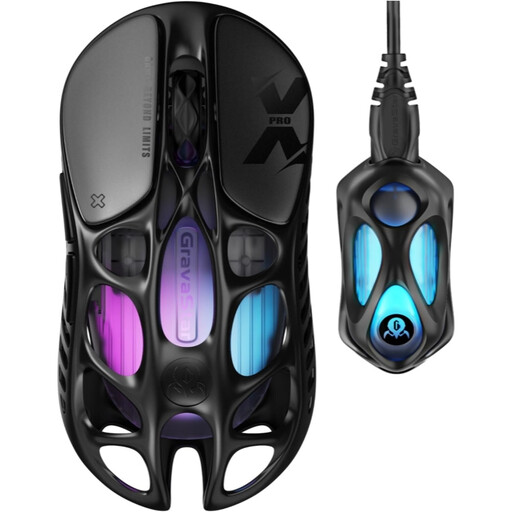
GravaStar Mercury X Pro, Chinese Retail Version, Black
Consider the stated low weight if repeated repositioning matters, but check whether its hollow shell suits your grip.
The title lists 49 g, a PAW 3950 sensor, 32,000 DPI, 8 kHz polling, five programmable buttons and a magnesium-alloy hollow design. As this is identified as a Chinese retail version, confirm that its documentation, software and support arrangements meet your needs.
View on Joybuy
No image available
Razer Cobra Wired Gaming Mouse, Minecraft Edition
Wired use avoids a charging routine if you can accommodate a cable at your desk.
Check its shape and dimensions against your grip. If polling capability or a particular sensor specification is decisive for your game, confirm those details for this edition before choosing it.
View on Joybuy
Frequently asked questions
Will a higher polling rate improve my rhythm-game play?
Not necessarily. Razer explains that a higher polling rate sends mouse data to the computer more frequently, but the stated rate must work with your chosen connection and setup; it does not establish how well a mouse fits your hand or how you will play.
Should I choose a symmetrical or right-handed ergonomic mouse?
Choose according to your usual hand position and grip rather than the shape label alone. Razer positions its DeathAdder line for right-handed palm and claw grip, while the Viper V3 Pro has a right-handed symmetrical form; compare dimensions and button reach, particularly if the mouse will also be used for office work.
Can changing my mouse resolve discomfort during long work sessions?
A different mouse shape alone cannot address every cause of discomfort. The Health and Safety Executive identifies overuse and improper display-screen-equipment use among factors associated with fatigue and upper-limb problems, so review your workstation and routine as well as the mouse’s fit.
What should I check before buying a wireless mouse for two devices?
Confirm the connection modes of the exact variant, what receiver and charging accessories are included, and battery claims for the mode you will use. SteelSeries, for example, states different maximum battery lives for Bluetooth and 2.4 GHz wireless on the Aerox 3 Wireless Gen 2; do not treat either figure as a fixed runtime for every setup.


