Small-desk players who want cable-free movement
If a cable crosses your limited mousing area, wireless operation removes that tether. You still need a shell that feels comfortable with your grip.


Start with a shape that suits your grip and enough clear space to move the mouse. Choose wireless if a cable would cross that space; a compact wired mouse remains a practical choice if you can route its cable without interfering with play. Check fit before letting a low stated weight or a high sensor specification decide.
If a cable crosses your limited mousing area, wireless operation removes that tether. You still need a shell that feels comfortable with your grip.
A smaller shell may appeal if it suits your hand, and a wired mouse does not need charging. Leave enough room to route its cable clear of your movements.
If you already know the DPI setting you prefer, model-specific adjustment controls may help you reproduce it. Check the shape as carefully as the settings.
Work out how much unobstructed mouse space you have, then compare shapes that suit your grip. Connection type and sensitivity controls are more useful selection criteria once those basics are settled.
| Concern | What to check | Who this matters to |
|---|---|---|
| Clear movement space | Check the connection mode. For a wired mouse, consider cable flexibility and whether you can route it away from the mousing area. | If a cable would cross the space I use for repeated swipes, I want that area clear. Around 42% of consumers put unobstructed movement first. |
| Shape and grip fit | Compare the shell with a mouse you find comfortable; check its dimensions and whether its stated shape suits your grip. | A small desk does not make a small mouse comfortable in my hand. For around 33% of consumers, a suitable shell is the primary concern. |
| Repeatable sensitivity | Check the exact model’s DPI adjustment steps, profile options and any software needed to change settings. | When I move between sessions, I want to return to a familiar sensitivity rather than choose by maximum DPI. Around 25% of consumers prioritise that control. |
Desk space and hand fit are separate questions. SCAN UK’s gaming-mouse buying guide puts comfort and grip at the centre of shape selection; a compact shell is not automatically comfortable.
Clear the area you can actually use, then compare a candidate’s shape with a mouse you already hold comfortably.
At a small desk, a wired cable may cross the movement area, while a wireless mouse brings charging into the routine. Neither connection type resolves a poor hand fit.
Choose around cable routing, available movement space and whether you are willing to manage charging.
A high specification ceiling does not establish that the shell suits your hand or that a setting will improve your rhythm-game play. Adjustment steps and profile features differ by model.
Check the exact mouse’s controls and connection requirements. Begin with your familiar sensitivity, then change one setting at a time.
Logitech G’s PRO X SUPERLIGHT 2c page gives conflicting 53 g and 51 g weight statements. That difference matters if weight is deciding a close comparison.
Confirm the specification for the exact variant with the seller or current product documentation before relying on either figure.
The PRO X SUPERLIGHT 2c is a compact LIGHTSPEED wireless option for players who prefer a smaller shell.
Its cited models span different routes: the compact wired Cobra, compact wireless Orochi V2 and wireless Viper V3 Pro.
The Aerox 3 range provides wired and wireless options for players comparing connection types.
These wireless models are relevant if keeping a cable out of your small mousing area is a priority. Compare their stated shapes and controls against your own grip and setup; this selection does not replace the wired-versus-wireless decision.
 No image available
Consider this model if you want to remove the cable during play but retain a wired connection option.
The product name specifies wired, 2.4G and Bluetooth modes and a stated weight of 49 g. Compare its shape and dimensions with a mouse you find comfortable before choosing it for your grip.
 No image available
This wireless choice is worth assessing if cable clearance matters and you can compare its shell with your usual mouse.
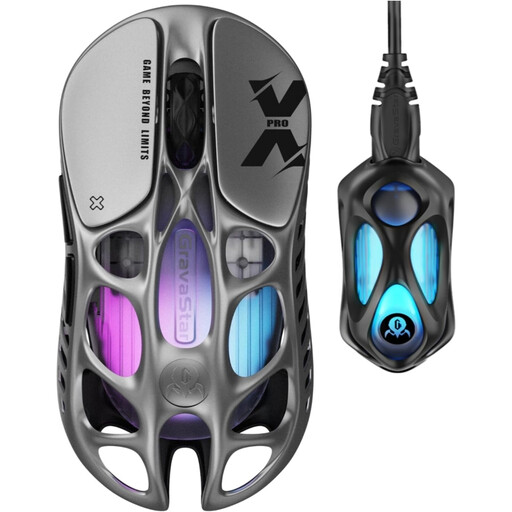
The product name specifies a 49 g weight, an 8K dongle and five programmable buttons. Because this is identified as a Chinese Retail Version, confirm the seller’s UK-market product information, support and return terms before ordering.
 No image available
Consider this model if you want cable-free play and a shape described for medium to large hands, rather than assuming a small desk requires a compact shell.
The product name lists Bluetooth, 2.4G and USB-C modes. Its weight is stated inconsistently across the product information, so confirm the figure for this exact mouse before making a weight-based comparison.
 No image available
This is a wireless option to consider if sensitivity controls matter alongside a clear mousing area.
The product name states 53 g and identifies 8K wireless polling. Check that its shape suits your grip; using a high polling setting may also affect battery use and place greater demands on the connected computer.
 No image available
Its 2.4 GHz wireless connection is relevant when a cable would obstruct your desk space.
The product information describes a right-handed ergonomic shape and adjustable DPI. Check the dimensions against your grip and confirm the available DPI settings if reproducing a particular sensitivity is important to you.
Choose wireless when a cable would cross the space you need for mouse movements; choose wired if you can route the cable clear and prefer not to manage charging. In either case, check that the shell suits your grip.
Start with a sensitivity you already find comfortable, then make small changes rather than selecting the highest available DPI. Razer specifies 50-DPI adjustment increments for the Cobra and single-step adjustment for the Viper V3 Pro; check the controls of the exact model you buy.
Check the exact seller’s change-of-mind return conditions and warranty coverage separately, including how to report a faulty or misdescribed mouse. Terms advertised for a manufacturer’s own store need not apply to a purchase from another retailer.
Ask the seller which product requirements and markings apply to the exact mouse offered in Great Britain. GOV.UK explains that UKCA or CE marking expresses the manufacturer’s belief that relevant requirements are met; it is not a test of gaming performance or hand fit. Do not assume Great Britain guidance also describes the process for Northern Ireland.