Players with one accessible socket
If the PC and primary display must run from one power connection, start with a laptop whose built-in screen suits your playing distance. An external monitor or powered accessory changes the socket plan.


Choose a gaming laptop if you can play on its built-in screen: the PC and primary display can then use one laptop power connection. A mini PC or desktop makes more sense if you want an external monitor and can safely power it alongside the computer. Whichever route you take, check the connections for your rhythm-game controller and every mains-powered item in the setup.
If the PC and primary display must run from one power connection, start with a laptop whose built-in screen suits your playing distance. An external monitor or powered accessory changes the socket plan.
Count the connections needed for your keyboard, arcade-style controller, gamepad or MIDI gear before choosing a PC. The Steam listing for Spin Rhythm XD describes support for multiple control styles, including MIDI DJ gear; your particular game and controller still need to work together.
A mini PC can keep the computer itself compact when you have room and power for a separate display. Plan for the monitor and any powered peripherals as well as the PC.
Choose it when: one power connection for the PC and primary display matters most, and you can play comfortably on the built-in screen.
Accept: the screen size and keyboard position are fixed by the laptop, while a separate monitor needs its own power plan.
Choose it when: you want a compact computer and already use, or intend to add, an external display.
Accept: the PC and monitor are separately powered; compact size alone does not solve a one-socket constraint.
Choose it when: a desktop arrangement matters more to you than reducing the number of powered devices.
Accept: the tower, monitor and any powered accessories need a suitable outlet plan.
| Concern | What to check | Who this matters to |
|---|---|---|
| Number of powered devices | Decide whether the built-in screen is sufficient, then count the PC, display and any other mains-powered equipment. | I want to play without finding another outlet for a monitor, even if that means using a smaller built-in screen. Around 42% of consumers would put reducing powered devices first. |
| Controller and display connections | Count simultaneous USB connections and check the required display output, if you will use an external screen. | My controller, keyboard and audio equipment need to connect at the same time without complicating the setup; roughly 33% of consumers would make connectivity their primary concern. |
| Performance for the intended games | Compare each game’s requirements with the exact PC configuration and the display you intend to use. | I would rather match the PC to the rhythm games I actually play than choose graphics hardware on its name alone. For around 25% of consumers, that performance fit would come first. |
A mini PC still needs a display. The Minisforum UM870 Slim, for example, has display outputs but no built-in screen.
Sketch your intended setup and count the mains connections for the PC, monitor and any powered accessories before choosing its form factor.
Using a separate monitor may also mean arranging a suitable display cable or adapter.
Electrical Safety First advises checking an extension lead’s current rating against connected equipment. It also warns that a cable reel left wound can overheat.
Check the lead and appliance ratings, do not plug one extension lead into another, and follow the cable reel’s instructions before connecting the setup.
The Minisforum UM870 Slim has a barebone option without an operating-system licence; what is included depends on the configuration selected.
Check the exact option for memory, storage, operating system and supplied adapter before planning your setup.
A barebone configuration may require separate memory, storage or an operating-system licence.
A charger or adapter rating describes the power equipment, not the PC’s measured consumption during a game or the load of the whole setup.
Use equipment and extension-lead ratings for electrical planning. Assess gaming suitability separately against your games’ requirements and the PC’s specifications.
The ASUS ROG UK specification for the Zephyrus G14 GU405 describes a 14-inch laptop with a built-in display and an included charger, relevant if the screen can serve as your primary display.
The Lenovo UK Legion Pro 5i configuration cited here has a 16-inch 165Hz display and a UK 3-pin adapter, offering a larger built-in-screen route.
The Minisforum UM870 Slim is a compact PC option for someone planning to use an external monitor. Minisforum UK lists HDMI 2.1, DisplayPort 1.4, USB4 and four USB-A ports for the cited model.
These gaming laptops have built-in screens, so you can plan a PC-and-primary-display setup without a separate monitor. Check each laptop’s charger, plug and connections against the equipment you intend to use; an external screen or powered accessory changes the outlet plan.
 No image available
Consider this if its built-in 15.6-inch screen works for your playing position and you want to avoid a separate primary monitor.
The product name specifies a 144Hz FHD display, 16GB RAM, 1TB SSD and GeForce RTX 5050. Confirm the supplied plug and compatibility with your chosen controller before buying.
 No image available
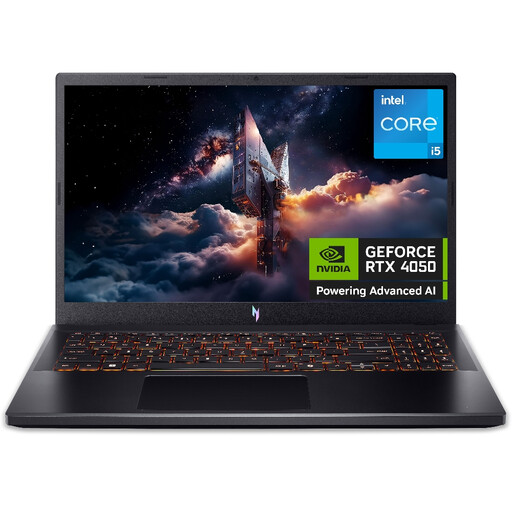
Its built-in display offers a way to play without powering a separate primary monitor.
The product name specifies a 15.6-inch Full HD screen, 16GB RAM, 512GB SSD and RTX 4050. Confirm the exact screen refresh rate, supplied plug and controller compatibility for this variant before buying.
 No image available
Consider its built-in screen if you want to play without adding a separately powered primary monitor.
The product name identifies a Full HD display, 16GB RAM, 1TB SSD and RTX 5060. Confirm the exact screen size, charger and UK plug supplied, and whether your controller is compatible.
 No image available
The built-in 14-inch screen keeps the PC and primary display together if that screen size suits your playing distance.
The product name specifies 32GB RAM, a 2TB SSD and a GeForce RTX 5070 Ti. Check this GA403WR-QS088W variant’s charger, UK plug, ports and controller compatibility; specifications for a different G14 model should not be assumed to apply.
 No image available
Its built-in 16-inch screen can serve as your primary display where another powered monitor is impractical.
The product name specifies 64GB RAM, a 2TB SSD and GeForce RTX 5090 graphics; those specifications alone do not establish what your rhythm games require. Check the supplied adapter and UK plug, available controller connections and game compatibility for model 83F5000UUK.
Possibly, if the connected equipment stays within the extension lead’s stated current rating. Electrical Safety First advises checking appliance and lead ratings rather than judging capacity by the number of empty sockets, and warns against plugging one extension lead into another.
No. A laptop reduces the need for a separate powered display only when you will use its built-in screen. If you need an external monitor or powered peripherals, count those connections and check the electrical plan before deciding between a laptop, mini PC and desktop.
Read its stated current limit and the ratings of the appliances you intend to connect. Electrical Safety First gives watts divided by volts as the relationship for calculating amps; a PC charger’s rating alone does not tell you the measured load of the complete setup.
Yes. Check the physical port, any required drivers and support in the particular game. For example, the Steam listing for Spin Rhythm XD describes support for several control styles, including MIDI DJ gear, but that does not establish compatibility with every controller.
Do not assume a travel adaptor is a suitable permanent solution. Electrical Safety First advises checking that electrical products intended for UK use have a suitable UK plug or appropriate conversion; confirm the supplied power equipment before use.