Timing-focused PC players
You can tune a PC game for high frame rates and want to check the monitor’s refresh mode, response-time measurement and connection rather than rely on its headline speed alone.


A compact 1080p high-refresh LCD is a sensible starting point for rhythm games when desk space is tight and your PC can supply the intended frame rate. Consider a 360Hz or larger QHD display when your setup can use its supported modes and you have room for it; whichever route you choose, check the exact connection, brightness controls and private-audio arrangement before buying.
You can tune a PC game for high frame rates and want to check the monitor’s refresh mode, response-time measurement and connection rather than rely on its headline speed alone.
You need space for the monitor and controls, manageable brightness for evening sessions and an audio arrangement that does not disturb someone else.
You use a PS5, Xbox or several devices and need to establish which resolution, refresh rate and variable refresh rate (VRR) modes work through the input you will actually use.
Start with the signal your game device can deliver, then decide how much screen and stand your desk can accommodate. These display routes involve different trade-offs; none makes a game run at its advertised maximum refresh rate by itself.
Consider it: If a roughly 24-inch screen fits your desk and 1080p suits your PC setup; AOC lists the 23.8-inch 24G4X at 180Hz.
Trade-off: You get less desktop detail than QHD, and the connected device must support the refresh mode you intend to use.
Consider it: If you play primarily on a PC that can sustain very high frame rates; ZOWIE lists the XL2566K and ASUS lists the PG259QNR as 360Hz models.
Trade-off: A 360Hz panel does not establish the refresh rate available from a console or guarantee lower end-to-end timing error in a particular game.
Consider it: If you also want QHD desktop space, have room for a larger display and can support its intended mode; ASUS lists the XG27AQDNG as a 27-inch QHD 360Hz OLED.
Trade-off: It needs more space, and OLED protection features reduce burn-in risk rather than eliminating the need to manage long periods of static game interfaces.
| Concern | What to check | Who this matters to |
|---|---|---|
| Timing and motion | Check the refresh mode on your chosen input and the response-time measurement label. For VRR, confirm support across the monitor, connection and source device. | If rapid note patterns are my priority, I want a consistent display path my game can actually drive. Around 36% of consumers would put timing and motion first. |
| Evening comfort | Look for accessible brightness controls and consider how the screen setting will work with room lighting. | When I play late, I want to adjust the picture without leaving the screen uncomfortably bright beside someone else. Evening comfort would be the primary need for around 29% of consumers. |
| Desk fit and private audio | Measure the screen and stand footprint, check any clamp against the desk edge, and confirm the audio connection you plan to use. | I need room for my controls and a way to hear the game without disturbing my roommate. Around 21% of consumers would make desk fit and private audio their first consideration. |
| Device compatibility | Check resolution, refresh rate and VRR for the exact PC or console, cable and monitor input. | If I switch between a console and PC, I need to know which display modes each connection supports. That would be the main purchasing concern for around 14% of consumers. |
A monitor’s panel rating does not tell you what a particular game, console, cable or input will output. ASUS, for example, lists its 360Hz PG259QNR with a separate Full HD 120Hz console mode.
Check the exact monitor’s input specifications alongside your device’s output settings, including the resolution, refresh rate and VRR mode you want.
AOC labels the 24G4X’s 1ms figure as GtG, while the Joybuy listing for the different AOC 24B36X model labels its 0.5ms figure as MPRT. Those figures do not describe the same measurement.
Keep the measurement label beside each number and check the model’s refresh modes and inputs separately.
ASUS describes the XG27AQDNG’s proximity-triggered black screen as a way to reduce burn-in risk, not a guarantee against effects from repeated static interfaces.
Read the exact model’s care guidance and consider an LCD if you expect long periods of static menus or game displays and do not want that upkeep.
A supplied clamp is useful only if the desk edge can take it. When replacing a monitor, UK WEEE guidance points towards appropriate electrical-equipment collection rather than general household waste.
Measure the desk and check clamp permission before ordering. Review the seller’s return information and find an appropriate collection or retailer take-back route for an old monitor.
If the desk cannot take a clamp, you may need a different stand or mount to make the planned layout work.
The 24G4X is a compact LCD reference point: AOC lists a 23.8-inch 1920×1080 Fast IPS panel, 180Hz refresh rate, 1ms GtG and Adaptive Sync.
ZOWIE lists the XL2566K as a 24.5-inch 360Hz TN esports monitor with DyAc+.
Two distinct options illustrate the range: ASUS lists the 24.5-inch 1080p PG259QNR as a 360Hz Fast IPS model with a desk mount kit, and the 27-inch XG27AQDNG as a QHD 360Hz OLED.
These monitors offer different screen sizes and stated refresh modes for the shared-bedroom setup. Measure your desk and compare the input you will use: a panel’s headline rating may differ from its supported HDMI or DisplayPort mode.
 No image available
A smaller-screen option if desk space is limited and the stated mode suits your device. The product title lists built-in speakers, AMD FreeSync, HDMI and a 75 × 75mm VESA mount; check the resolution and refresh mode available through your intended connection. Its 1ms MPRT figure is not directly comparable with a GtG figure.
 No image available
Consider this larger display if your desk has space and your PC can use its stated QHD high-refresh mode. The title lists 2560 × 1440 resolution, Adaptive Sync, HDMI, DisplayPort and a 100 × 100mm VESA mount. The listed 165Hz QHD mode uses DisplayPort; check the lower HDMI limit against your device before ordering.
 No image available
A larger-screen option for a setup with room for it and a suitable DisplayPort connection. The title lists 2560 × 1440 resolution, two HDMI inputs and two DP 1.4 inputs; the listed QHD modes are 180Hz over DisplayPort and 144Hz over HDMI. Check the mode supported by your device and whether you need VRR. The 1ms MPRT figure does not establish measured game performance.
 No image available
This model suits a setup that can accommodate a larger screen and does not depend on a specialist high-refresh mode. Its title lists Adaptive Sync and built-in speakers; the product information gives a 75Hz refresh rate. Check the supported mode on your intended input and measure the desk before choosing it for rhythm games.
 No image available
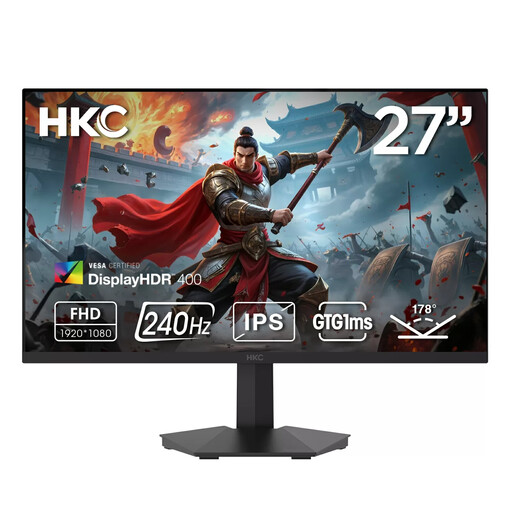
Consider this 27-inch option only after confirming its fit and the refresh mode you intend to use. The title states 1920 × 1080 and 180Hz, while the product description and specification table give 240Hz; resolve that difference for the exact model and input before buying.
No: the monitor’s PC-oriented panel rating does not set the PS5 game’s output. PlayStation describes a 120Hz output setting for supported games and displays; check the game and the exact monitor’s HDMI mode and cable requirements.
No. The Video Electronics Standards Association describes DisplayPort Adaptive-Sync, which does not by itself establish HDMI VRR support. Check the monitor’s specific input and your source device’s VRR settings.
Start with adjustable brightness and a private-audio connection that works with your device. ZOWIE advises avoiding a large mismatch between room and screen brightness; its low-blue-light setting can make colours look yellower, so adjust the picture to your preference rather than assuming one preset suits everyone.
Check the seller’s cancellation information before ordering and arrange appropriate electrical-equipment collection when an old monitor reaches end of life. GOV.UK describes cancellation up to 14 days after delivery for online orders; check the terms and any applicable exception for your purchase. A change-of-mind cancellation is distinct from a remedy for faulty, damaged or misdescribed goods. UK WEEE guidance addresses recovery, reuse and recycling of electrical equipment.