Detail-focused puzzle players
If busy scenes make small objects difficult to inspect, you may prefer the viewing space of an approximately 11-inch tablet. Samsung and Lenovo list 11-inch models, while Apple also lists an 11-inch iPad.


For a passenger playing hidden-object games, choose a compact tablet if holding and packing it matters most; consider a larger screen if you want more physical space to inspect crowded scenes. Check that your games are available in the tablet's app store, that the internal storage suits them, and that you can charge the device on the journey.
If busy scenes make small objects difficult to inspect, you may prefer the viewing space of an approximately 11-inch tablet. Samsung and Lenovo list 11-inch models, while Apple also lists an 11-inch iPad.
If you expect to hold the tablet or pack it between stops, a smaller model may suit you better. Apple lists the iPad mini with an 8.3-inch display and a 293 g weight for its Wi-Fi model.
If your choice depends on a few particular games, check their availability on the tablet's own platform before deciding. This matters especially for Amazon Fire tablets: Amazon says they do not support Google Play.
For passenger play on a road trip, confirm the games you need first, then decide how much viewing space you are willing to carry and how you will keep the tablet charged.
| Concern | What to check | Who this matters to |
|---|---|---|
| Viewing small clues | Compare screen size and resolution for the exact model; check any stated glare treatment rather than relying on refresh rate alone. | When scenes are crowded, I want enough screen space to examine small objects without choosing a tablet that is awkward to carry. Roughly 33% of consumers put viewing area first. |
| Handheld portability | Check the listed weight and dimensions of the intended variant, allowing for any case you plan to use. | If I will hold the tablet in the passenger seat and pack it between stops, I may accept a smaller screen for easier handling; around 25% of consumers prioritise portability. |
| Games and internal storage | Find each required game in the supported app store and check the chosen variant's built-in storage; do not assume microSD space holds apps. | I need my chosen games installed and ready before departure, rather than discovering that the store or available app storage is unsuitable. For roughly 25% of consumers, game access and installation space are the primary concern. |
| Journey charging | Check the tablet's charging requirements, what comes in the box and whether your car charger and cable are compatible. | On a longer trip, I want a workable way to recharge between places with mains power. Charging arrangements come first for around 17% of consumers. |
Amazon says Fire tablets do not support Google Play, so a Google Play listing does not establish that a game can be installed on a Fire HD 10.
Search the exact tablet's supported app store for each game you intend to play. Check its device, storage and connection requirements before the trip.
Samsung says Galaxy Tab A9+ external memory can hold media but not applications. Its microSD capacity therefore cannot replace sufficient built-in space for games.
Choose the internal-storage variant with your planned game installs and updates in mind; use a compatible card for media where supported.
GOV.UK says a driver must not hold and use a tablet while driving, including when stationary in traffic. A mount does not make playing a game while driving an appropriate plan.
Keep road-trip gaming for passengers or for times when the vehicle is safely parked.
A charging plan depends on the tablet's port, the cable and the power source. Apple lists a USB-C car charger that connects to a vehicle's 12V auxiliary outlet as an option for compatible iPads.
Check the exact box contents and match any in-car charger and cable to your tablet's requirements.
Amazon's cited Fire HD 10 listing says a power adaptor is not included.
The iPad mini is a compact iPadOS option for passengers who expect to hold and pack their tablet frequently.
The Galaxy Tab A9+ is an Android option for passengers who favour an 11-inch screen.
The listed Tab M11 configuration is an 11-inch Android option for comparing display and storage specifications.
The Fire HD 10 is an entertainment-tablet option if your required games are available through its supported app catalogue.
These choices cover larger-screen tablets for viewing puzzle scenes and a compact iPad mini for passengers who put handheld size first. For any model, check the particular games and charging setup you need before travelling.
 No image available
Consider this Wi-Fi tablet if you want a 128GB configuration for passenger entertainment; check that your chosen games are available and work as needed during the trip.
The product name specifies 8GB RAM and 128GB storage. Confirm the charging accessories you need for the car.
 No image available
The stated 11-inch screen suits passengers who want more viewing space for busy scenes, provided their chosen games support this tablet.
The product name lists a 256GB storage configuration, a SIM card slot and an 8,000mAh battery. Battery capacity alone does not establish playing time; check your charging setup before relying on it for a long journey.
 No image available
This 10-inch option may suit a passenger who wants a screen larger than a compact tablet without choosing a 14-inch model.
The product name lists Android 16, 128GB storage, a 6,000mAh battery and a keyboard. Check your games and charging requirements for the journey.
 No image available
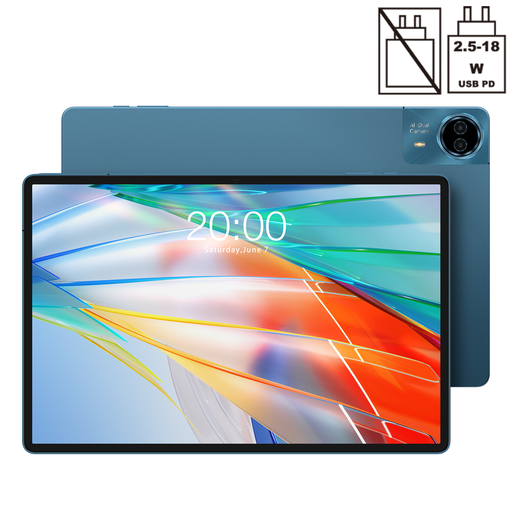
A passenger who chiefly wants a large viewing area can consider this 14-inch tablet, but should check its weight and dimensions if handheld play matters.
The product name specifies a 2240 × 1400 display, Android 15, 128GB storage and 18W PD charging. Check game compatibility and the car-charging equipment needed for this model.
 No image available
This compact iPad mini suits a passenger who would rather hold and pack a smaller tablet than use the largest screen in this selection.
The product name specifies 512GB storage. Apple lists an 8.3-inch display for the iPad mini, which leaves less physical room for a scene than an 11-inch screen. Check your games in the App Store and plan compatible charging.
No: tablet gaming is for passengers or for when the vehicle is safely parked. GOV.UK says drivers must not hold and use a tablet while driving, including when stopped at traffic lights or in a traffic queue.
Some may work offline, but the answer depends on the individual game. Check its store listing for sign-in, downloads and connection requirements, then install and try it before departure; a Wi-Fi-only tablet can suit the trip if your chosen games work offline.
Do not rely on it for app installation. Samsung says Galaxy Tab A9+ external memory stores media such as photos and video, not applications, so choose built-in storage with your games and updates in mind.
Check the tablet's charging port and requirements, then match them to a suitable cable and car charger. Apple lists a USB-C car charger that uses a vehicle's 12V auxiliary outlet for compatible iPads; also check what accessories come with the tablet you choose.
A Google Play listing is not enough to establish Fire HD 10 compatibility: Amazon says Fire tablets do not support Google Play. Look for each required game in Amazon's supported app catalogue before choosing a Fire tablet.