What to check before choosing
Remote-led play
Choose this when: The child mainly wants to steer a dog and trigger tricks without setting up a coding interface.
Trade-off: Controls and power requirements vary by model, so check the exact toy and remote rather than assuming all remote-control dogs work alike.
Coding and build activities
Choose this when: The child wants to create actions, and the household is comfortable with the model’s particular coding method or assembly.
Trade-off: Button sequences, device-based coding and building a quadruped involve different equipment and setup; Petoi describes 40–90 minutes to assemble and configure the Bittle X construction package.
App-connected play
Consider this when: App features such as profiles or activities are wanted and you can check the exact model’s data practices first.
Trade-off: An app, Bluetooth connection or audio sensor does not establish what is recorded or sent online; check the model-specific information before enabling connected features.
For households choosing a robot dog for a child’s home play or as a gift, each concern below reflects the need a consumer would prioritise most.
| Concern |
What to check when buying |
Who this matters to |
| Immediate interaction |
Check the included controls and whether the remote needs separate batteries. |
If the child mainly wants to steer and trigger tricks, I would prioritise straightforward controls and check the remote’s power needs. Around 29% of consumers put immediate play first. |
| Age and gift-day setup |
Read the exact model’s age guidance, contents, battery or charging instructions and any setup requirements. |
If I need the gift to suit the child’s age and be ready for the planned play, I would check warnings and what must be prepared beforehand. Around 21% of consumers prioritise age and setup fit. |
| What coding involves |
Identify the input method, required computer or tablet, included accessories and any assembly or configuration. |
When the child wants to make behaviours rather than just activate preset tricks, I would match the coding activity to the available equipment and time. Around 21% of consumers put creating actions first. |
| Apps and children’s data |
For the exact model and app, check permissions, audio or camera functions, internet transmission, data controls and deletion options. |
If app or sensor features are part of the decision, I would establish what data is handled before enabling them for a child. Around 29% of consumers prioritise understanding connected features and data. |
Joybuy product choices
These Joybuy options cover remote-led and interactive robot-dog-style play, including wheeled designs; check each model’s controls and form against the child’s preferred activity.
 No image available
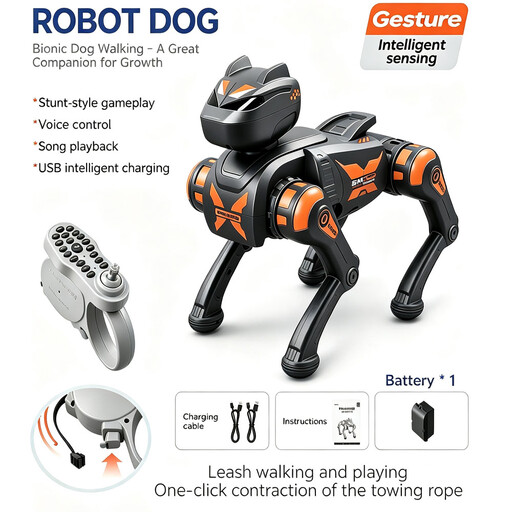
Interactive Robot Puppy with App, Voice and Remote Control
Consider this if the child wants several listed ways to interact, including remote and app control.
The product name states ages 3+ and lists voice and remote control, programmable walking and dancing, and app control.
View on Joybuy
 No image available
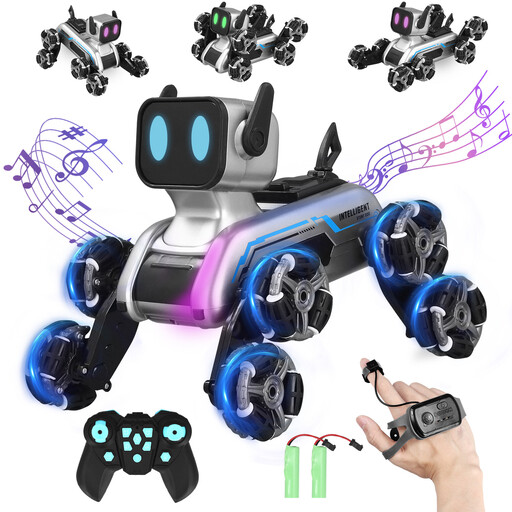
2.4 GHz 8WD Gesture-Sensing Robot Dog Stunt Toy
Consider this if the child is interested in remote control and gesture sensing in a wheeled stunt design.
The product name lists 2.4 GHz control, music and lights, and ages 6–12; it describes an 8WD wheeled toy rather than a legged quadruped.
View on Joybuy
 No image available
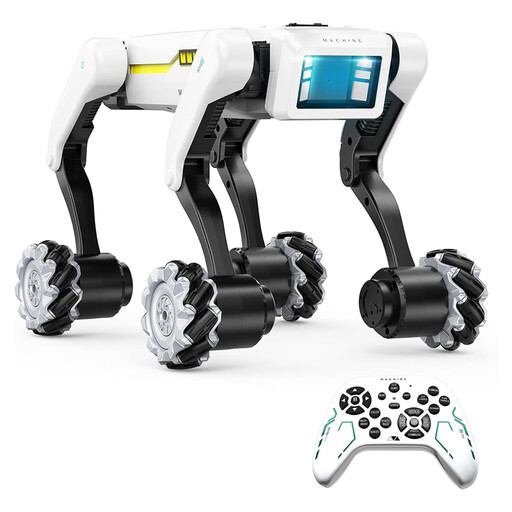
FACEGLE 8088 Intelligent Robot Dog
Consider this for interactive play involving voice features and programmed actions.
The product information describes mechanical wheels and lists voice interaction, programming actions, singing and dancing; check the exact setup and supervision instructions before use.
View on Joybuy
Robot dog FAQs
Does a robot dog that responds to voice necessarily upload speech?
No: voice response alone does not show whether a particular toy records or sends audio online. Check the exact model’s information about audio capture and transmission; WowWee describes audio sensors for Dog-E, but that does not establish whether they record or transmit speech.
Do I need home internet to code PYXEL?
Learning Resources says PYXEL’s password-protected Wi-Fi does not need internet for the described coding connection. Its quick-start instructions also refer to software and a possible update, so check those setup steps and arrange the required computer or tablet.
What should I prepare before giving a robot dog as a gift?
Check the exact model’s age guidance, contents, supervision instructions and power requirements. For example, Learning Resources specifies three AAA batteries for Ranger & Zip that are not included; other models may have different requirements.
Do Great Britain and Northern Ireland use identical toy-market rules?
Use the guidance that applies to the part of the UK where the toy is placed on the market. The UK Office for Product Safety and Standards publishes separate guidance for the Toys (Safety) Regulations 2011 in Great Britain and Northern Ireland; those requirements do not establish that a particular toy is suitable for a particular child.
Is a coding dog always a better choice than a remote-control dog?
No; choose according to the activity the child wants and the setup your household can manage. Remote-led play suits a child who mainly wants to steer and trigger tricks, while a coding option makes more sense when creating sequences—or, for a build kit, assembly—is part of the intended activity.


