What to prioritise when choosing a classroom robot dog
Start with the lesson outcome, then check the exact model’s software, package contents and operating routine against the way pupils will share it.
| Concern |
What to check when buying |
Who this matters to |
| Coding progression |
Check the model-specific block-coding materials and any text-based lesson route; trial the software on school devices. |
If I want pupils to move from introductory commands to later programming tasks, I need a usable route for both stages. Consumers whose main concern is coding progression make up around 31%. |
| Sensors and movement |
Match a planned project’s sensor list against the exact package and consider how pupils will observe the resulting movement. |
When a lesson links a sensor input to visible robot behaviour, I need the required parts and a clear activity. Consumers focused on sensor-and-movement projects make up around 25%. |
| Assembly and mechanisms |
Confirm whether the package is for construction or is pre-assembled, and allow time for assembly and configuration. |
If pupils are learning how the mechanism is built, I want assembly to be part of the planned lesson rather than an unexpected setup task. Consumers prioritising mechanisms and assembly make up around 19%. |
| Shared operation |
Plan group turns and check the selected model’s setup, battery instructions and charging equipment. |
For a shared set, I need group turns and charging to fit the activity without overlooking supervision. Consumers chiefly concerned with shared-use operations make up around 25%. |
These proportions describe possible priorities among consumers planning school quadruped activities; they are not measured UK purchaser statistics. STEM Learning’s general robotics lesson connects robot sensors, motors and programming, while manufacturer materials describe model-specific teaching and coding routes.
Joybuy product options for introductory robot-dog activities
These Joybuy options are robot-dog toys described with programmable actions or movement features. Check the exact product details and assess whether the device, software and supervision arrangements suit the intended school activity; their listings do not establish classroom compliance.
 No image available
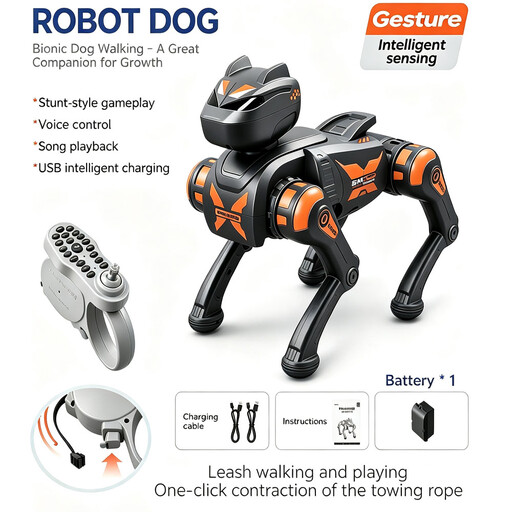
Programmable Robot Dog Toy with Voice, App and Remote Control
Its listed walking, dancing and programmable features may suit introductory movement activities, but the listing does not establish that it is suitable for a school lesson.
The USB-C charging cable is not included. Check software and device requirements before planning a coding activity.
Joybuy
 No image available
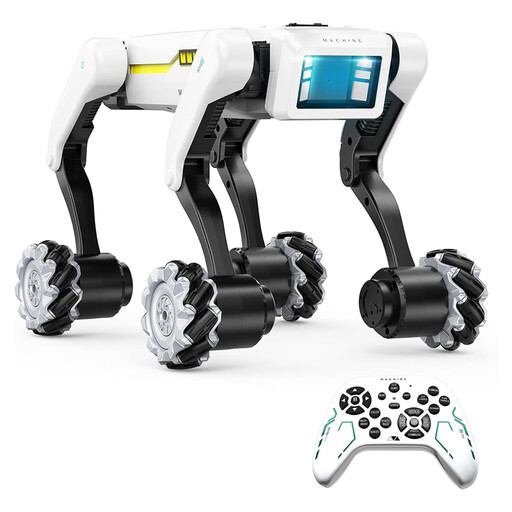
FACEGLE 8088 Intelligent Robot Dog
The product description lists programmable action sequences and movement on four wheeled feet; consider it only if those features fit the planned activity.
Adult assembly is required, and the description recommends adult supervision. Check the product details and assess the intended school use before ordering.
Joybuy
Questions and answers
Should a school choose a construction kit or an assembled robot?
Choose a construction kit when building the mechanism is a planned, supervised activity; an assembled package leaves more lesson time for programming and testing. Petoi describes 40–90 minutes to assemble and configure its Bittle X construction package, but class preparation and completion time can differ.
How should teachers plan charging between groups?
Follow the selected model’s instructions and include charging in the activity risk assessment. For Bittle X V2, Petoi instructs users to detach the battery and charge it through the specified 5 V USB Type-C connection. Fire-service guidance advises using the correct charger and keeping damaged batteries out of use; these instructions are not a universal procedure for other models.
What should a school check besides the robot itself?
Check whether the exact package includes the required controller, computer, sensors and charging equipment, and confirm the software and support arrangements for the intended use. SunFounder’s PiDog listing says the Raspberry Pi is not included, while Petoi offers different construction and assembled packages.
Is a CE mark automatically sufficient throughout the UK?
No single marking answer applies to every product and destination. UK Department for Business and Trade guidance distinguishes Great Britain’s UKCA-or-CE arrangements for covered product types from Northern Ireland’s CE, or CE-and-UKNI, arrangements. Check the product rules for the destination and obtain conformity documentation for the exact robot and supplied charger before purchase.


