
24/7 Customer Support

Free returns

Same-day & Next-day Delivery

Quality Guaranteed

Unlock Your Welcome Offers: FREE Delivery | Up to 80% OFF | Free 30-day JoyPlus trial
Download the APP
Robot toys can offer more than lights and sound. Depending on the design, they may introduce children to sequencing, movement, problem-solving or simple mechanical principles. For adults, a robotic chess set, DIY robotics kit or AI robot dog can provide a more demanding technology-focused hobby.
However, product descriptions often use broad terms such as “smart”, “AI-powered” and “educational” without explaining what the device actually does. This guide from the Joybuy Product Recommendation Officer focuses on practical details, so you can compare robot toys by age suitability, operation, safety, learning value and ongoing requirements.
An interactive robot toy may play music, dance or respond to touch, but that does not necessarily mean it teaches coding or engineering. Look for specific functions such as action programming, programmable sequences, construction steps, sensor responses or problem-solving games.
For younger children, recording, movement and gesture control can support imaginative play. Older children and hobbyists may need STEM robot kits or DIY robotics kits with a genuine build or programming element.
A rechargeable robot may still require batteries for its controller. Some products include a battery but not the charging cable, while others need disposable AA or AAA batteries. Check:
These details affect the real cost and convenience of ownership. For example, a robot that needs frequent battery replacement may be less practical for daily play than a USB-rechargeable model.
Robot toys often contain wheels, detachable accessories, batteries, magnets or construction pieces. Always follow the manufacturer’s stated age guidance rather than relying on appearance. A product designed for children aged 3 and over may still include small components that require supervision.
For UK households, check the packaging and listing for appropriate CE or UKCA marking, clear manufacturer or responsible-person information, battery warnings and instructions in a suitable format. These checks do not replace the manufacturer’s safety guidance, but they help identify whether essential product information is available.
Remote control robots are usually straightforward for beginners, while gesture-sensing models add hands-free interaction. Check the control range, button layout and whether the robot responds to infrared sensors, touch, sound or a mobile app.
Interactive robot toys with several input methods can suit shared parent-and-child play. However, more features can also mean a longer setup process, so consider whether the intended user can operate the product independently.
“Programmable” can describe anything from combining preset movements to writing code in an app. Read the feature list carefully:
A construction kit may be more suitable for an 8-year-old interested in mechanics, whereas a younger child may benefit from a robot with simple buttons and visual feedback.
Measure the available floor or table space before ordering. A compact model works well in a bedroom or on a coffee table, while a larger robotic pet needs a clear, level surface. Also consider noise, movement speed and whether the product is intended for indoor use.
An AI robot dog is not automatically a children’s toy. Some models are heavy, powerful and intended for users aged 14 or over. Treat their operating area and moving joints with the same caution as other powered equipment.
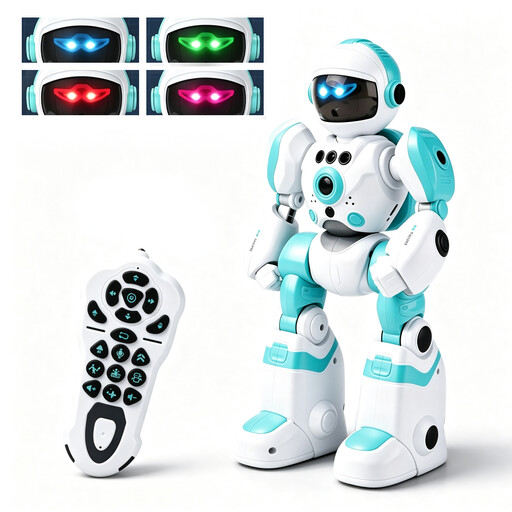
Why This Fits Their Persona: A practical entry point for children aged 3 and over who want movement, lights and simple interaction without a construction project.
The listing specifies both remote control and gesture sensing, rather than relying only on a vague “smart” label. It also states that the robot battery is rechargeable and identifies the separate AA battery requirement for the controller.
27.5cm body, four selectable LED eye colours, voice recording and playback, music, dancing and action programming.
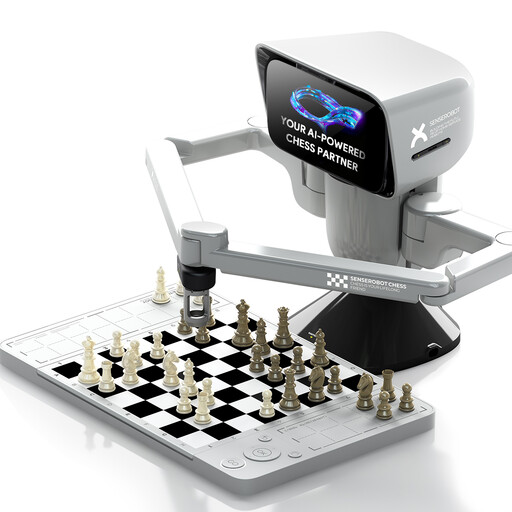
Why This Fits Their Persona: Suitable for adults, older children and technology enthusiasts looking for a structured game rather than a character-led toy.
Its purpose is clearly defined as an electronic chessboard with a robotic arm and app connection, making the core activity easier to understand than a general-purpose “AI toy” claim.
Combines a physical chessboard, robotic arm, app connectivity and portable design, with support for 3D-printed DIY pieces.
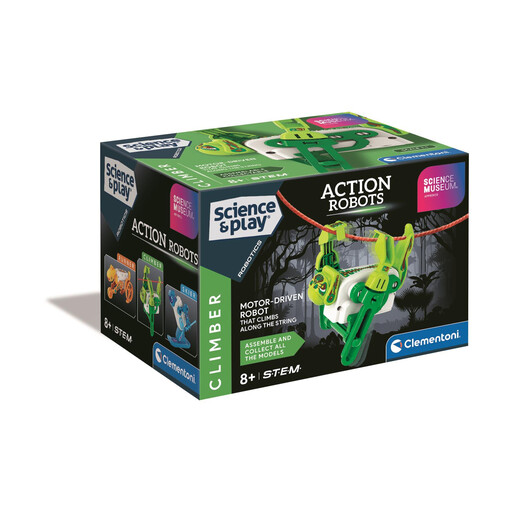
Why This Fits Their Persona: Designed for children aged 8–14 who prefer assembling a working mechanism and exploring how motors and gears create movement.
The learning activity is specific: the user builds a motorised robot that travels along a rope. The age warning and requirement for two AA batteries are also clearly stated.
Step-by-step illustrated instructions, a central electronic module and gears that enable vertical movement.
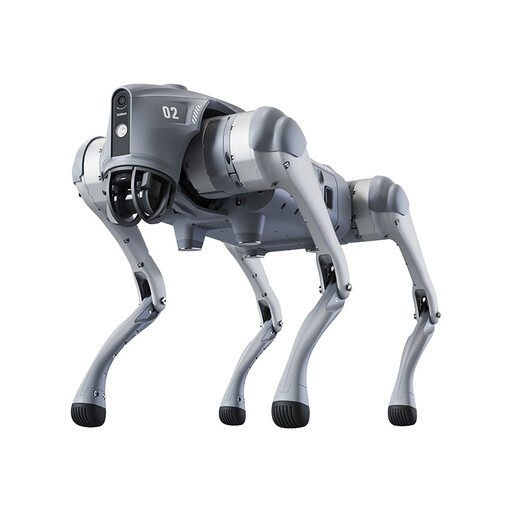
Why This Fits Their Persona: Intended for adult users and robotics enthusiasts who need a substantial device for app control, movement and sensor-based navigation.
The listing explicitly states that this is not a toy and is unsuitable for under-14s. Its 15kg weight, 1–2-hour stated battery life and level-surface startup requirements help set realistic expectations.
Includes app integration, remote control, a front camera, 4D LiDAR sensing, obstacle avoidance and graphical programming.
We have compiled a complete, real-time list of products that fully satisfy these strict selection criteria and UK safety regulations.
Before giving robot toys as a gift, set aside time to:
For smart robot pets, also check replacement attachments and model compatibility. For example, the Enabot ROLA Mini Cat Teaser Wand Set is specified for ROLA Mini robots only. Its small butterfly, fish and bird-shaped parts should not be left with children or pets unsupervised.
Some are, but age suitability varies by model. A simple interactive robot may be marked for age 3+, while construction kits can be marked for 8+ and larger robotic pets may be unsuitable for anyone under 14. Always follow the product warning, particularly where small parts or batteries are included.
Not always. Remote control robots and basic programmable robot toys can often operate without Wi-Fi. App-connected products, including some robotic chess sets and AI robot dogs, may use Bluetooth or Wi-Fi for additional controls, mapping, updates or programming. Check the product instructions before purchase.
Running costs depend mainly on battery type, charging frequency and replacement parts. USB-rechargeable models reduce the need for disposable batteries, although charging cables or replacement battery packs may eventually be needed. Kits using AA or AAA batteries require ongoing replacements, while accessory-based products may incur costs when attachments wear out or need replacing.