Move-in floor cleaners
You have a broad hard-floor area with dust, crumbs and occasional marks. You want to compare vacuum-and-mop models rather than choose a robot for dry debris alone.


For open-plan hard floors after a move, choose a robot that can map the cleaning route and handle the mix of loose debris and floor marks you expect. A self-emptying base reduces dustbin work, while a dock that also washes and dries mops suits regular mopping; neither removes the need for maintenance. If thresholds or rugs divide the route, check the exact model's crossing and carpet behaviour before choosing it.
You have a broad hard-floor area with dust, crumbs and occasional marks. You want to compare vacuum-and-mop models rather than choose a robot for dry debris alone.
You expect cleaning to continue frequently after unpacking. Dust emptying and mop care matter to you, but the tasks a dock performs vary by model.
Thresholds, rugs, furniture legs or newly arranged belongings may divide your open-plan floor. You need to check where a robot can travel, not just how it maps the space.
Start with the floors and debris you need to clean, then decide how much dock maintenance you want to avoid; measure any transitions before settling on a model.
| Concern | What to check | Who this matters to |
|---|---|---|
| Debris and floor marks | Check that the exact model both vacuums and mops, and compare its mop arrangement with the kind of marks on your hard floors. | If unpacking leaves loose debris as well as marks, I want one cleaning routine that addresses both; around 42% of consumers put this combined floor-cleaning need first. |
| Routine maintenance | Check dust emptying separately from mop washing, drying and water refilling, and measure the intended dock space. | When cleaning becomes a frequent job, I want to spend less time emptying the robot and tending its mop; about 33% of consumers make reduced routine maintenance their main concern. |
| Access across the floor | Measure thresholds against the exact model's stated limit, and check how it handles rugs during mopping. | If a threshold or rug divides my cleaning route, I need the robot to reach the areas I expect it to clean; roughly 25% of consumers prioritise route access and navigation. |
Mapping cannot overcome a physical threshold. ECOVACS support describes a particular robot with a climbing limit of up to 2.4 cm; that figure does not apply to every model.
Measure each transition on the proposed route and compare it with the specification for the exact robot you plan to buy.
ECOVACS says a DEEBOT X1 may avoid a carpet or mat in vacuum-and-mop mode to prevent wetting it. Cables and unpacked belongings can also obstruct a first run.
Check the model's carpet and no-mop controls, then clear loose objects before mapping and cleaning.
Dust emptying and mop care are different dock functions. A base that empties dust does not necessarily wash or dry mops.
Check which tasks the exact dock performs and which compatible parts need regular attention.
Depending on the model, upkeep may involve replacement bags, filters, brushes, mop cloths or cleaning solution.
The Joybuy safety information for the eufy X10 Pro Omni warns against picking up hard or sharp objects such as glass, nails and screws.
Remove sharp items, packing staples, wet spills and flammable material manually before an automated cleaning run.
The Saros 20 is a model to examine when unusually high thresholds are a confirmed obstacle.
The Omni C20 illustrates the difference between a dock that only empties dust and one intended to handle mop care too.
Relevant when room and zone controls matter after furniture has been placed, or when comparing automated dust disposal.
The DEEBOT range includes mapped vacuum-and-mop models, but route access needs checking model by model.
These vacuum-and-mop models cover different approaches to dust emptying and mop care. Compare the exact robot's floor access, carpet behaviour and dock tasks against your new layout.
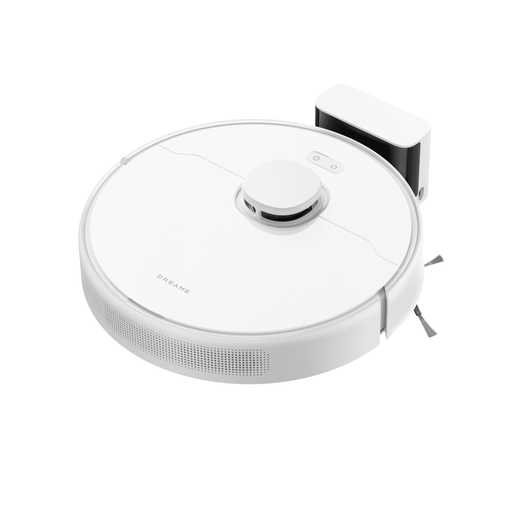 No image available
Consider this model if you want mapped vacuuming and mopping and are prepared to empty the robot's dustbin yourself.
The product name specifies LDS navigation, 6,000 Pa suction, up to 285 minutes of runtime and a 570 ml dust box. Its static mop arrangement is not an automated mop-washing dock.
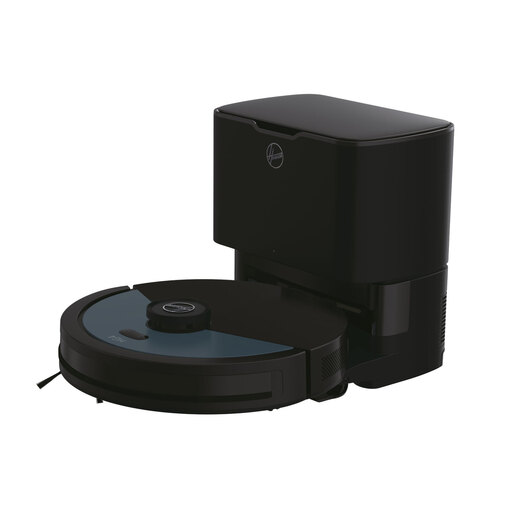 No image available
This vacuum-and-mop model suits a layout where you want mapped cleaning and automated dust emptying, while handling mop care separately.
Its product name specifies 4,000 Pa suction, laser navigation, Wi-Fi, obstacle sensors, a customisable home map and a self-emptying base. Check the dock's dimensions for your intended location.
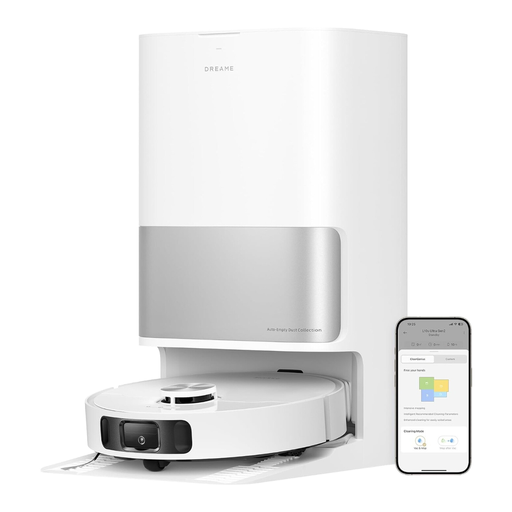 No image available
Consider this model if regular mopping makes automatic mop care more useful than dust emptying alone.
The product name specifies 10,000 Pa suction, LiDAR obstacle avoidance and MopExtend, alongside mop washing and drying, dust emptying and water refilling. Measure the dock space and check threshold compatibility for your route.
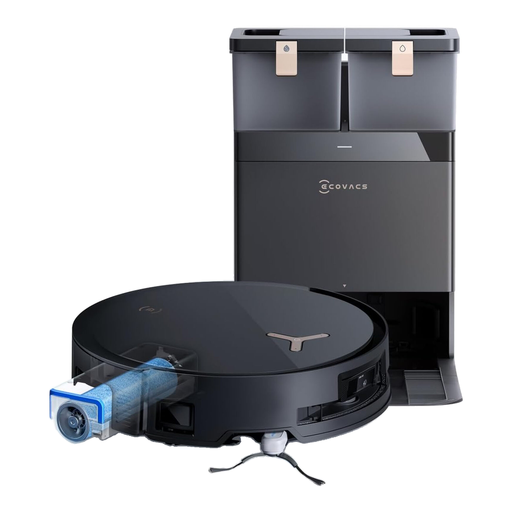 No image available
This vacuum-and-mop option is worth examining if mop care and rugs are important parts of your routine; confirm its room controls and route access before relying on it for the whole floor.
The product name specifies 18.000 Pa suction, OZMO ROLLER self-washing and ZeroTangle 2.0. Check the exact model's threshold clearance and dock dimensions against your home.
 No image available
Consider this model for a mapped hard-floor route, but check the cleaning mode where rugs interrupt that route.
The product name specifies 8,000 Pa suction, anti-tangle technology, TrueMapping and a 20 mm threshold-climbing claim. Do not use its mop function on carpets; confirm runtime and whether a self-emptying station comes with this variant before buying.
Yes, for a mapped robot, make the first mapping run once the main furniture layout is in place. iRobot UK Support says compatible Smart Maps can be customised into rooms and zones after a run; clear loose cords and belongings first.
No; crossing ability depends on the exact model and transition. ECOVACS support describes a particular robot that can climb up to 2.4 cm, not a limit shared by all robots. Measure your highest threshold and compare it with the model you are considering.
It depends on the model and cleaning mode. ECOVACS says a DEEBOT X1 may avoid a carpet or floor mat during vacuum-and-mop cleaning to prevent wetting it. Check carpet handling and available no-mop controls if a rug divides the route.
Contact the seller and keep your proof of purchase. GOV.UK explains that the Consumer Rights Act 2015 covers faulty goods, including remedies involving repair or replacement; a retailer's change-of-mind policy is a separate matter.
Do not put electrical products or batteries displaying the crossed-out wheelie-bin symbol in household rubbish, according to GOV.UK. Use an appropriate electrical or battery recycling collection point instead.