Home-office gamers near the router
If your PC or console is close enough for an Ethernet cable, compare the available LAN ports with the device and broadband connection before choosing a router for its wireless rating.


Before replacing a router to improve game-update downloads, check whether the broadband service or the connection inside your home is limiting them: Ofcom notes that Wi-Fi cannot outperform the broadband service feeding it. For an office near the router, a practical Ethernet connection may be the most direct route; for a distant office with weak Wi-Fi, placement and coverage deserve attention before higher wireless speed ratings. Wi-Fi 7 and multi-gig ports matter most when the connected devices and network can use them.
If your PC or console is close enough for an Ethernet cable, compare the available LAN ports with the device and broadband connection before choosing a router for its wireless rating.
If distance or walls separate the office from the router, assess the signal in that room first. Ofcom's Wi-Fi guidance makes placement and obstacles relevant; a compatible mesh setup is worth considering when a single router cannot provide the coverage you need.
If game updates run alongside calls, streaming and other connected devices, look at usable wired connections and device-prioritisation controls. Those controls address traffic within the home; they do not increase the broadband service rate.
Check the broadband connection before comparing router speeds, then decide whether your office needs a direct wired link, stronger Wi-Fi coverage or controls for a shared network.
| Concern | What to check | Who this matters to |
|---|---|---|
| Broadband and local-link limits | Compare your broadband service with the router's WAN port and your gaming device's Ethernet or Wi-Fi capabilities. Ofcom says Wi-Fi cannot outperform the broadband service. | If downloads are slow even close to the router, I want to know whether changing the router could address the limiting connection. Around 50% of consumers put that broadband-versus-local-link question first. |
| Office coverage | Assess the office signal, router placement and intervening walls. If considering mesh, check node compatibility with the chosen system. | When my office is several rooms away, a dependable signal there matters more than a router's headline wireless rating. Roughly 30% of consumers prioritise coverage for that reason. |
| Shared-network demand | Check which devices are active together and whether the router offers suitable wired ports or device-prioritisation controls. | I need to download an update while other people use the network, without treating gaming controls as a faster internet service. For about 20% of consumers, managing that simultaneous demand is the primary concern. |
A rated wireless speed is not a promised game-download speed. Ofcom notes that the broadband service sets a ceiling for Wi-Fi internet access, while Wi-Fi 7 features also depend on compatible devices.
Check the broadband connection and the gaming device's connection capabilities before deciding whether faster ports or Wi-Fi 7 features would be useful.
Distance, walls and interference can weaken Wi-Fi in the office even when a router has a high wireless rating.
Assess the connection where you actually download games and, where possible, try a more central router position before deciding whether wider coverage is needed.
Mesh compatibility can depend on the product family. BT says several Whole Home Wi-Fi families cannot be mixed, so a matching brand name alone is not enough.
Confirm the exact router and node models, their compatibility and the required connection to your existing equipment before adding a unit.
A router remains connected to the network after the initial setup, making its update and support arrangements relevant throughout use.
Check the manufacturer's firmware-update information and the security features you intend to use, then change the administrator password and apply available updates during setup.
Its Archer BE550 and Archer GE550 illustrate the choice between a general-purpose Wi-Fi 7 router and one with gaming-focused controls.
The RT-AX86U series is relevant when a nearby gaming PC or console can use a wired connection and device prioritisation matters.
The Nighthawk RS300 is a standalone Wi-Fi 7 option for an office that receives an adequate signal from one router.
The eero Max 7 is relevant to a multi-room setup where mesh expansion is a consideration.
These choices include single routers for an office with a usable signal, three-unit mesh systems to consider when coverage is weak, and a router with potential mesh expansion. Choose the connection approach for your room layout before comparing their named wireless features.
 No image available
Consider this single-router option when the office has a usable signal and your devices can make use of Wi-Fi 7. It is identified as tri-band; check the exact port arrangement and your broadband and gaming-device capabilities before relying on faster wired connections.
 No image available
Consider a three-unit mesh system if the home office has weak coverage from a single router. This dual-band BE3600 variant names Wi-Fi 7 and 2.5 Gbps Ethernet; check where the units can be placed and whether your existing modem or gateway meets its setup requirements.
 No image available
This three-pack is a coverage-led option for an office separated from the router by distance or obstacles. Its name identifies it as a Wi-Fi 7 mesh system; assess the office signal and confirm the Ethernet connections needed for your intended setup.
 No image available
Consider this Wi-Fi 7 router if a single unit suits the office now but mesh expansion is part of your plan. Check which additional devices work with the M95 and what is included before depending on a multi-unit setup.
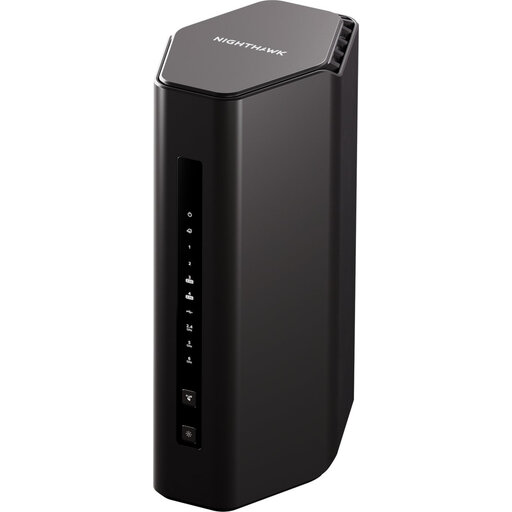 No image available
This single-router option is worth considering for an office that already receives a suitable signal. NETGEAR specifies a 2.5 Gig internet port for the RS300; confirm the exact LAN port layout before planning a wired connection to your gaming device.
No. Ofcom says Wi-Fi cannot outperform the broadband service, so a new router will not remove a limit imposed by that service. Check whether the slow connection occurs throughout the home or mainly on the office device before deciding what to change.
Ethernet is a practical choice when you can run a cable to the device and want a direct local connection. Check that the router has a suitable LAN port; ports faster than 1 Gbps are relevant to internet downloads only when the service and connected equipment can use them.
Consider mesh when the office has persistently weak Wi-Fi because of distance or obstacles, especially if other rooms also need coverage. Check placement and compatibility first: BT notes that several of its Whole Home Wi-Fi product families cannot be mixed.
That depends on the provider's connection and setup requirements. Confirm the required connection method, authentication details and troubleshooting arrangements before purchasing; Ofcom notes that an independently purchased router can be trickier to set up.
Check the manufacturer's firmware-update information and the support available for the exact model. When setting it up, use a unique administrator password and apply available firmware updates rather than assuming its initial settings will remain appropriate throughout use.