
24/7 Customer Support

Free returns

Same-day & Next-day Delivery

Quality Guaranteed

Unlock Your Welcome Offers: FREE Delivery | Up to 80% OFF | Free 30-day JoyPlus trial
Download the APP
A Royalaxe magnetic gaming keyboard can appeal to competitive PC gamers looking for adjustable actuation, rapid trigger control and a compact aluminium chassis. However, a high specification sheet does not automatically make every model suitable for every desk or game.
Before choosing a Royalaxe mechanical keyboard, check the switch technology, layout and connection method rather than focusing only on precision figures. The right choice depends on whether you prioritise mouse space for FPS gaming, dedicated navigation keys, a premium frame or straightforward wired reliability.
Product listings may highlight 0.001mm RT precision, but this figure should not be confused with total system latency. It generally refers to the level at which key movement or rapid trigger behaviour can be adjusted or detected. Actual in-game response also depends on the keyboard electronics, firmware, USB connection, computer and game settings.
A rapid trigger keyboard can reset a key as soon as it begins moving upwards, rather than waiting for a traditional fixed reset point. This may suit repeated movement inputs in competitive FPS games, but the feature still requires sensible setup. An overly sensitive setting can lead to accidental movement or unintended key presses.
A 68-key gaming keyboard and a 75% gaming keyboard both save desk space, but they do not offer the same arrangement.
A 68-key model typically removes the function row and number pad while retaining a compact navigation cluster. This gives an FPS player more room for a low mouse sensitivity setup. A 75% model usually keeps a function row and more navigation controls in a compressed arrangement, making it more practical for mixed gaming, work and shortcuts.
Check the product photographs and layout description carefully. Compact keyboards can use different positions for Delete, Page Up, arrow keys and other commands. A short adjustment period may be needed if you are moving from a full-size keyboard.
“Magnetic switch keyboard”, “Hall Effect keyboard” and “mechanical keyboard” are not interchangeable descriptions. Traditional mechanical keyboards detect a physical switch contact, while Hall Effect models use magnetic sensing to detect key movement. The switch type, actuation range and available adjustment controls can vary between models.
The Royalaxe range also includes different switch descriptions, including Oracle and TTC magnetic switch options. Confirm the exact model before ordering, particularly if you have a preferred key feel or want to match an existing setup.
The main reason to consider a Hall Effect keyboard is adjustable actuation. It can allow a key to register at a chosen point and support rapid trigger behaviour. For FPS gaming, this can be relevant to movement keys where quick press-and-release inputs matter.
Look for clear information about:
These details are more useful than selecting a keyboard solely because it uses the word “esports”.
Choose a 68-key design if maximum mouse clearance is your priority and you are comfortable using shortcuts for function-row commands. A 75% layout may be more suitable if you switch between gaming, study, streaming or office work and want quicker access to function and navigation keys.
Also check the keycap legends, arrow-key position and whether the model is supplied in the layout you expect for use in the UK. A compact physical layout does not necessarily mean an identical typing experience from one model to another.
An aluminium alloy keyboard can provide a rigid, substantial chassis and a more premium appearance than a lightweight plastic frame. It may also add weight to the setup, which is worth considering if you regularly move your keyboard between rooms or competitions.
A wired Type-C keyboard is a practical option for users who want a direct connection without charging or wireless pairing. Confirm whether the keyboard is wired-only and whether the included cable is detachable. A Type-C port on the keyboard does not by itself indicate wireless support.
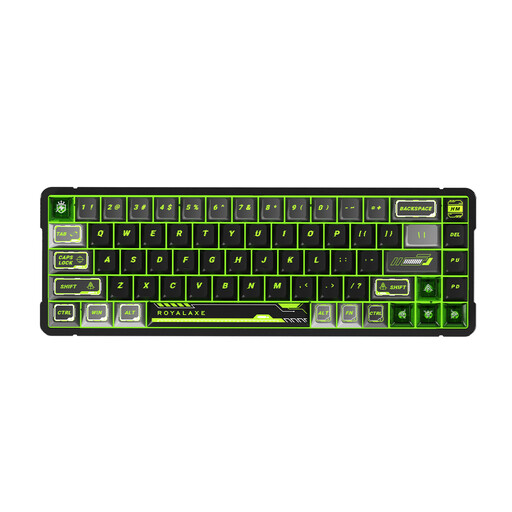
Why This Fits Their Persona: Its 68-key format is a practical starting point for players who want a compact wired keyboard and more room for mouse movement without moving to a larger desk setup.
The listing identifies a 68-key layout, wired Type-C single-mode connection and magnetic Jade switches, helping buyers check the core format before ordering.
68-key compact design; wired Type-C connection; aluminium alloy chassis listed in the product name.
Why This Fits Their Persona: This model suits a setup builder seeking a compact keyboard with a full aluminium alloy frame and a distinctive colourway.
The product name specifies both the magnetic switch format and full aluminium alloy frame, rather than leaving the chassis material unclear.
68-key layout; full aluminium alloy frame; listed RT precision of 0.001mm.
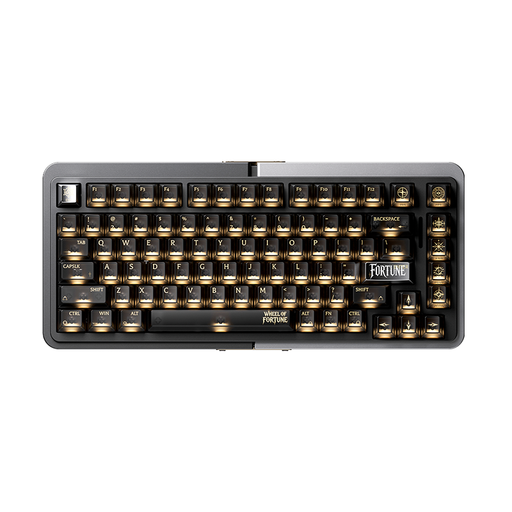
Why This Fits Their Persona: The 75% arrangement is suited to players who need a compact footprint but still want a function row and a more conventional everyday layout.
Its listing states the 75% layout, Oracle magnetic switches, Type-C interface and 0.001mm RT precision, giving heavy users several specifications to verify together.
75% layout; aluminium alloy frame; Type-C interface; listed 0.001mm RT precision.
We have compiled a complete, real-time list of products that fully satisfy these strict selection criteria and UK safety regulations.
A magnetic switch keyboard may suit FPS players who value adjustable actuation and rapid trigger controls. Its usefulness depends on your preferred settings, keyboard layout and ability to configure the controls consistently. It is not a replacement for practice, stable PC performance or a suitable mouse.
Choose the X68 if you prioritise a smaller 68-key footprint and additional mouse space. Choose the E75 if you prefer a 75% gaming keyboard with a function row and a layout that may transition more easily between gaming and general computer use.